Enable HTTP/3 on Cloudflare:Verify QUIC Without Confusing Fallback
Cloudflare says HTTP/3 is on, but is the request really using it? Verify QUIC, interpret fallback and separate the visitor connection from the origin.

On this page
- Know which connection you are changing
- Prepare a controlled change
- 1. Confirm the hostname is actually proxied
- 2. Enable the Cloudflare setting
- 3. Check the curl build before testing the site
- 4. Require HTTP/3 and print what was used
- 5. Compare a test that permits fallback
- Interpret the evidence together
- Confirm in Chrome without confusing asset hosts
- Troubleshoot in this order
- Decide whether the change helped your visitors
- Reader questions
- Sources & further reading
The short answer
Enable HTTP/3 for a proxied hostname in Cloudflare, then use a capable curl build with --http3-only and print the negotiated HTTP version. A completed request reporting version 3 proves HTTP/3 for that request. A dashboard toggle or Alt-Svc header alone does not.
Before you start
Permission to manage the Cloudflare zone, a working HTTPS hostname, a capable curl build or browser, and an authorised network path that permits QUIC. Record the current setting before changing it.
Your Cloudflare dashboard says HTTP/3 is enabled, but Chrome still shows h2. Before changing your server, check what you have actually measured. A setting, a response header and a completed HTTP/3 request answer three different questions.
This guide shows how to turn the feature on, test the public hostname and distinguish a network or client limitation from a website problem. The commands are documented examples, not results from a Hostlelo benchmark or a test of your domain.
Documentation checked: 16 October 2026. This is an operational guide, not a newly announced Cloudflare release.
Know which connection you are changing
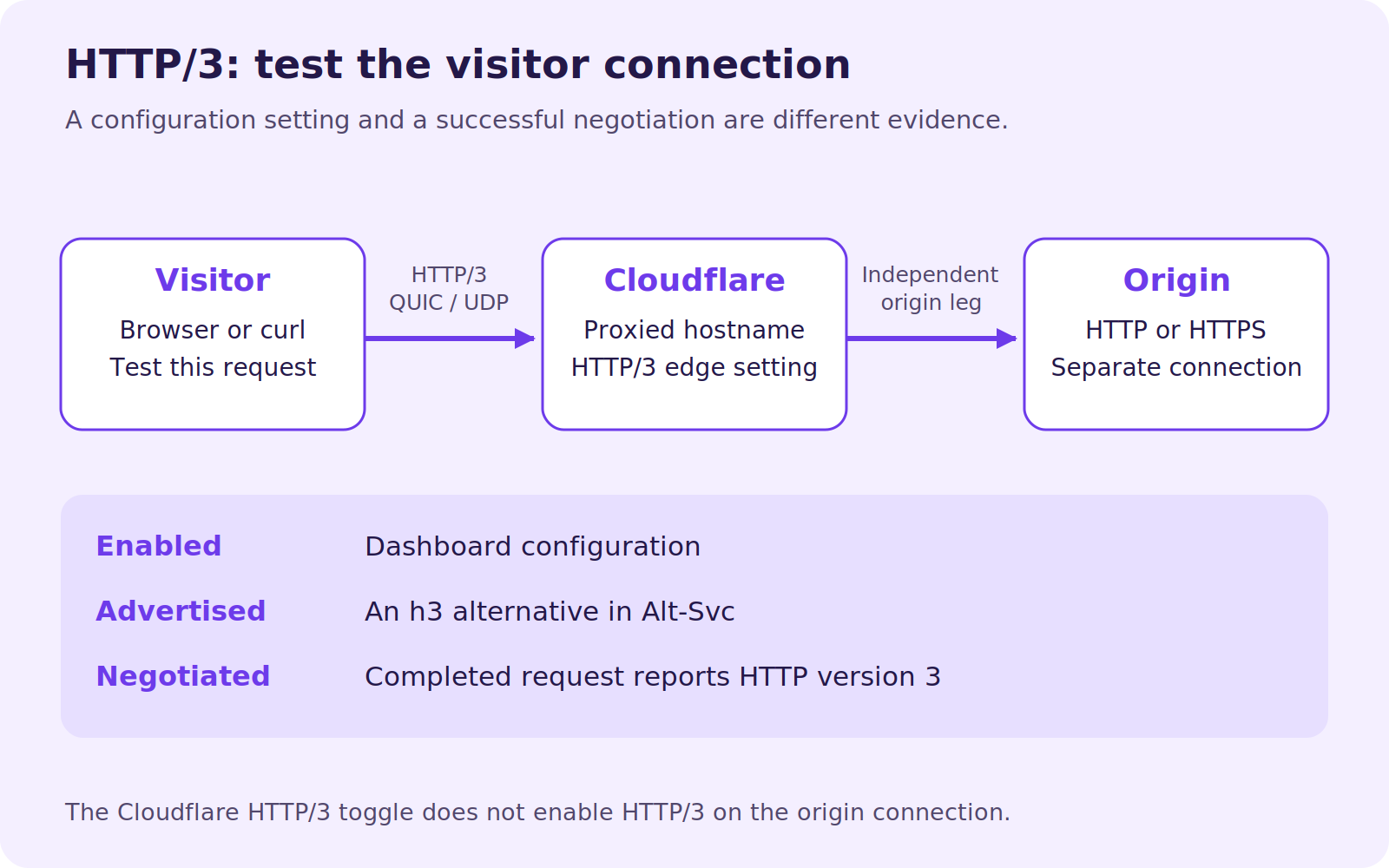
For a proxied website, the visitor connects to Cloudflare, and Cloudflare makes a separate connection to the origin server. The Cloudflare HTTP/3 documentation says this feature applies to the visitor connection; HTTP/3 to the origin is not supported by this setting.
That distinction saves unnecessary work. Enabling the Cloudflare feature does not require enabling QUIC in Apache, Nginx or LiteSpeed, or opening a UDP port on the origin. A direct-origin HTTP/3 deployment is a different task.
HTTP/3 carries HTTP over QUIC. QUIC avoids the TCP stream blocking problem that can hold unrelated HTTP/2 streams behind lost data. It does not eliminate congestion, server processing time or all delays. RFC 9114 explains the protocol and connection discovery.
Prepare a controlled change
Have permission to manage the Cloudflare zone, a working HTTPS hostname and a way to test from a network that allows QUIC. You also need either an HTTP/3-capable curl build or a browser with a visible protocol column.
Record the current HTTP/3 setting. Keep this change separate from DNS migrations, certificate replacements and firewall changes so that a later problem has a smaller set of possible causes.
If the site is already failing over ordinary HTTPS, diagnose that first. Our Cloudflare origin-certificate guide covers a different problem: Cloudflare rejecting the origin certificate.
1. Confirm the hostname is actually proxied
In Cloudflare, select the zone and open DNS > Records. Check the exact names visitors use, including the apex domain and www if both serve your site.
A relevant web A, AAAA or CNAME record should show Proxied, represented by an orange cloud. A DNS only record resolves the name without routing its web requests through Cloudflare. See the proxy-status documentation.
Do not switch every record to orange. Mail, verification and other non-web services have different requirements. If changing a web record from DNS only, first confirm the application is suitable for proxying; that is a routing change as well as a prerequisite for this feature.
You can inspect response headers for supporting evidence:
curl -sS -I --connect-timeout 10 --max-time 20 https://example.com/A cf-ray header is a useful signal when troubleshooting. The dashboard record and the intended traffic path remain the better starting point; the presence or absence of one header alone should not decide your diagnosis.
2. Enable the Cloudflare setting
For the selected zone, open Speed > Settings > Protocol Optimization and turn HTTP/3 on. An active edge certificate is required. Cloudflare currently lists the feature on its Free, Pro, Business and Enterprise plans.
Check that the setting remains on after refreshing the dashboard. That confirms configuration, not successful negotiation from a particular visitor's network.
For automation, Cloudflare also documents the zone-setting API using the http3 setting and an on value. Use the official API reference with a token restricted to the intended zone and required settings permission. A dashboard change is sufficient for the single-zone walkthrough here; no API credential is needed for the tests below.
3. Check the curl build before testing the site
Run:
curl -VLook for HTTP3 in the feature list. A recent version number alone is insufficient: HTTP/3 support depends on how curl and its libraries were built. The curl HTTP/3 build documentation describes supported build combinations.
If the feature is missing, use a suitable maintained build or test with the browser instead. A local message that an option or protocol is unsupported is information about the client, not evidence that your site rejected HTTP/3.
Also account for proxies. The curl manual documents limitations for HTTP/3 through proxies. Use an authorized test environment with a suitable direct network path; do not change an organisation's network controls just to make a test pass.
4. Require HTTP/3 and print what was used
Replace example.com with your actual HTTPS hostname:
curl --http3-only -sS \
  --connect-timeout 10 --max-time 20 \
  -o /dev/null \
  -w 'http_version=%{http_version} status=%{http_code}\n' \
  https://example.com/
This performs a GET and discards the response body. It avoids relying on whether the application accepts HEAD requests. Keep certificate verification enabled.
The documented purpose of --http3-only is to prevent fallback to an older HTTP version. A completed transfer reporting http_version=3 is evidence that this request used HTTP/3. A version of 0, no usable response, or a curl error is not a successful proof.
Read the HTTP status separately. An HTTP/3 response carrying 403, 404 or 500 can demonstrate transport negotiation while still indicating a blocked, missing or failing application response. Confirm the intended page and customer task as well.
Test each important hostname independently. Working HTTP/3 on www.example.com does not establish the result for example.com, a separate application subdomain or an unrelated CDN asset host.
5. Compare a test that permits fallback
Now use the alternative documented by everything curl:
curl --http3 -sS \
  --connect-timeout 10 --max-time 20 \
  -o /dev/null \
  -w 'http_version=%{http_version} status=%{http_code}\n' \
  https://example.com/
--http3 can use an older version when the QUIC attempt fails or is slow. A successful page download therefore does not, by itself, establish HTTP/3 use. Read the reported version.
This distinction matters when investigating corporate networks, VPNs and mobile connections. A visitor may reach the website successfully over HTTP/2 while the UDP path needed for QUIC is unavailable. That is a narrower finding than a website outage.
Interpret the evidence together
Observation | What it establishes | Next check |
|---|---|---|
Dashboard toggle is on | The zone configuration enables the feature | Test the public hostname |
Alt-Svc contains an h3 alternative | The response advertises an HTTP/3 route | Check actual negotiation |
Completed --http3-only transfer reports 3 | That request used HTTP/3 | Inspect HTTP status and the application |
--http3 completes using 2 | This request used HTTP/2 after negotiation/fallback | Check client capability and network path |
The curl build lacks HTTP3 | The local curl cannot run this test | Use a capable client |
One network fails, another succeeds | The result depends on the tested path or client environment | Compare those environments before changing the origin |
An Alt-Svc header is an advertisement, not a measurement of what a browser used. Reading it does not require an HTTP/3-enabled curl build. RFC 9114 describes HTTP/3 discovery and the h3 protocol identifier.
Confirm in Chrome without confusing asset hosts
Open your site and then DevTools > Network. Right-click the requests-table header and enable Protocol. Reload and inspect the main document request for your hostname. Chrome's Network reference explains the column controls.
h3 identifies HTTP/3 on a request. h2 identifies HTTP/2. A page can contain requests to several hosts using different protocols, so an h3 font or analytics request does not prove the main document used it.
Discovery and existing connections can affect the first load. A later navigation may behave differently. Record the actual request, hostname, browser version and network rather than trying repeated reloads until one result looks good.
Troubleshoot in this order
No HTTP/3 support in curl
Resolve the client limitation first. Do not reinstall the web server, replace a working certificate or change Cloudflare DNS because a local binary lacks a feature.
HTTP/3 fails but ordinary HTTPS works
Confirm the hostname is proxied, the toggle is enabled and the edge certificate is active. Then compare another authorized network or client. QUIC uses UDP; a filtered UDP path can produce a different outcome from TCP-based HTTPS.
Keep the test bounded with connection and overall time limits. Record the error, not just a screenshot of the toggle. If both HTTP/3 and ordinary HTTPS fail, investigate the broader connectivity or application problem.
A browser shows only HTTP/2
Check the precise request host and whether the browser or managed environment permits QUIC. Compare the forced curl test from a capable client. Browser policy and network conditions may explain the observation without an origin change.
HTTP/3 reaches a challenge or block page
Inspect the request in the zone's security events and review relevant rules with their owner. A response received over HTTP/3 confirms the transport while leaving an access-control issue to investigate. Do not disable the WAF as a protocol test.
Decide whether the change helped your visitors
Protocol support is a capability check. A performance conclusion needs measurements for the same pages and comparable conditions. Server response time, image weight, scripts, caching and the visitor's network still matter.
We have not measured a Hostlelo speed gain, a Core Web Vitals change or a search-ranking effect in this guide. Use Cloudflare RUM diagnostics to investigate which loading phase actually needs work, and check compression separately.
For a support handover, include the tested URL, timestamp, curl version/features, command, reported HTTP version/status and whether a second network behaved differently. That evidence is much more actionable than “HTTP/3 is on but the site feels slow.”
Reader questions
Does the origin server need HTTP/3 for Cloudflare HTTP/3?
No. The Cloudflare setting applies to visitor-to-edge connections. It does not enable HTTP/3 to the origin, so changing origin QUIC settings is a separate task.
Does an Alt-Svc h3 header prove a browser used HTTP/3?
No. It advertises an alternative service. Inspect the actual request's protocol, or complete a capable curl --http3-only test and check the reported version.
Why does curl --http3 report HTTP version 2?
That option permits fallback. The request completed using HTTP/2; the result alone does not establish that HTTP/3 is disabled. Check client capability and network conditions.
Why is a recent curl version unable to test HTTP/3?
The installed build and linked libraries must include HTTP/3 support. Check curl -V for HTTP3; the version number alone is insufficient.
Will enabling HTTP/3 guarantee a faster site or higher rankings?
No such result is established by this capability check. Measure representative pages and real-user outcomes separately; application, network and content costs still matter.
Sources & further reading
What changed
Reworked the diagnostic steps and clarified client-side failures, connection boundaries and before/after checks. Current primary documentation reviewed; original cover and explanatory diagram added.
Originally published . About our editorial updates.