Cloudflare Error 526 on cPanel:Fix the Origin Certificate Safely
Fix Cloudflare Error 526 on cPanel by checking the origin hostname, expiry and chain, then repairing AutoSSL or Origin CA without weakening Full (strict).

On this page
- What changed on 12 October 2026?
- Where the failure actually occurs
- Step 1: inspect the certificate served by the origin
- Step 2: match the failure to the cPanel fix
- Option A: renew with cPanel AutoSSL
- Option B: install a Cloudflare Origin CA certificate
- Step 3: test HTTP routing without confusing trust
- Should you switch from Full (strict) to Full?
- A five-minute recovery checklist
- Reader questions
- Sources & further reading
The short answer
Error 526 means Cloudflare could not validate the certificate served by the origin under Full (strict). Check the exact cPanel origin with SNI, then repair hostname coverage, expiry or the certificate chain instead of leaving the zone on a weaker SSL mode.
Before you start
You need the affected hostname and origin IP. cPanel access is enough for AutoSSL or certificate installation; WHM/root access may be required for server-wide TLS or port 443 problems. Keep a copy of the current certificate configuration, and never share private keys or API tokens.
Cloudflare Error 526 means Cloudflare could not validate the TLS certificate presented by your origin server while the zone was using Full (strict). The browser-to-Cloudflare certificate can still be valid. On cPanel, repair the certificate that Apache serves for the requested hostname: check its names, validity dates and chain, then renew AutoSSL or install the correct Cloudflare Origin CA certificate.
Short answer: do not treat Error 526 as a global Cloudflare outage, and do not leave the zone on a weaker SSL mode. First inspect the certificate served by the origin with the correct SNI hostname. Then fix the hostname coverage, expiration or missing chain in cPanel and return to Full (strict).
What changed on 12 October 2026?
Error 526 is not new. The timely signal is that Cloudflare updated its official Error 526 documentation on 12 October 2026. The updated page states that 526 occurs when Cloudflare cannot validate the origin certificate and the zone uses Full (strict). It also calls out an incomplete certificate chain, a hostname mismatch, expiration, revocation and a closed HTTPS port as checks for the server administrator.
That makes this a good moment to replace two common shortcuts with a safer workflow:
- a green padlock in the browser only proves the visitor-to-Cloudflare leg;
- switching to Full can hide an invalid origin certificate, but it does not repair it.
Cloudflare recommends Full (strict) whenever possible. Its requirements are an unexpired certificate, a matching Common Name or Subject Alternative Name, and either a publicly trusted issuer or Cloudflare Origin CA.
Where the failure actually occurs
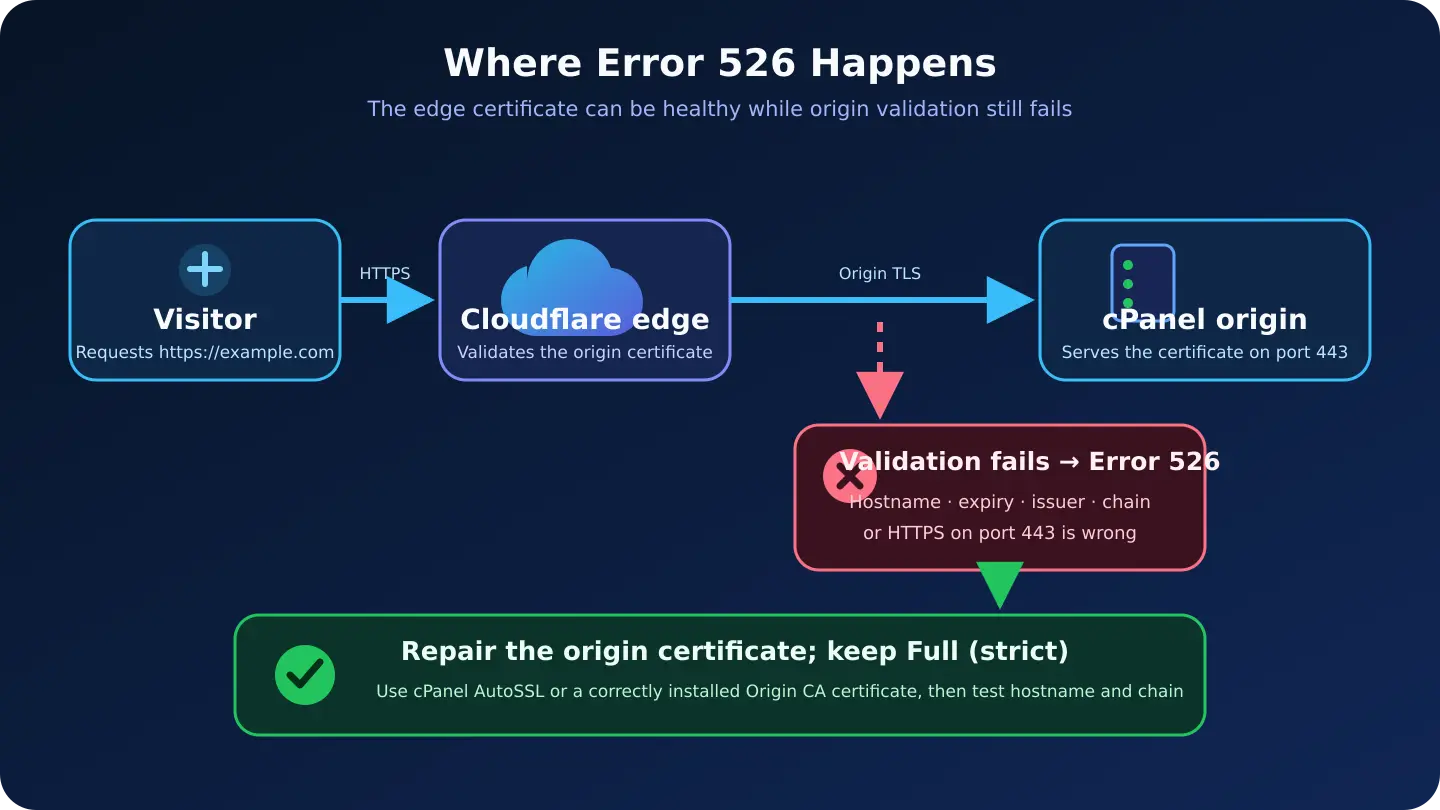
There are two separate encrypted connections:
- Visitor → Cloudflare: Cloudflare presents its edge certificate to the browser.
- Cloudflare → cPanel origin: the origin presents a different certificate to Cloudflare.
Error 526 concerns the second connection. Reissuing the edge certificate or clearing a browser cache will not fix a bad origin certificate.
Error 525 versus Error 526
- Error 525 — handshake failure. Start with port 443, TLS versions and ciphers, SNI, firewall rules and web-server TLS errors.
- Error 526 — certificate validation failure under Full (strict). Start with hostname coverage, validity dates, issuer and the certificate chain.
The symptoms can look similar, but the diagnosis should not be combined into one generic “SSL error” checklist.
Step 1: inspect the certificate served by the origin
You need the hostname and the real origin IP. Do not post the IP, private key or API token in a public support thread.
Run this from a computer that has OpenSSL. Replace both example values:
ORIGIN_IP="203.0.113.10"
HOSTNAME="example.com"

openssl s_client \
  -connect "${ORIGIN_IP}:443" \
  -servername "${HOSTNAME}" \
  -showcerts </dev/null 2>/dev/null \
| openssl x509 -noout \
  -subject -issuer -dates -ext subjectAltName
This is a reader-run diagnostic, not a benchmark performed against your server. The -servername value matters: shared cPanel servers use SNI to choose the virtual host and its certificate. Testing only https://ORIGIN_IP/ can show the server's default certificate and send you in the wrong direction.
Check the output:
notBeforeis in the past andnotAfteris in the future;- the requested hostname appears in the Subject Alternative Name list;
- both
example.comandwww.example.comare covered if both are proxied; - the issuer is expected;
- the origin is serving the intended certificate, not a default cPanel certificate.
To see OpenSSL's validation result too, run:
openssl s_client \
  -connect "${ORIGIN_IP}:443" \
  -servername "${HOSTNAME}" \
  -verify_hostname "${HOSTNAME}" \
  -showcerts </dev/null
Look near the end for Verify return code. A non-zero result needs investigation, but there is one important exception: a Cloudflare Origin CA certificate is designed for the Cloudflare-to-origin connection, not for ordinary browsers or every local operating-system trust store. A local “unknown issuer” result can therefore be expected even when Cloudflare trusts the certificate. Still verify its hostname, dates and installed chain.
Step 2: match the failure to the cPanel fix
The certificate is expired
AutoSSL may not have renewed, or an old manual certificate may still be installed. Open cPanel → SSL/TLS Status, review excluded domains and renewal problems, then run AutoSSL if your host exposes the control.
www or another proxied hostname is missing
The certificate may have been issued before the alias existed, or the wrong SANs were selected. Add the hostname to the account, include it in the next certificate and reissue.
The origin serves an unexpected default certificate
The request may be reaching the wrong virtual host or origin IP, or the test omitted SNI. Confirm the proxied DNS record points to this server and repeat the test with -servername.
A public certificate still fails validation
An intermediate certificate may be missing. Reinstall the certificate with its CA bundle/chain, then reload the web server through the controls provided by your host.
The origin uses a self-signed certificate
Full (strict) does not trust an ordinary self-signed certificate by default. Replace it with AutoSSL, another publicly trusted certificate or Cloudflare Origin CA.
Origin CA is installed, but chain errors remain
The wrong root/chain file may be installed on Apache cPanel. Use the Cloudflare Origin RSA PEM chain; Cloudflare explicitly says not to use its Origin ECC PEM root with Apache cPanel.
Nothing answers on port 443
The HTTPS virtual host, firewall or web service may be unavailable. Restore HTTPS on port 443 before certificate validation can succeed.
If you do not control WHM or the web-server configuration, send the OpenSSL output and the affected hostname to your hosting provider. Do not send the private key.
Option A: renew with cPanel AutoSSL
For most shared-hosting sites, AutoSSL is the simplest choice because it installs a publicly trusted certificate and normally handles the chain.
- Open cPanel → Security → SSL/TLS Status.
- Confirm the affected hostname is included rather than excluded from AutoSSL.
- Check that the hostname resolves to this cPanel server so domain control validation can succeed.
- Run AutoSSL if the button is available. Some hosts manage this centrally, so the control may be absent.
- Repeat the SNI-aware OpenSSL check against the origin IP.
If a CAA record restricts which certificate authorities may issue for the domain, verify it allows your host's current AutoSSL provider. Our CAA record guide explains that check. Because certificate lifetimes are shortening, renewal monitoring matters more than a one-time install; see our 64-day certificate readiness checklist.
Option B: install a Cloudflare Origin CA certificate
Origin CA is useful when every public request to that hostname should pass through Cloudflare.
- In Cloudflare, create an Origin CA certificate for the exact proxied hostnames you need.
- Save the certificate and private key securely. Cloudflare only displays the private key during creation.
- In cPanel → SSL/TLS → Manage SSL sites, install the certificate, matching private key and required CA bundle for the domain.
- For Apache cPanel, use the Origin RSA PEM chain referenced in Cloudflare's Origin CA documentation. The same page explicitly labels the Origin ECC PEM root “do not use with Apache cPanel.”
- Keep the DNS record proxied and use Full (strict).
Cloudflare warns that visitors may see an untrusted-certificate error if you pause Cloudflare or turn the DNS record grey-cloud while the origin uses Origin CA. That is expected: Origin CA is trusted by Cloudflare for the origin leg, not as a general browser certificate. If visitors must sometimes connect directly, use a publicly trusted certificate instead.
Cloudflare's Origin CA documentation also says it does not send expiration notifications for Origin CA certificates. Add the date to your certificate inventory and monitoring even if the certificate is long-lived.
Step 3: test HTTP routing without confusing trust
After inspecting the certificate, you can test whether the origin serves the expected site:
curl -I --resolve "example.com:443:203.0.113.10" \
  "https://example.com/"
--resolve keeps the hostname and SNI while sending the request to the chosen IP. With a publicly trusted certificate, this should validate normally. With Cloudflare Origin CA, a regular curl trust store may reject the issuer. For a narrowly scoped HTTP-routing test only, you can repeat with --insecure after separately checking the certificate details:
curl --insecure -I \
  --resolve "example.com:443:203.0.113.10" \
  "https://example.com/"
--insecure is not a production fix and should never appear in application code just to suppress a certificate problem.
Should you switch from Full (strict) to Full?
Cloudflare's Error 526 guidance lists Full as a potential quick workaround. It can also be a useful diagnostic: if 526 disappears under Full, certificate validation is the likely issue.
However, Full encrypts the connection without requiring Cloudflare to validate the origin certificate as strictly. Leaving it there can hide an expired, mismatched or self-signed certificate. Repair the certificate and return to Full (strict). Avoid Flexible for a site that supports HTTPS at the origin because it removes encryption from the Cloudflare-to-origin leg and can create redirect problems.
After recovery, use a normal request through Cloudflare:
curl -I https://example.com/Confirm you receive the expected status and application, not merely “some” 200 response from a default virtual host. If you also changed redirects, verify one canonical HTTPS URL; our HTTP-to-HTTPS guide covers safe redirect checks.
A five-minute recovery checklist
- Confirm the zone uses Full (strict) and the error is truly 526.
- Identify the hostname and origin IP without exposing secrets.
- Inspect the origin certificate with SNI using
openssl s_client. - Check SAN coverage, dates, issuer and the full chain.
- Renew AutoSSL or install the correct Origin CA certificate and RSA chain for Apache cPanel.
- Re-test the origin, then test the normal proxied hostname.
- Keep Full (strict) after the certificate is valid.
- Add expiry monitoring; do not rely on a browser padlock or a long certificate lifetime.
The core idea is simple: the edge can be healthy while the origin certificate is not. Diagnose the certificate Cloudflare actually receives, repair that certificate in cPanel, and keep end-to-end validation enabled.
Reader questions
Is Cloudflare Error 526 a Cloudflare outage?
Usually no. Error 526 identifies a certificate-validation failure between Cloudflare and the origin for the affected hostname under Full (strict). Check the specific origin certificate before describing it as a wider outage.
Why does my browser show a valid certificate while Cloudflare shows 526?
The browser validates Cloudflare's edge certificate. Cloudflare separately validates the certificate presented by the cPanel origin. The first connection can be healthy while the second certificate is expired, mismatched or missing its chain.
Can I fix Error 526 by changing Full (strict) to Full?
Changing to Full can temporarily bypass strict certificate validation and help confirm the cause, but it does not repair the certificate. Fix the origin and return to Full (strict).
Should I use cPanel AutoSSL or Cloudflare Origin CA?
Use AutoSSL when you want a publicly trusted origin certificate or may connect directly to the server. Origin CA is appropriate when the hostname remains proxied through Cloudflare; ordinary browsers do not generally trust Origin CA certificates directly.
Why does the origin IP show the wrong certificate?
Shared cPanel servers use SNI to select a virtual host. Test the origin IP with the requested hostname using openssl -servername or curl --resolve; opening only the IP may return the server's default certificate.
Which Cloudflare Origin CA chain should Apache cPanel use?
Cloudflare's documentation says Apache cPanel should use the Cloudflare Origin RSA PEM root/chain and explicitly says not to use the Origin ECC PEM root with Apache cPanel.
Sources & further reading
What changed
Created as a distinct cPanel-specific Error 526 guide after reviewing the current Hostlelo catalog, fresh Cloudflare documentation and visible competing results. Added SNI-aware checks, a 525/526 distinction and the Apache cPanel RSA-chain warning.
Originally published . About our editorial updates.