Let’s Encrypt 64-Day Certificates: Audit Renewals Before 2027
Verify the 2027 certificate change, audit Certbot and AutoSSL, check CDN and origin certificates separately, and monitor trust, hostname and expiry.
The short answer
Let’s Encrypt has announced default 64-day certificates for new issuance and renewals from 10 February 2027; its announced staging transition date was 14 October 2026. Audit scheduling, validation, deployment and live certificates. Prefer ARI or lifetime-aware renewal timing to fixed day counters.

Reading options
On this page
- The verified dates: what changes and what does not
- First identify who renews each certificate
- How renewal timing should work
- Audit a Certbot installation
- Audit cPanel AutoSSL without changing the provider blindly
- Check the certificate visitors receive
- A practical completion checklist
- Reader questions
- Sources & further reading
Before you start
Know which system renews each public and origin certificate. Have the appropriate cPanel/WHM access or administrator access to the actual renewal client, logs and scheduler. Review configured validation and hook effects before a test run.
Let’s Encrypt’s default certificates are getting shorter. The urgent job for a site owner is to check the whole renewal path: a scheduled client, successful domain validation, installation on the right server, and the certificate visitors actually receive.
A certificate renewed on disk can still leave a website serving the old one. A working CDN certificate can also hide an expiring origin certificate. This guide helps you check both situations without replacing a healthy renewal setup with another cron job.
The verified dates: what changes and what does not
The 7 October 2026 Let’s Encrypt announcement sets out this timetable. Checked for this editorial update on 11 October 2026:
Date | Announced change | What to do |
|---|---|---|
14 October 2026 | Staging starts issuing 64-day certificates | Test your configured renewal workflow after the staging change |
10 February 2027 | Default production validity becomes 64 days | Have automated renewal and deployment working before this date |
11 May 2027 | Expected expiry of the last 90-day certificate | Do not assume a recently issued certificate still lasts 90 days |
2028 | Default validity is planned to become 45 days | Build around actual validity or renewal information |
Existing valid certificates will not be revoked simply because of the transition. The announcement also says this change does not alter ACME endpoints, issuance chains or rate limits. Authorization reuse is being shortened separately, from 30 days to 10 days, with seven hours planned in 2028.
The production default change is still upcoming as of 25 October 2026; the announced staging transition date has passed. This does not mean every current certificate lasts 64 days. Check the actual validity dates and selected profile for each certificate.
First identify who renews each certificate
Make a short inventory before running commands. Include the apex domain, www, important subdomains and any separate origin behind a CDN.
For each endpoint, record its certificate provider, renewal client, scheduled task, deployment destination and responsible person. Website TLS, a hosting-panel certificate and SMTP TLS may have different owners. The HTTPS checks below do not test mail-server TLS.
Setup | Start here | A result that needs attention |
|---|---|---|
Shared cPanel hosting | SSL/TLS Status and your host’s renewal process | Repeated validation errors or expiry approaching without a successful run |
VPS with Certbot | Certificate inventory, timer/cron and renewal logs | A disabled task, manual challenge without automation, or a failing hook |
CDN in front of hosting | Public edge certificate and origin certificate separately | One is healthy while the other is expired or not deployed |
Another ACME client or panel | Its own documented renewal and deployment settings | A fixed day counter or unclear ownership |
A hostname missing from certbot certificates is not managed by that Certbot installation. It may be managed by AutoSSL, another client, a load balancer or the CDN. Find its owner rather than immediately requesting another certificate.
How renewal timing should work
ACME Renewal Info, usually called ARI, lets a supporting client obtain a suggested renewal window from the certificate authority. Check whether your actual client and installed version implement it.
A client can also make a lifetime-based decision. Certbot’s current user guide documents that, from version 4.0.0, its lifetime-based readiness threshold is less than one third of the certificate’s lifetime remaining; for lifetimes of ten days or less, it is half. Earlier versions used a fixed 30 days remaining.
These are different from a wrapper that waits 80 days after issuance. Such a wrapper would wait past a 64-day certificate’s expiry. For a lifetime-based fallback, about two thirds elapsed is roughly 42–43 days into a 64-day certificate. Do not turn that illustration into a new permanent “renew on day 43” rule.
The scheduler should invoke the renewal client regularly. The client decides whether renewal is due. Successful renewal still depends on valid credentials, reachable challenges and a working deployment path.
Audit a Certbot installation
The listing commands in this section are read-only. Test renewals and hooks can perform validation, modify temporary web-server configuration or run configured scripts, so review those before a dry run.
1. Check the installed client and certificate inventory
certbot --version
sudo certbot certificates
Record the certificate names, covered domains, expiry dates and paths. Compare the list with your endpoint inventory. A functioning client version does not prove its scheduled task is enabled.
Certificates created using the manual authenticator do not renew unattended unless the required authentication is automated with appropriate hooks. DNS API credentials used by a DNS plugin must also remain valid and correctly scoped.
2. Find the real scheduled task
On a systemd server:
systemctl list-timers --allFind the timer associated with the installation method you use, then inspect that timer and its corresponding service. Names vary between distribution packages, snap installations and custom deployments. Check whether it is enabled, when it last ran, its exit status and the relevant journal.
Also inspect the cron locations your installation uses:
sudo crontab -l
sudo grep -RInE 'certbot|letsencrypt|acme' /etc/crontab /etc/cron.d /etc/cron.daily /etc/cron.weekly /etc/cron.monthly
Some listed paths may not exist; review those messages rather than treating them as proof that renewal is absent. Other users, containers and an external orchestration system can own scheduled tasks too.
Do not append a cron entry just because this search finds nothing. Follow the installation-specific Certbot instructions, confirm the existing owner, and create one documented scheduler if it is needed. Duplicated jobs make failures harder to diagnose.
3. Review custom timing and deployment logic
Inspect the actual wrapper scripts referenced by your tasks. Search those files and your runbooks for day counters such as 60, 80 or 83, and uses of --force-renewal.
A matching number is only a clue. Establish whether it controls renewal, a retry interval or something unrelated. Save a private copy of a script before changing it. Preserve necessary DNS validation, certificate distribution and deployment steps when replacing obsolete timing logic.
A server that relies on --force-renewal for routine scheduled runs deserves review. That flag can request certificates that are not due; it is not a substitute for healthy automated renewal.
4. Test one configured certificate carefully
Replace example.com below with the certificate name listed by Certbot, which may differ from a hostname:
sudo certbot renew --cert-name example.com --dry-runWith the normal Let’s Encrypt configuration, a dry run uses staging and does not save its test certificates as your active production certificates. However, Certbot’s documentation notes that a custom --server or configuration can change which server is used.
Review authenticator settings and pre/post hooks first. Standalone validation can require port 80; a hook may stop and restart a service. A dry run is not a promise of zero operational effects.
The announced 14 October 2026 staging transition date has now passed. Run a controlled test before the February production change, and inspect the validity period returned rather than assuming the staging profile from the calendar alone. This editorial review did not request a staging certificate. Never install an untrusted staging certificate on a public production endpoint.
5. Verify installation and reload separately
Certbot supports deploy hooks that run after a successful renewal. The right hook depends on where the certificate is used. It may reload a web service, update a load balancer or distribute files to several servers.
For a plain Nginx installation managed by an administrator, a reviewed deploy-hook script might validate the configuration before reloading:
#!/bin/sh
set -eu
/usr/sbin/nginx -t
/bin/systemctl reload nginx
This is an installation-specific example. Confirm executable locations, service name and permissions, save the script outside public web roots, then configure it through Certbot’s documented deploy-hook mechanism. An installer plugin may already handle deployment; adding another reload hook is not automatically necessary.
Ordinary dry runs do not run deploy hooks unless --run-deploy-hooks is requested. That option executes real hook logic using the active certificate after a successful test. Review it before using it. A failed hook needs its own alert; issuance success alone does not establish deployment success.
Finally compare the live endpoint with the new certificate on disk. If the public site still presents an older certificate, inspect the configured certificate path, every relevant server, CDN termination and the deployment logs.
Audit cPanel AutoSSL without changing the provider blindly
For an account user, start at cPanel > Security > SSL/TLS Status. Review domain coverage and any validation errors. Ask the host who owns the renewal process and how failures are reported.
A WHM administrator can review SSL/TLS > Manage AutoSSL, its current provider, user enablement and recent logs. cPanel documents nightly update runs and checks after account creation, as well as a manual run facility.
This audit does not require selecting a new provider, recreating its registration or accepting a hardcoded terms URL. If provider settings need a change, handle that separately with the server owner and current documentation.
Check the actual validation failure. A proxied hostname need not resolve publicly to the origin IP, and IPv4 is not the only DNS information that can matter. Examine relevant A/AAAA records, challenge handling and CAA authorization in the context of your provider. Do not disable a CDN or replace DNS records just to make an IP comparison look simple.
On shared hosting, ask support for evidence of the latest successful renewal and installation. A generic “SSL is automatic” reply is less useful than a recent run, covered hostnames and an escalation route.
Check the certificate visitors receive
An expiry date alone does not prove that a certificate has a trusted chain or matches the hostname. Start with a normally verified HTTPS connection:
curl --connect-timeout 5 --max-time 15 --silent --show-error --output /dev/null https://example.com/Without an insecure bypass, curl normally verifies certificate trust and hostname against its configured trust store. A TLS error needs investigation. A completed transfer does not prove the page, checkout or application is healthy; HTTP error pages can still complete this command successfully.
A small monitor that checks trust, hostname and expiry
This Python 3 example uses the standard library’s verified TLS context. Replace the example hostnames before running it. It checks HTTPS on port 443, prints one result per hostname and exits nonzero if any check fails or the certificate expires within the configured warning window.
import socket
import ssl
import sys
import time

HOSTS = ["example.com", "www.example.com"]
WARNING_DAYS = 14
context = ssl.create_default_context()
failed = False

for host in HOSTS:
    try:
        with socket.create_connection((host, 443), timeout=8) as tcp:
            with context.wrap_socket(tcp, server_hostname=host) as tls:
                cert = tls.getpeercert()
        expiry = ssl.cert_time_to_seconds(cert["notAfter"])
        seconds_left = expiry - time.time()
        days_left = seconds_left / 86400
        if seconds_left <= WARNING_DAYS * 86400:
            failed = True
            print(f"EXPIRING {host}: {days_left:.1f} days remain")
        else:
            print(f"TLS_OK {host}: {days_left:.1f} days remain")
    except (OSError, ValueError, KeyError) as exc:
        failed = True
        print(f"TLS_CHECK_FAILED {host}: {exc}")

sys.exit(1 if failed else 0)
Python’s SSL documentation explains certificate validation and hostname checking through create_default_context. Keep the machine’s CA trust store current; do not “fix” a verification failure by switching verification off.
The socket timeout applies to socket operations; DNS resolution can have platform-specific delays. This is a starting monitor, not a full multi-region service. It does not test all CDN locations, every load-balancer backend, SMTP, certificate revocation status or application functionality. For scheduled use, connect failures and nonzero exits to a notification system someone actually receives.
Fourteen days is an example warning window, not a renewal schedule and not an early enough window for every short-lived certificate profile. Adjust it to the actual validity, the client’s renewal window and the time your team needs to respond. Alert on failed renewal attempts as well as declining time to expiry.
A practical completion checklist
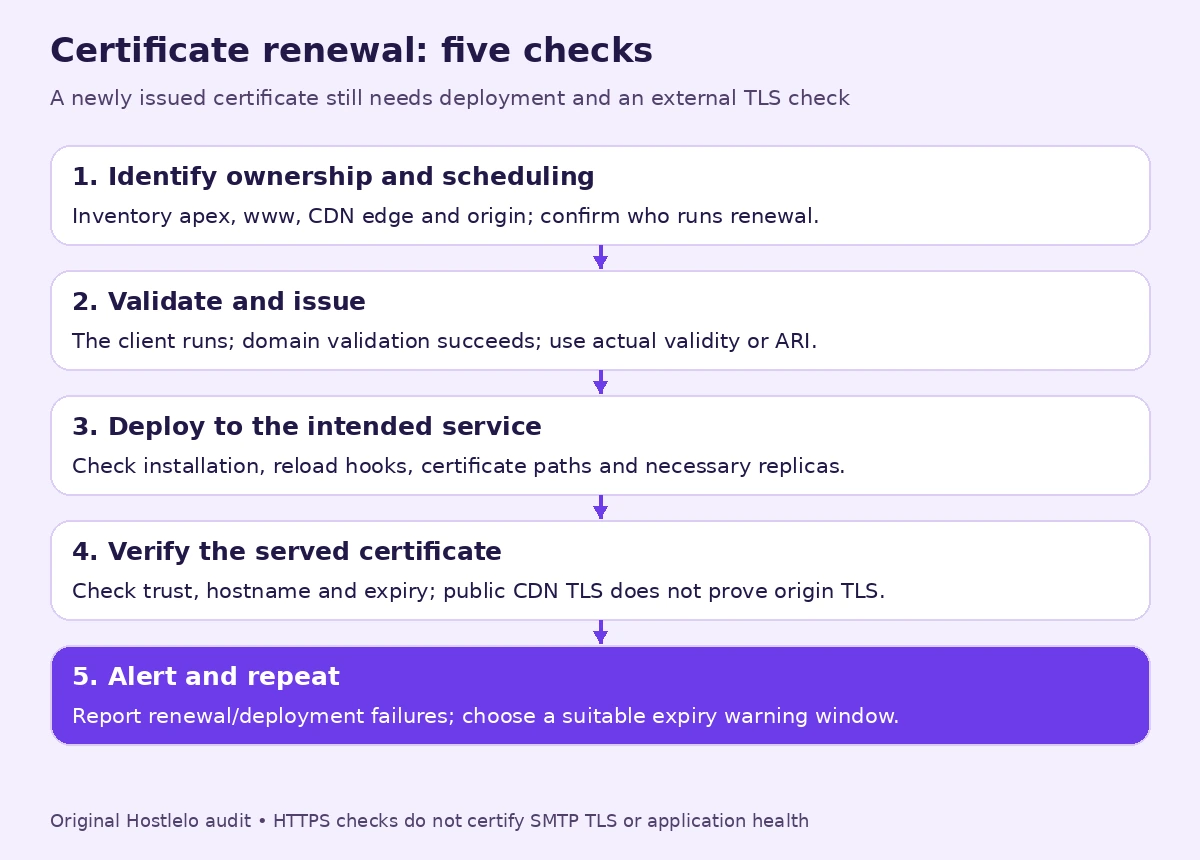
A renewal audit is complete when you can answer all of these:
- Which system owns each public and origin certificate?
- Does its scheduled task run successfully, with validation credentials still usable?
- Does a controlled renewal test succeed for the configured certificate?
- Does deployment reach the intended service and every necessary replica?
- Does the public endpoint pass normal trust and hostname checks and present the expected certificate?
- Does a failed renewal or deployment reach a responsible person?
- Have you tested the configured renewal workflow against the shortened staging lifetime and recorded the result before the February production change?
For a managed site, send the inventory to your host and ask them to confirm these points. Keep the answers with your backup and restore plan, so a server migration does not quietly drop renewal automation.
The useful outcome is a working process with evidence. A new expiry date in one panel is only one part of that process.
Reader questions
When do Let’s Encrypt certificates become 64 days long?
The 7 October 2026 announcement sets 10 February 2027 for default production validity and 14 October 2026 for staging. Existing certificates retain their own validity dates; the change does not make all current certificates 64 days long.
Will my existing 90-day certificate be revoked?
Let’s Encrypt says it will not revoke valid certificates as part of this change. It expects the last 90-day certificate to expire on 11 May 2027.
Does Certbot 4.0.0 or later automatically solve every renewal problem?
No. Its documented lifetime-based readiness threshold adapts to shorter certificates, but the scheduler, authenticator, credentials and deployment must still work. This behavior does not itself prove that a particular client version implements ARI.
Is certbot renew --dry-run completely read-only?
No. It normally obtains staging certificates without installing them as active production certificates, but validation, temporary server changes and configured pre/post hooks can have effects. Deploy hooks normally require --run-deploy-hooks during a dry run; custom server settings also need review.
Should I change my cPanel AutoSSL provider now?
An audit starts with coverage, user enablement and recent validation/installation logs. Do not change a healthy provider or recreate registration solely because validity is getting shorter. Your host should verify its own renewal and deployment workflow.
Does a valid CDN certificate prove that origin TLS is healthy?
No. The CDN edge and origin can use different certificates and renewal owners. Test them separately through the supported hosting and CDN configuration; the public hostname usually tests the edge.
What does a certificate expiry monitor actually prove?
The example monitor verifies the TLS hostname and trust through the machine’s configured CA store, then checks the presented certificate’s expiry. It does not prove application health, revocation status, SMTP TLS or every CDN/backend certificate. Its warning window must suit the actual certificate lifetime.
Was this guide helpful?
Help us make the next update better.
Sources & further reading
What changed
Verified the announced rollout dates; clarified renewal ownership, Certbot test effects and deployment checks; added a monitor that verifies TLS trust and hostname as well as expiry.
Originally published . About our editorial updates.