Is Gzip or Brotli Working? Check the Actual HTTP Response
Check a real GET, compare stable text responses and distinguish origin settings from CDN behavior before changing compression configuration.
The short answer
Request a real GET from the final HTTPS URL with Accept-Encoding, then inspect status, Content-Type, Content-Encoding and Vary together. Compare explicit identity and supported compressed requests only for stable equivalent content. Test HTML, CSS and JavaScript individually and distinguish CDN delivery from origin behavior; one uncompressed response does not prove compression is disabled everywhere.

Reading options
On this page
- Ask for compression on a real GET
- Interpret the result narrowly
- Compare transferred body bytes, not two unrelated pages
- Pick the setting for the server that serves the response
- Brotli is a deployment choice, not a requirement
- Separate CDN evidence from origin evidence
- Diagnose the warning that remains
- Finish with an evidence checklist
- Reader questions
- Sources & further reading
Before you start
Your own public site and curl for read-only checks. Server changes require authorized cPanel/WebAdmin/administrator access, a saved configuration and a rollback path. Origin testing requires a known authorized origin address; keep TLS and firewall protections intact.
A server setting saying “compression enabled” is not the same as a compressed response reaching a visitor. A CDN can negotiate a different encoding, a stylesheet may have the wrong MIME type, or a redirect can make you inspect the wrong response.
Start with one URL and one actual GET response. Then work backward to the component that produced it. This guide focuses on evidence you can collect before changing cPanel, Apache, Nginx or OpenLiteSpeed.
Ask for compression on a real GET
Use the final HTTPS URL of your own site:
curl --silent --show-error --dump-header - --output /dev/null \
  --header 'Accept-Encoding: br, gzip' \
  https://example.com/
This downloads the response body and discards it while showing headers. It does not ask curl to decode Brotli; it is a header inspection. Look at the status, Content-Type, Content-Encoding and Vary together.
If the response is a redirect, inspect its Location and run the check against the final page. A 301 response with no Content-Encoding does not prove that the destination HTML is uncompressed. A 304 has no representation body to measure; start with a fresh response rather than conditional requests.
HEAD requests can be useful, but curl -I sends HEAD rather than GET and does not, by itself, request compression. An application's HEAD behavior may differ from its GET behavior.
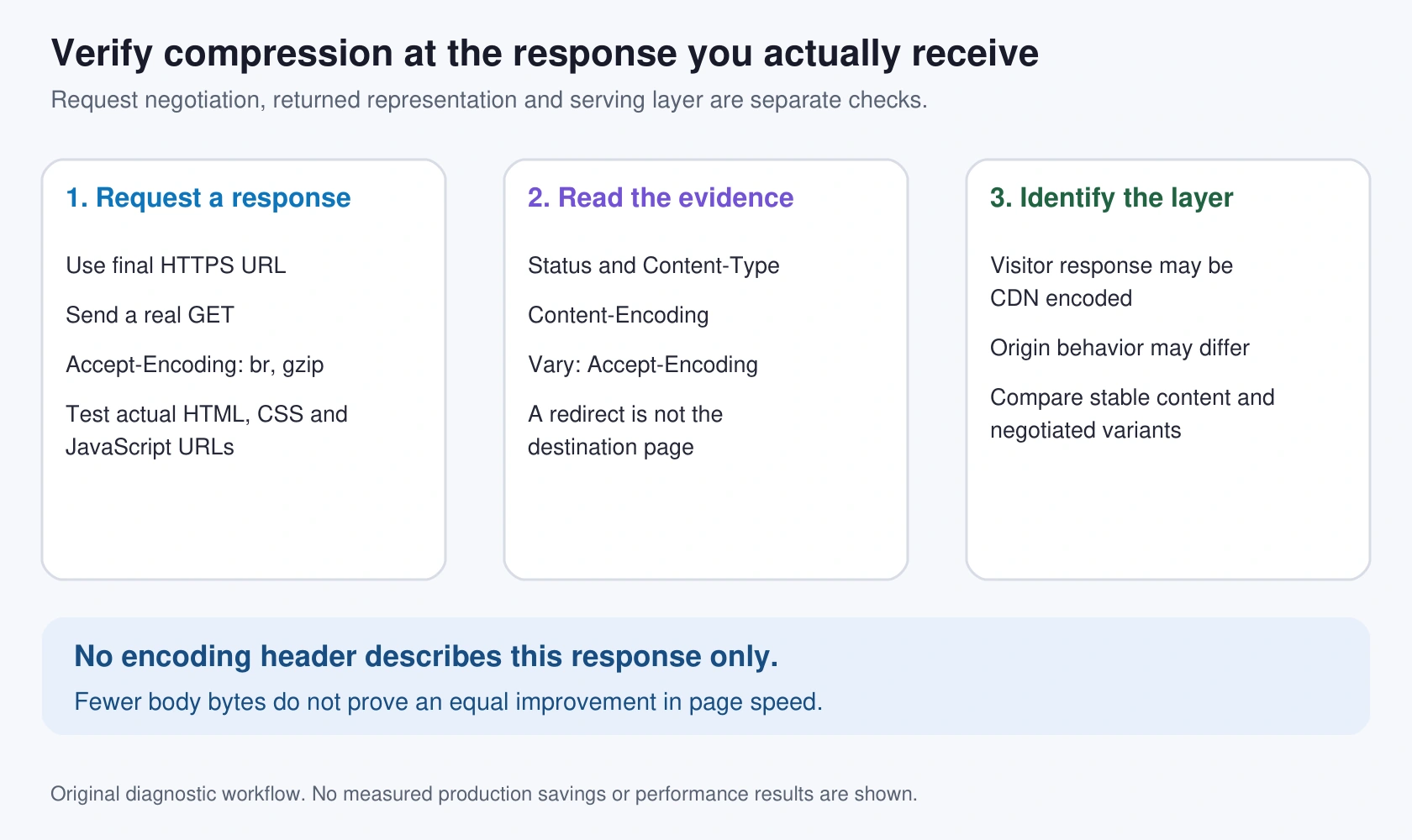
Interpret the result narrowly
Content-Encoding: gzipmeans that returned representation is gzip encoded.Content-Encoding: brmeans Brotli is being used for that response.- Another supported encoding, such as
zstd, may also be legitimate. - No Content-Encoding means this response is not labeled as encoded. It does not show that every URL or every server setting has compression disabled.
Small bodies, already-compressed formats, MIME filtering, caching, request negotiation and security policy can all affect the result. A response incorrectly labeled or encoded needs a different investigation from an intentional uncompressed response.
Vary: Accept-Encoding tells ordinary HTTP caches that representation selection can depend on that request header. Preserve other Vary values rather than overwriting them. Apache's gzip module adds this header automatically; Nginx provides gzip_vary to control it.
Test one HTML page, one actual CSS URL and one actual JavaScript URL from your site. Use URLs present in the page, not a guessed theme filename that returns 404. Record the MIME type and response status for each.
Compare transferred body bytes, not two unrelated pages
Use an explicit identity request for the first measurement:
curl --silent --show-error --output /dev/null \
  --header 'Accept-Encoding: identity' \
  --write-out 'status=%{http_code} body_bytes=%{size_download}\n' \
  https://example.com/
Then ask curl to negotiate an encoding it can decode:
curl --silent --show-error --compressed --output /dev/null \
  --write-out 'status=%{http_code} body_bytes=%{size_download}\n' \
  https://example.com/
The curl manual documents --compressed and transfer statistics. size_download measures the transferred body, not headers or total browser-page weight. Curl's supported codecs depend on its build; check curl --version rather than assuming Brotli support.
Inspect the headers in both cases too. If a server ignores identity or does not compress the second request, this is not a useful identity-versus-compressed comparison.
Dynamic content, different status pages and cache variants can change body size. For a clean diagnostic, use the same stable public text asset. If you additionally compare decoded files, ensure both responses represent identical content before attributing the entire difference to compression.
An illustrative calculation, not a Hostlelo benchmark: transferring a 100,000-byte representation as 25,000 encoded bytes reduces body bytes by 75%. It does not prove that LCP, total page weight or every visit becomes 75% faster.
On Windows PowerShell, use curl.exe, replace /dev/null with NUL, and keep each command on one line rather than using Bash line continuations.
Pick the setting for the server that serves the response
Back up the relevant configuration and have a rollback path. On shared hosting, check existing provider/CDN behavior before adding another compression layer.
cPanel Optimize Website
cPanel's Optimize Website documentation describes a text-MIME selection and requires the Apache mod_deflate module. The host can also control feature availability. A missing interface is not evidence that all response compression is absent.
Choose “Compress the specified MIME types” for a deliberate text list, for example:
text/html text/plain text/css text/javascript application/javascript application/json image/svg+xmlThe interface uses spaces between MIME types. Check the actual Content-Type of a skipped asset. SVG is text-based; JPEG, PNG, WebP and most video/archive formats already use compression and usually do not benefit from another pass.
The cPanel page currently includes PHP guidance involving zlib.output_compression. Treat that as panel-specific documentation, not a universal rule that Apache cannot compress PHP output otherwise. Ask the host which layer should own compression for your stack and retest the returned HTML. Do not switch on multiple layers blindly.
Apache mod_deflate
For a permitted Apache configuration or .htaccess context, this is an example based on the module's documented MIME filter:
<IfModule deflate_module>
  AddOutputFilterByType DEFLATE text/html text/plain text/css text/javascript application/javascript application/json image/svg+xml
</IfModule>
Apache's documentation identifies the DEFLATE filter and automatic Vary behavior. Check module availability and allowed override context with the administrator. An IfModule wrapper may silently skip the block; successful page loading is not proof that the filter ran.
If the edit produces a 500 response, restore the saved configuration and inspect server errors. Do not keep adding directives while the site remains broken.
Nginx gzip
An administrator can adapt this example inside the appropriate http or server context:
gzip on;
gzip_vary on;
gzip_comp_level 5;
gzip_min_length 1000;
gzip_types text/plain text/css application/javascript application/json image/svg+xml;
Nginx treats text/html specially, so it need not appear in the extra type list. Compression level 5 here is an example, not a measured optimum for your CPU or workload. See the gzip module reference for supported contexts and defaults.
Test configuration with nginx -t. If it passes, reload using the system's established process; a service managed by a panel or container may not use a host-level systemd command.
For gzip_proxied, Nginx determines a proxied request from the Via request header. Do not assume that every request coming through any CDN automatically has that header. Review the actual request path and intended handling rather than adding gzip_proxied any everywhere.
OpenLiteSpeed and provider-managed LiteSpeed
OpenLiteSpeed exposes server and virtual-host compression controls. Check the applicable server/virtual-host settings and supported types, save through WebAdmin and apply changes using its normal graceful-restart workflow. Its compression documentation is the primary reference.
Do not treat an OpenLiteSpeed menu path as a guaranteed match for LiteSpeed Enterprise, cPanel or another managed panel. Ask the provider which setting controls your responses. The LiteSpeed Cache guide explains caching; a cache hit and compressed transfer are distinct properties.
Brotli is a deployment choice, not a requirement
Apache mod_brotli provides the BROTLI_COMPRESS filter in supported builds. Module availability and filter interactions need administrator review. Stock Nginx's gzip module does not implement Brotli; adding a separate compatible module is a separate deployment task.
Before installing anything, check whether your CDN already encodes visitor responses. Gzip can still be a sound fallback. Brotli availability alone does not establish a meaningful speed benefit for your particular mix of files and visitors.
Separate CDN evidence from origin evidence
Cloudflare's compression documentation distinguishes communication with the origin from responses to visitors. The edge may serve gzip, Brotli or Zstandard according to its rules and negotiation.
An authorized administrator with the known origin IP can use curl's --resolve option to connect to that IP while retaining the hostname for TLS:
curl --silent --show-error --dump-header - --output /dev/null \
  --header 'Accept-Encoding: gzip' \
  --resolve example.com:443:192.0.2.10 \
  https://example.com/
192.0.2.10 is a documentation address. Use your actual authorized origin address, and do not probe guessed IPs. This check can fail intentionally when the origin accepts only CDN connections or needs authenticated origin access. Do not weaken the firewall or disable TLS verification to force the test through.
Diagnose the warning that remains
If HTML compresses but an asset does not, check its actual MIME type, size and serving hostname. A third-party asset needs action from its owner; editing your origin does not change another company's response.
If a browser shows a decoding error, investigate mismatched Content-Encoding, truncated bodies, cached variants or overlapping compression layers. Double compression is one possible cause, not a diagnosis from the error text alone.
If a performance report still flags text compression, compare its exact flagged URLs with your GET checks. Cache propagation and request variants can explain different observations. Retest affected URLs instead of clearing every cache repeatedly.
Applications combining reflected attacker-controlled input and secrets in compressed responses need a security review for compression side channels such as BREACH. The right control depends on the application; a blanket level setting is not a security assessment.
Finish with an evidence checklist
Record final URL, status, MIME type, requested encoding, returned encoding and Vary. Repeat for HTML, CSS and JavaScript. Confirm decoded content still renders correctly and that expected uncompressed clients can obtain an appropriate response.
Then rerun the original diagnostic and inspect the remaining flagged resources. Keep the config change and rollback record. Use browser or field performance measurements to judge user impact; a compressed transfer is a useful technical result, not a ranking guarantee.
This article's server configuration examples are proposals for an administrator to adapt. We did not enable compression on a customer's server or measure a production speed improvement during the editorial review.
Reader questions
Does missing Content-Encoding mean my whole website has compression disabled?
No. It describes the tested response. Redirects, small bodies, MIME filters, already-compressed files, request variants and CDN behavior can produce different results.
Is curl -I enough to test compression?
It sends HEAD, and by itself does not request a compressed response. A GET with an explicit Accept-Encoding header is the more useful initial response check.
What does curl --compressed do?
It requests a compressed response using algorithms supported by that curl build and decodes it. Check curl --version rather than assuming Brotli support.
Do smaller transferred bytes prove an equal page-speed improvement?
No. Body-byte savings do not directly determine total page weight, rendering, LCP or real user experience. Compare equivalent content and measure performance separately.
Should I compress JPEG, PNG or WebP again?
Usually not; these formats already use compression. SVG is text-based and can belong in a deliberate text-compression list.
Why can Cloudflare return Brotli when my origin is configured only for gzip?
The CDN can negotiate and transform visitor-facing responses independently of origin encoding. Inspect the actual layer being tested before changing the origin.
Was this guide helpful?
Help us make the next update better.
Sources & further reading
What changed
Rewritten and verified on 12 October 2026 before first publication. Corrects response-specific interpretation, redirects, identity comparisons, CDN/origin scope, cPanel PHP guidance and Nginx Via-based gzip_proxied behavior. Adds an original cover and diagnostic map. Bash syntax checked; no production compression benchmark or server change performed.
Originally published . About our editorial updates.