
WordPress cURL Error 60 but Browser HTTPS Works?
A browser lock does not test WordPress outbound HTTPS. Identify the actual request, CA bundle and PHP runtime before changing certificates or php.ini.
The short answer
WordPress cURL error 60 means an outbound certificate check failed. Browser HTTPS success does not test that request. The WordPress HTTP API normally provides its own CA bundle, while plugins, PHP and shell curl may use different settings. Identify the failing path, then repair trust or the remote certificate with verification enabled.

Reading options
On this page
- First, identify which connection failed
- Record the full message, not just the number
- Why changing curl.cainfo may not fix WordPress
- Compare the same destination from the hosting server
- Apply the fix that matches the evidence
- Verify the original operation with protection still enabled
- Reader questions
- Sources & further reading
Before you start
Access to the full error and destination hostname. Optional templates require authorized hosting-shell access and WP-CLI; they were not executed against WordPress here. WP-CLI loads WordPress and extensions can run callbacks. Use a controlled environment and protect diagnostic output. The separate offline lab requires Bash, OpenSSL 3 and ripgrep; it creates disposable synthetic keys without installing trust or changing system time.
Direct answer: WordPress cURL error 60 is an outbound certificate-verification failure. A working HTTPS page in your browser does not prove that WordPress trusts the server it is calling. Identify the failing destination and request code first: WordPress's HTTP API normally supplies its own CA bundle, while raw PHP cURL and command-line curl can use different configuration. Repair the matching trust path or remote certificate; keep verification enabled.
If you have already renewed your website certificate or edited php.ini and nothing changed, stop making broader changes. You may have repaired a different connection from the one that failed.
This is an evergreen troubleshooting guide checked on 16 October 2026, not a new WordPress vulnerability or outage announcement.
First, identify which connection failed
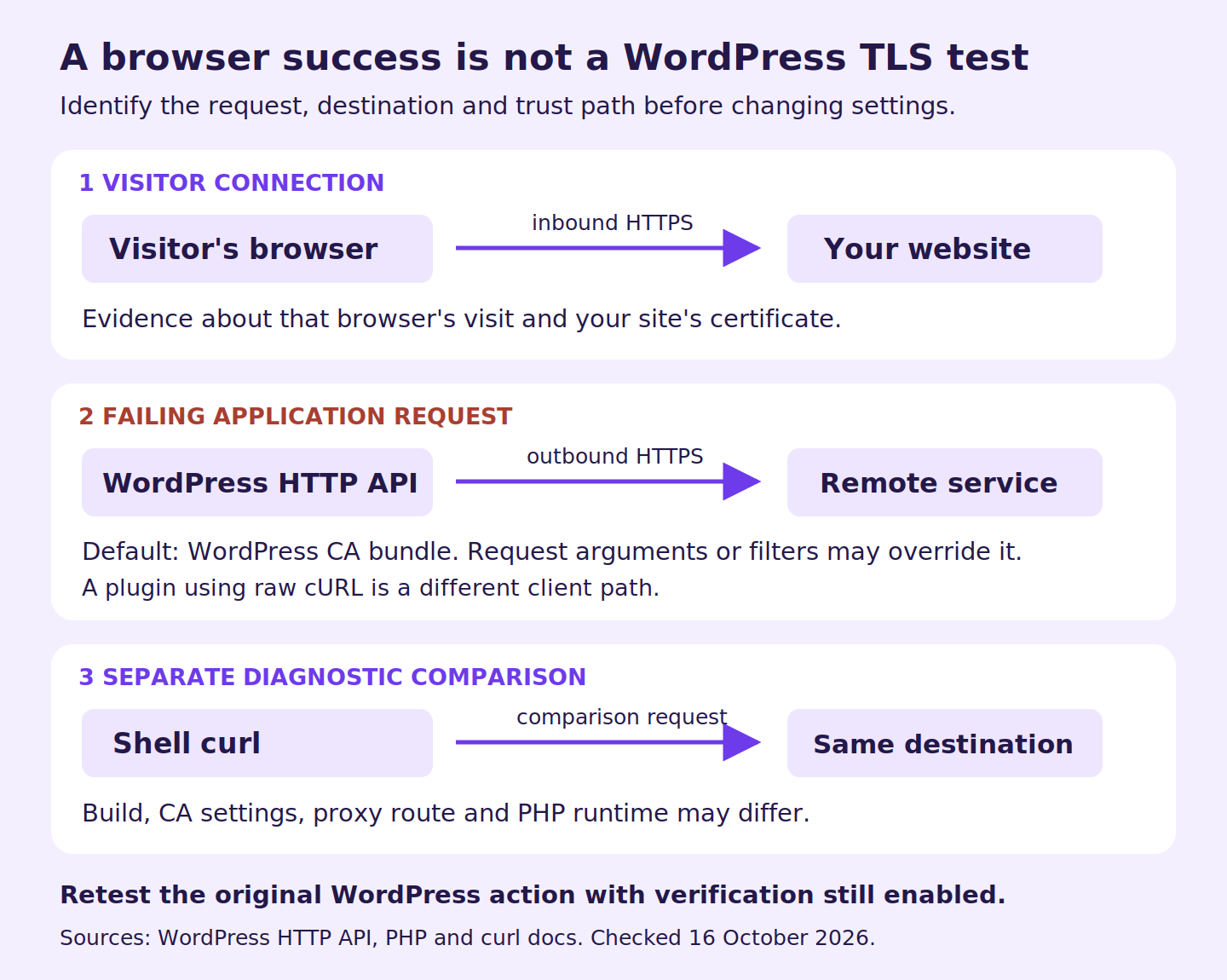
There are at least two distinct HTTPS journeys:
- A visitor's browser connects to your website and checks its certificate.
- WordPress connects from your hosting server to another service, such as an update download or a plugin's API.
The browser, PHP process and terminal client need not share a trust store, network route or TLS implementation. The curl verification guide explains file-based and native trust stores, including platform differences. Treat a successful browser visit as evidence about that visit, not the failing server-side request.
If visitors actually see Cloudflare Error 526, use our origin-certificate guide. That is a different diagnostic path; do not lower Cloudflare's SSL mode to repair an unrelated outbound WordPress error.
Record the full message, not just the number
libcurl documents error 60 as failed peer verification. The detailed text matters: an issuer/chain failure, hostname mismatch and expired certificate do not have the same repair.
Before retrying, record:
- The exact failing action and timestamp: update download, licence check or API request.
- The destination hostname and full error, with tokens, query secrets and personal data removed.
- Whether core updates and unrelated integrations still work.
- Whether the failure began after a migration, PHP change, plugin update or approved network-proxy change.
A missing or unreadable CA file can produce error 77, not necessarily error 60. A DNS failure or timeout needs its own investigation. Do not diagnose every cURL error as an expired CA bundle.
Use our safe WordPress debug-log guide if you need application logs. Keep logs private and avoid collecting authorization headers or complete customer requests.
Why changing curl.cainfo may not fix WordPress
The current WordPress HTTP API reference and source show sslverify enabled by default and sslcertificates set to:
ABSPATH . WPINC . '/certificates/ca-bundle.crt'With verification enabled, core passes this certificate-file setting into its Requests library. This explicit application setting is why changing a PHP default is not automatically the repair for a WordPress HTTP API failure.
By contrast, PHP documents `curl.cainfo` as a default for CURLOPT_CAINFO, requiring an absolute path. It is an INI_SYSTEM directive, not something to fix with a runtime ini_set() pasted into a theme.
There are qualifications. A caller can supply different HTTP arguments; the `https_ssl_verify` filter can change verification settings. A plugin can also call raw cURL or another client instead of the WordPress HTTP API. Ask the plugin maintainer which path it uses rather than assuming every request inherits the same bundle.
A limited CLI inventory
For an authorized operator with WP-CLI, this example prints the default WordPress bundle and the CLI PHP configuration. It was not executed against a WordPress installation for this article. Replace the site path and run as the account owner, not root:
wp --path='/absolute/path/to/wordpress' eval '
$bundle = ABSPATH . WPINC . "/certificates/ca-bundle.crt";
echo wp_json_encode( array(
    "php_version" => PHP_VERSION,
    "php_sapi" => PHP_SAPI,
    "loaded_ini" => php_ini_loaded_file(),
    "curl_cainfo" => ini_get( "curl.cainfo" ),
    "wordpress_default_bundle" => $bundle,
    "bundle_readable_here" => is_readable( $bundle ),
), JSON_PRETTY_PRINT ), PHP_EOL;
'
WP-CLI's eval command loads WordPress. Bootstrap and installed extensions can run callbacks, so this is not a promise of a side-effect-free production operation. Use a controlled environment when appropriate, and do not publish the output or create a public phpinfo() endpoint.
The output is an inventory, not proof of the effective certificate file used by a particular request. It does not observe argument overrides or the final transport. Also, CLI PHP is not necessarily your web PHP-FPM process. PHP's configuration documentation explains configuration selection; ask the host to compare the actual web runtime, account permissions and loaded settings.
Compare the same destination from the hosting server
An operator can compare shell curl's default verification with an explicit CA file. These are unexecuted diagnostic templates, not test results from your server. Replace the example hostname with an approved, non-sensitive HTTPS endpoint and use the actual WordPress bundle path:
curl --version
date -u
curl --verbose --connect-timeout 10 --max-time 20 \
  --output /dev/null 'https://api.example.com/health'
curl --verbose --connect-timeout 10 --max-time 20 \
  --cacert '/absolute/path/to/wordpress/wp-includes/certificates/ca-bundle.crt' \
  --output /dev/null 'https://api.example.com/health'
--cacert selects a CA file for that transfer. These commands do not follow redirects, so a redirect response tests only the initial connection. Inspect any subsequent destination separately before testing it. Do not add credentials or send a payment, email or other business action just to test TLS.
Interpret the comparison cautiously:
- Default curl succeeds, explicit-bundle test fails: inspect that bundle, its readability, the error detail and the chosen TLS backend. This suggests a trust-path difference; it does not prove WordPress used this exact file.
- Both fail: inspect the remote chain, hostname, validity period, clock and route. Two failures do not establish that the operating-system CA store alone is responsible.
- Both succeed, WordPress fails: compare PHP-FPM and CLI, request arguments, plugin-specific clients, redirects and proxy settings. A shell success is not a WordPress acceptance test.
Verbose output can expose network details. Redact it before sharing. Do not use --insecure, -k, sslverify => false or a global verification-disabling filter as the repair.
Apply the fix that matches the evidence
An outdated or damaged WordPress bundle
cPanel's support article, updated 16 August 2026, specifically documents WordPress's bundled CA file as a cause of update/download failures. That is an existing support case, not evidence that every current WordPress installation is affected.
Prefer a staged update or repair from an authenticated official WordPress source with backup and compatibility checks. A manual bundle replacement is a controlled file change: preserve the previous file, verify the new file is actually a certificate bundle, retain correct ownership/readability and document the source. Do not delete the only working bundle before confirming the replacement. A later core update may replace a manual core-file change.
The core checksum command can help investigate unexpected core modifications. A mismatch is evidence to review, not automatic proof of malware; checksum verification also does not test the remote endpoint's TLS. Do not bypass TLS to fetch integrity evidence.
A raw PHP cURL or system-trust problem
Have the authorized server operator repair the distribution-managed trust store or the specific PHP configuration actually used by the failing application. Package commands and reload procedures depend on the operating system, PHP handler and hosting policy. A generic server restart is not a diagnostic step.
On shared hosting, provide the host with your evidence rather than attempting root-level changes. Our PHP-version guide explains why selecting the correct site/runtime matters, but a version switch alone is not a CA repair.
A remote certificate or approved inspection proxy
If one service fails because its certificate has expired, omits the required intermediate or does not cover the requested hostname, its owner must repair that endpoint or correct the destination. Adding random certificates to your trust store does not fix a wrong hostname.
If approved TLS inspection is involved, obtain the correct CA and installation policy from the responsible administrator through a trusted channel. Scope changes to the intended application where appropriate. Never promote a certificate captured from an untrusted connection into a trust anchor just because it makes an error disappear.
Verify the original operation with protection still enabled
After the smallest justified change, repeat the original request through the original WordPress feature. Confirm the expected application result, not merely the absence of an error banner. A TLS-valid HTTP 401 or 500 is still not a successful plugin update or API transaction.
Check that certificate verification remains enabled, review the relevant logs and confirm that an unrelated known-good integration still works. Keep the rollback until these checks agree. For a real update, follow the backup and checkout-test plan.
What we tested: on 16 October we ran four offline OpenSSL certificate assertions with synthetic certificates: trusted CA accepted, unrelated CA rejected, wrong hostname rejected and an expired leaf rejected at a simulated future verification time. The test used OpenSSL 3.0.13 and did not install a CA, change system time or contact a server.
This illustrates why trust, identity and validity are separate checks. It does not reproduce WordPress cURL error 60 or verify any customer's WordPress, PHP, proxy or remote service. The WP-CLI and network examples above remain unexecuted templates.
Reader questions
Why does WordPress show cURL error 60 when my website has a valid certificate?
The failing connection may be from WordPress to another service. Your browser's successful visit tests a different endpoint and client configuration. Record the actual destination and full error before renewing your own website certificate again.
Will setting curl.cainfo in php.ini always fix it?
No. It is a PHP default for the CA-file option. WordPress's HTTP API normally supplies a bundled CA file explicitly, and plugins can override settings or use other clients. Identify the request path and actual PHP runtime first.
Is disabling sslverify a safe fix?
No. It removes certificate-verification protection rather than repairing the trust or identity problem. Keep verification enabled and correct the appropriate CA configuration, destination hostname or remote certificate chain.
Does a successful shell curl test prove the WordPress request works?
No. Shell curl and web PHP may differ in TLS backend, CA settings, user permissions, proxy route and request behavior. Use shell checks as comparison evidence, then retest the original WordPress action.
Should every error 60 be fixed by replacing WordPress's CA bundle?
No. Error details can point to hostname, validity, remote-chain or interception problems. A damaged or unreadable CA file can also produce a different code, such as error 77. Match the repair to the evidence.
What did Hostlelo actually test?
Four offline OpenSSL assertions passed with synthetic certificates: trusted issuer accepted, unrelated issuer rejected, wrong hostname rejected and expiry rejected at a simulated future time. No customer's WordPress, PHP runtime or remote service was tested.
Was this guide helpful?
Help us make the next update better.
Sources & further reading
- WordPress HTTP API defaults and source
- WordPress verification filter
- PHP curl.cainfo configuration
- PHP configuration-file selection
- curl TLS verification and CA selection
- libcurl error codes, including 60 and 77
- cPanel WordPress bundled-CA support case, updated 16 August 2026
- WP-CLI eval command
- WP-CLI core checksum verification
- OpenSSL 3 certificate verification command
Originally published . About our editorial updates.