WordPress HSTS via .htaccess: Safe Setup, Checks and Rollback
Add HSTS, nosniff and Referrer-Policy on Apache, verify real public responses, understand subdomain scope and prepare a rollback that browsers can receive.
The short answer
On direct-HTTPS Apache 2.4.10+, use one controlled HSTS header with a short max-age, verify real GET responses and raise the lifetime only after checking HTTPS and renewal. Manage headers at the correct proxy/CDN layer. Rollback requires a working HTTPS response with max-age=0 and separate attention to subdomain policies or preload.

Reading options
On this page
- What these headers do
- Check readiness before editing .htaccess
- Understand which host the policy covers
- Add a short trial policy on direct HTTPS Apache
- Verify GET responses through the actual delivery path
- Raise max-age when the evidence supports it
- Roll back a learned policy correctly
- WordPress admin HTTPS and proxy loops
- Keep Content Security Policy as its own project
- Troubleshooting without weakening HTTPS
- Reader questions
- Sources & further reading
Before you start
Have working HTTPS, reliable certificate renewal and authorized Apache configuration access. Confirm the server and CDN/proxy header layer, keep a private copy of .htaccess and have a way to restore access if a rule fails.
HSTS can make a browser refuse insecure connections to your WordPress site. It can also make a certificate mistake much harder for a visitor to get past. A useful setup therefore starts with working HTTPS, clear ownership of response headers and a short trial policy.
This guide covers Apache with HTTPS reaching Apache directly. If a CDN or reverse proxy terminates HTTPS before the request reaches the origin, choose the appropriate header-setting layer first. Copying an origin-only rule into that setup can leave HSTS missing.
What these headers do
HSTS stands for HTTP Strict Transport Security. A browser that receives a valid Strict-Transport-Security header over HTTPS remembers to use HTTPS for that hostname for the specified max-age.
It does not replace a valid certificate, renew one, secure your database or make a WordPress installation free of vulnerabilities.
Header | Purpose | Important limit |
|---|---|---|
Strict-Transport-Security | Makes a supporting browser use HTTPS for a remembered host | Normally learned after a secure visit; certificate errors can then prevent access |
X-Content-Type-Options: nosniff | Restricts MIME-type sniffing, including checks for scripts and styles | Your server still needs to send correct content types |
Referrer-Policy: strict-origin-when-cross-origin | Limits referrer detail for cross-origin navigation | Same-origin requests can still carry the path and query; it is not a general secret-removal tool |
For cross-origin HTTPS navigation, that referrer policy generally sends the origin—scheme, hostname and port where applicable—rather than the full page URL. It sends no referrer on an HTTPS-to-HTTP downgrade. It is already the modern default described by MDN; setting it explicitly documents your choice. It does not reliably override every policy another layer might add.
HSTS is useful when an HTTP request would otherwise be made. Modern browsers may also try HTTPS first or apply other upgrade mechanisms, so typing a bare hostname does not invariably cause an initial HTTP request. A newly visited host without a learned or preloaded HSTS policy still has a first-contact limitation.
Check readiness before editing .htaccess
Start with these prerequisites:
- A valid certificate for every hostname in the scope you plan to protect, with reliable renewal.
- An HTTP-to-HTTPS redirect that behaves correctly for your canonical hostname.
- Apache 2.4.10 or newer,
mod_headersand permission to use Header directives in.htaccess. - A private backup of
.htaccessand a way to restore it through the hosting panel or SFTP. - An inventory of existing headers from WordPress plugins, server configuration and the CDN.
- Access to test homepage, login, static assets, redirects and error responses.
Nginx does not read Apache .htaccess rules. LiteSpeed products and hosted configurations need their own confirmed compatibility and access settings. Ask the host about the exact server in use rather than relying on the name of a caching plugin.
A CDN is especially important here. If it terminates visitor HTTPS but contacts the origin over HTTP, Apache’s HTTPS variable can be off. The example below then correctly declines to add HSTS at the origin. Configure HSTS at the trusted edge or use a host-approved origin configuration for that topology.
Do not solve this by trusting an arbitrary X-Forwarded-Proto header from the public internet. The proxy trust boundary must be configured so untrusted callers cannot spoof the value.
Understand which host the policy covers
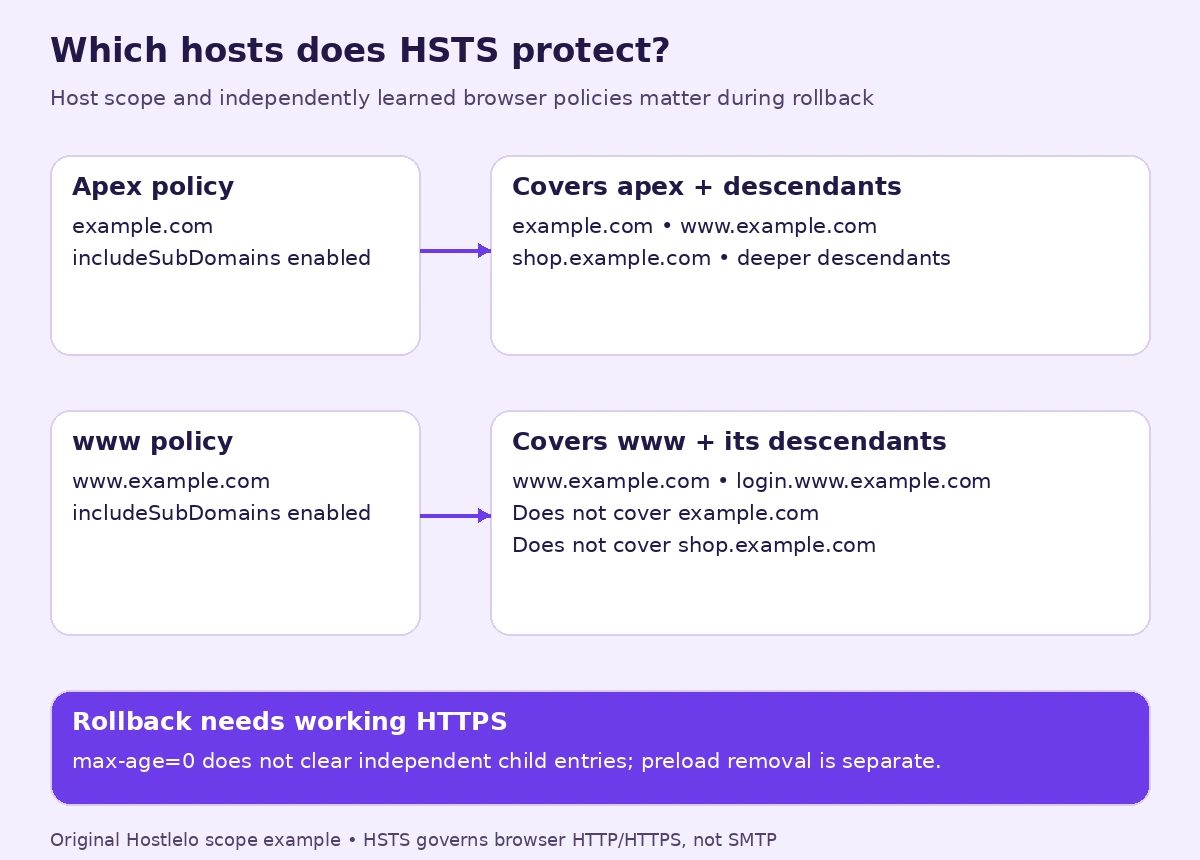
A policy sent by www.example.com applies to that hostname. Adding includeSubDomains there also covers descendants such as shop.www.example.com. It does not extend upward to example.com or sideways to shop.example.com.
A policy sent by example.com with includeSubDomains covers its descendants, including www.example.com and shop.example.com. Audit internal, test and future web-facing subdomains too. HSTS affects browser HTTP/HTTPS behavior; it does not turn SMTP into HTTPS or repair mail-server TLS.
Browsers can store an apex policy and a subdomain’s own policy separately. This distinction matters when rolling back. MDN’s HSTS reference describes the independent entries.
Add a short trial policy on direct HTTPS Apache
1. Save a private copy
In cPanel File Manager, enable Show Hidden Files, locate the site’s actual document root and download .htaccess to private local storage. Keep the copy outside any web-served directory. A backup filename next to the live file is not automatically protected like .htaccess itself.
Record the current file and the date. For account recovery planning, use our cPanel backup and test-restore guide.
If you do not have a file named .htaccess, confirm the server and the intended directory before creating one. A multisite installation or a WordPress installation in a subdirectory may have a different scope from the domain’s root.
2. Choose one authoritative layer
Check the current public response before editing. If the CDN already owns HSTS, manage it there and avoid competing values at the origin. The same principle applies to nosniff and the referrer policy.
For the simple case in this article, Apache owns these headers and no later edge layer replaces or duplicates them. Put the custom block outside the # BEGIN WordPress / # END WordPress section, which WordPress can regenerate.
3. Add the trial block
This example clears the default Apache response table and sets the controlled value in its always table:
<IfModule headers_module>
  Header onsuccess unset X-Content-Type-Options
  Header always set X-Content-Type-Options "nosniff"

  Header onsuccess unset Referrer-Policy
  Header always set Referrer-Policy "strict-origin-when-cross-origin"

  Header onsuccess unset Strict-Transport-Security
  Header always unset Strict-Transport-Security
  Header always set Strict-Transport-Security "max-age=300" "expr=%{HTTPS} == 'on'"
</IfModule>
The explicit clearing is for the selected Apache-managed setup, including removal of an existing origin HSTS value on HTTP. It cannot clear a header subsequently added by a CDN. Do not use this block to wrest control from another layer without first changing that layer’s configuration.
Apache’s mod_headers documentation explains that onsuccess and always are distinct response-header tables. always also handles locally generated error and redirect responses; it is not a universal merged list of every header.
The expression requires Apache 2.4.10 or later. <IfModule> avoids applying the block when the module is absent, but it can also fail silently by adding nothing. A missing header is a failed verification, not a successful installation.
If the edit causes a 500 response, restore your original file through the panel. Do not keep experimenting while the live site is down.
Verify GET responses through the actual delivery path
HEAD requests are useful, but some applications handle them differently from ordinary page requests. These commands make GET requests, discard the body, print headers and do not follow redirects:
curl --connect-timeout 5 --max-time 15 --silent --show-error --dump-header - --output /dev/null https://example.com/
curl --connect-timeout 5 --max-time 15 --silent --show-error --dump-header - --output /dev/null http://example.com/
On the HTTPS response, expect one effective HSTS header:
Strict-Transport-Security: max-age=300
X-Content-Type-Options: nosniff
Referrer-Policy: strict-origin-when-cross-origin
Header names are case-insensitive. On the HTTP response, expect the intended HTTPS redirect, commonly 301 or 308, and no HSTS header. If the canonical URL changes hostnames, inspect each hop separately, including the HTTPS redirect from apex to www or vice versa.
Then test:
- The canonical homepage and an ordinary content page.
- The HTTPS login/dashboard route.
- A real CSS file and a real JavaScript file, with their correct MIME types.
- A harmless missing-page URL and its actual error response.
- Any alternate hostname in your inventory.
- The contact form or checkout user journey.
Use the browser Network panel to confirm what visitors receive after any CDN/cache layer. Duplicate, conflicting or missing headers need investigation. Purge relevant cached responses if the delivery layer requires it, then retest.
A security-header grade is useful feedback, but a high score does not prove that your HTTPS certificates, application or rollback process are healthy.
Raise max-age when the evidence supports it
Every new HSTS response refreshes the browser’s expiry relative to the time it receives that response. A value of 300 means five minutes from the latest received policy, not automatically five minutes from your first edit.
The following is an illustrative rollout, not an RFC-mandated schedule:
Trial stage | Example max-age | Evidence before moving on |
|---|---|---|
Initial test | 300 seconds | Correct GET headers, certificate and redirect behavior |
Short operational trial | 86400 seconds | No unexpected access problems in representative user journeys |
Longer trial | 604800 seconds | Hostname inventory, renewal alerts and configuration ownership checked |
Long-lived policy | 31536000 seconds | Operational confidence in certificate renewal and the chosen scope |
A quiet week is not proof that a rarely used subdomain, disaster-recovery host or future hostname supports HTTPS. Validate those explicitly before broadening scope.
To change the lifetime, replace the max-age value on the single controlled HSTS line. Do not add a second HSTS line with a different number.
Add includeSubDomains only after a complete scope review
For an apex whose present and future web subdomains can support HTTPS, the long-lived value might be:
Header always set Strict-Transport-Security "max-age=31536000; includeSubDomains" "expr=%{HTTPS} == 'on'"This replaces the set line in the block; keep the clearing lines and the one-header ownership model. If the scope is not ready, keep a host-only policy. Reliable certificate renewal is a prerequisite.
Treat preload as a separate commitment
Adding preload to a header does not automatically place the domain in browser lists. Submission, eligibility checks and distribution through browser releases are separate steps.
The preload service requires valid HTTPS, qualifying redirects and an HSTS policy with at least a year’s lifetime, includeSubDomains and preload, among its requirements. Removal is not an immediate server-side switch; reaching users can take months.
Do not submit solely to improve a scanner score. Decide with whoever owns every relevant hostname, renewal and future DNS changes. A working host-only HSTS policy is a reasonable stage while that review is incomplete.
Roll back a learned policy correctly
If HTTPS is broken, restore the certificate and reachable HTTPS service first. A browser cannot securely receive your cancellation header while TLS is failing, and HSTS can prevent it from bypassing that failure.
For the controlled direct-Apache setup, replace the set line with:
Header always set Strict-Transport-Security "max-age=0" "expr=%{HTTPS} == 'on'"Keep the existing clearing lines and verify the public HTTPS GET response. Deleting the header alone leaves previously learned policies active until they expire.
A successful HTTPS response with max-age=0 removes that browser’s learned entry for the responding host. It does not instantly update every visitor, remove another subdomain’s independent entry, or remove a domain from the browser preload list.
Keep valid HTTPS and the cancellation response available long enough for the previous policies and visitor revisit patterns; maintain a record of previously served lifetimes. If a subdomain has its own policy, address it separately. If the apex policy still includes subdomains, cancelling only the child policy does not remove the inherited restriction.
For a malformed .htaccess file, restoring the saved file can restore server behavior. It does not undo the HSTS state already stored in browsers.
WordPress admin HTTPS and proxy loops
WordPress supports this setting in wp-config.php:
define( 'FORCE_SSL_ADMIN', true );Back up the file privately and confirm HTTPS works before adding or modifying the existing definition. Add it before WordPress bootstrap; do not define it twice.
Behind a reverse proxy, WordPress must recognize the trusted external scheme correctly. Otherwise forcing HTTPS can create a redirect loop. The WordPress HTTPS handbook discusses this case. Have the host configure trusted proxy handling; do not blindly copy an internet-facing forwarded-header snippet.
After a change, verify login, logout and the dashboard. If access loops, restore the reviewed configuration through the panel and investigate scheme recognition.
Keep Content Security Policy as its own project
CSP controls sources for scripts and other resources. A restrictive enforcing policy can break inline scripts, styles or integrations in a WordPress theme.
Start a separate, application-specific report-only evaluation with a developer. Report-only violations can be visible in browser developer tools; collecting remote reports needs supported reporting directives and a configured endpoint. Report delivery and browser support vary.
A generic default-src https: policy is not a tailored allowlist and does not justify calling the site protected against all script injection. Do not add a borrowed CSP simply to collect another header.
Troubleshooting without weakening HTTPS
No HSTS but the other headers appear: check where visitor TLS terminates and whether Apache sees HTTPS=on. Configure the correct trusted layer.
Headers appear twice: identify the plugin, origin or edge owner. Clear or disable the redundant source at that layer; Apache cannot remove a later CDN-added value.
Scripts or styles stop loading after nosniff: inspect their Content-Type and browser console. Correct the MIME type rather than removing protection as the first response.
A subdomain becomes inaccessible: repair its HTTPS, then examine inherited and independently learned HSTS policies. Removing includeSubDomains on one response is not a universal immediate rollback.
500 after an edit: restore the private file copy, check syntax and ask whether Header directives are allowed in this directory.
The useful finish line is a policy whose hostname scope, renewal dependency, public responses and recovery behavior you understand.
Reader questions
Does HSTS replace an HTTP-to-HTTPS redirect?
No. Keep an appropriate redirect for visitors without a learned policy. HSTS is normally learned over HTTPS and governs future connections; browser HTTPS-first features and preload can affect the initial connection behavior.
What max-age should I start with?
A short value such as 300 seconds is useful for a controlled trial. Increase it when certificates, public GET responses, redirects, renewal and the selected hostname scope are verified. Each received header refreshes the browser’s expiry; there is no universal one-week approval rule.
Does includeSubDomains on www.example.com cover example.com?
No. It covers descendants of www.example.com, not the apex or sibling hosts. An apex policy with includeSubDomains has a broader descendant scope. Browsers can also retain each subdomain’s independently learned policy.
How do I turn HSTS off?
Restore working HTTPS and send max-age=0 for the relevant host through the authoritative header layer. It only affects browsers that securely receive it. Separate child policies and preload require separate handling; deleting the header or editing DNS is not an instant universal rollback.
Why does the Apache HSTS rule fail behind a CDN?
If the CDN terminates HTTPS and forwards HTTP to the origin, Apache may see HTTPS=off. Configure HSTS at the trusted edge or through a host-approved proxy-aware setup. Do not blindly trust user-supplied X-Forwarded-Proto values or simply remove the condition.
Is adding preload enough to get on the browser preload list?
No. The header token is part of eligibility; submission, validation and browser distribution are separate. Removal can take months. Review present and future subdomain HTTPS support and certificate operations before submitting.
Should I copy a Content Security Policy into this header block?
Treat CSP as a separate application-specific project. Test a tailored policy in report-only mode first, inspect browser violations and configure a reporting endpoint if remote collection is needed. A generic enforcing policy can break WordPress themes and integrations.
Was this guide helpful?
Help us make the next update better.
Sources & further reading
- MDN: Strict-Transport-Security, expiry and subdomain policies
- RFC 6797: HTTP Strict Transport Security
- Apache mod_headers: response tables, conditions and directives
- Apache expression variables and syntax
- HSTS preload requirements and removal guidance
- MDN: Referrer-Policy
- MDN: X-Content-Type-Options
- WordPress: HTTPS administration and reverse proxies
- MDN: Content Security Policy guide
- cPanel File Manager
What changed
Clarified Apache and CDN header ownership, public GET checks, hostname scope and browser policy expiry; corrected rollback guidance for independent subdomain policies and preload.
Originally published . About our editorial updates.