DNSSEC Rollover 2026: Website Down After October 11? Check This First
The Internet’s DNS signing key changed on October 11. Here is how to investigate a website outage, identify the right owner and avoid unnecessary DNS changes.
The short answer
IANA now lists KSK-2024 as the active DNS root signing key, with key tag 38696. Website owners usually do not need to edit domain records for this rollover. If a site appears down, compare affected resolver paths, check the domain’s DNSSEC chain and test HTTPS separately before choosing a fix.

Reading options
On this page
- What changed, in plain English?
- Who actually needs to act?
- First, run the checks a website owner can do
- Compare DNS answers without changing anything
- SERVFAIL does not mean “the root key broke my website”
- If one domain fails, examine its own DNSSEC chain
- If one resolver fails broadly, contact its operator
- Use a sentinel test only when its result is meaningful
- If DNS works, test the website and business tasks
- Send a support ticket that the right team can use
- Keep monitoring the paths customers actually use
- Reader questions
- Sources & further reading
Before you start
For basic checks: the affected hostname, the exact error, a second network and permission to share diagnostic results with your provider. For command-line checks: dig and curl. Resolver administration needs authorized access to that resolver; a cPanel login alone does not provide it.
A customer says your website is down. You open it on your phone and it works. Your first instinct is to change a DNS record, restart WordPress or call the hosting company.
Pause long enough to collect two pieces of evidence: which network fails, and what its DNS resolver returns.
There is a timely reason to ask those questions. On 11 October 2026, the DNS root switched signing keys. IANA’s live key-status page now lists KSK-2024, key tag 38696, as active. The previous key, KSK-2017, has stopped signing the root key set.
Root-key status checked: 25 October 2026 (UTC). This is a source-checked diagnostic guide, not a report of tests on your resolver. It confirms the signing-key change; it does not claim that a widespread outage is happening or that the rollover caused your particular error.
What changed, in plain English?
A DNS resolver looks up a hostname so an application can connect to the right service. A validating resolver also checks DNSSEC signatures: evidence that the DNS information has a valid chain of trust.
The root key is the starting point of that chain. Its job is to sign the root zone’s DNSKEY set, rather than directly sign every website’s address record. The replacement key must be trusted by resolvers that validate from the root.
The word “2024” is the key’s name, not the date of the October 2026 signing switch. IANA lists these milestones:
- 11 January 2025: KSK-2024 was published in the root zone.
- 11 October 2026: KSK-2024 became the signing key.
- 11 January 2027: revocation of KSK-2017 is scheduled.
- 22 March 2027: removal of KSK-2017 is scheduled.
Stopping a key from signing and revoking it are separate stages. Follow IANA’s current schedule if you maintain validating infrastructure. IANA still lists KSK-2017 as a valid trust anchor in post-publication. That does not make an old-key-only resolver ready: KSK-2024 now signs the root key set. The retirement process continues into 2027.
Who actually needs to act?
A WordPress owner using managed hosting normally does not maintain the DNS root trust anchor. The resolver operator does: perhaps an Internet provider, an employer, a hosting provider or a public recursive DNS service.
Your authoritative DNS provider has a different job. It publishes records for your domain. Your registrar manages delegation and the domain’s parent-zone DS information. Those roles can belong to different companies.
If you operate a validating recursive resolver, verify its active trust-anchor state. If you do not, identify the operator of the failing resolver and give it useful evidence. ICANN’s rollover FAQ describes the operator responsibilities.
A root-validation failure can affect lookups for unsigned domains too: the resolver still needs to establish the delegation’s security state. But a failure limited to one hostname could have many other causes. Akamai’s operator guidance makes that distinction.
Do not disable resolver validation, delete your domain’s DS record or change nameservers merely because SERVFAIL appeared after 11 October. These affect different parts of DNS and can weaken protection or interrupt service. If a configuration change is necessary, its responsible operator should first document the diagnosis, save the current configuration and plan verification and rollback.
First, run the checks a website owner can do
Use the same hostname each time. Testing www.yourdomain.com on one network and yourdomain.com on another creates a misleading comparison.
- Write down the time, timezone and exact browser or application error.
- Try the same URL from a second network, such as mobile data.
- Record whether a VPN or browser Secure DNS is in use.
- Check an unrelated hostname through the affected DNS path.
- Record any recent domain, nameserver, DNSSEC, CDN or hosting changes.
A second network working narrows the investigation. It does not by itself prove that the first network has a stale root key. Filtering, IPv6 reachability, cached answers and routing can also produce different results.
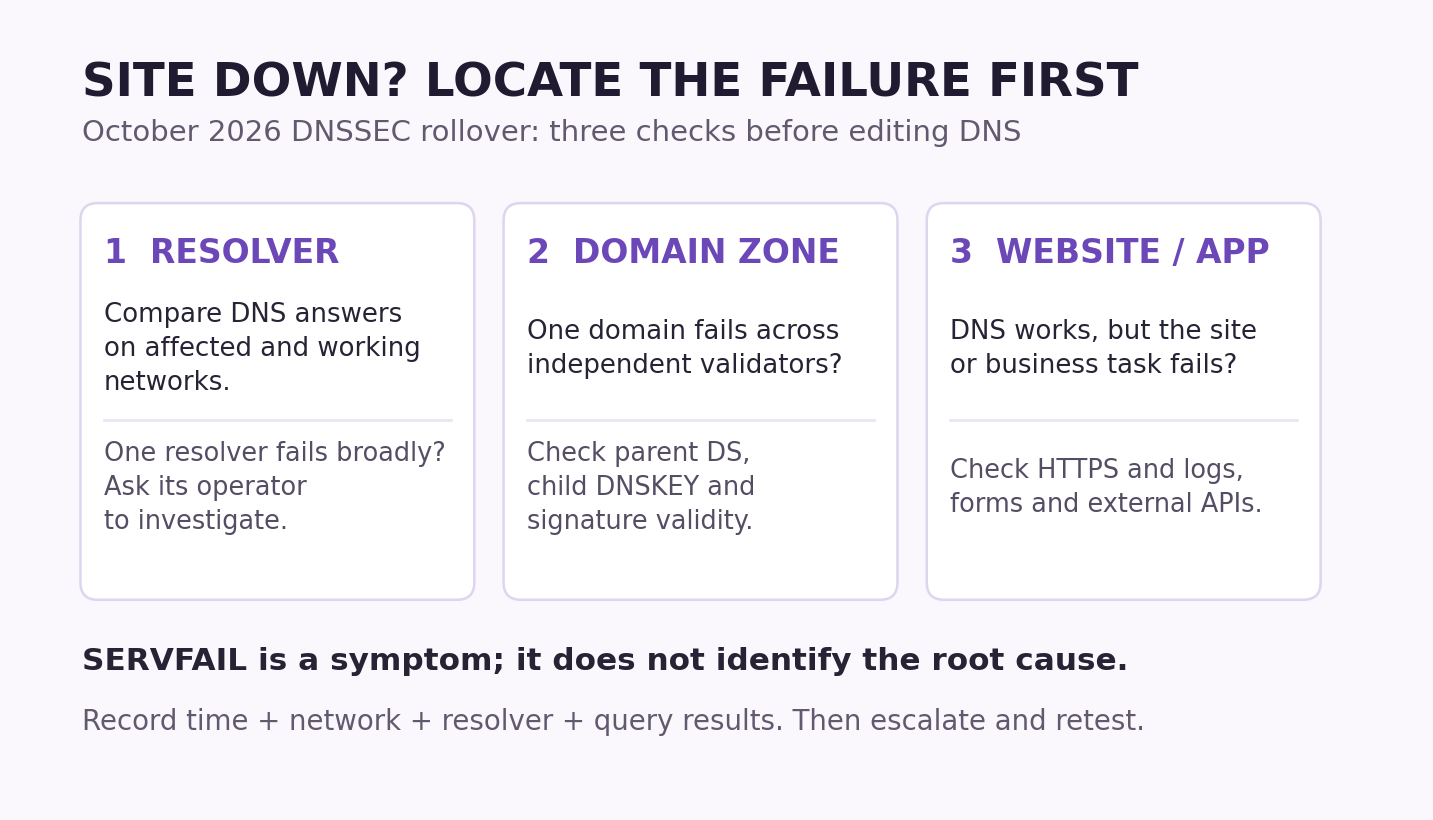
Think of the investigation as three questions: Can this resolver answer? Is this domain’s DNS chain valid? Can the application serve the request?
Compare DNS answers without changing anything
These commands are lookups. Replace the example hostname with the affected hostname. Run them from the affected machine when possible, and keep the complete output. These examples use standard DNS queries; if your network requires an encrypted-DNS or other special client configuration, use its approved diagnostic method instead. Use the public-resolver comparisons only for public hostnames and where your network policy permits them. Those queries disclose the hostname to the selected provider. Keep private or split-horizon names on your organization’s approved DNS path; a different public answer may be intentional.
HOST='www.yourdomain.com'

# Query the machine's configured DNS resolver.
dig -r "$HOST" A +dnssec +noall +comments +answer +stats

# Compare two explicitly selected public resolvers.
dig -r @1.1.1.1 "$HOST" A +dnssec +noall +comments +answer +stats
dig -r @8.8.8.8 "$HOST" A +dnssec +noall +comments +answer +stats

# Check IPv6 separately if the hostname has IPv6 service.
dig -r "$HOST" AAAA +dnssec +noall +comments +answer +stats
A VPN, browser Secure DNS setting or application-specific resolver can mean that the browser uses a different DNS path from dig. Explicitly querying a public resolver also does not reproduce the failing local path.
Look for the response status and the answer section. RFC 1035 defines the basic response codes:
- SERVFAIL: the resolver could not complete the lookup successfully. Investigate the reason.
- NXDOMAIN: the resolver reports that the queried name does not exist. Check spelling and delegation instead of treating it as proof of a KSK problem.
- NOERROR: inspect the records returned. An empty A answer does not necessarily mean the name is absent.
- Timeout: investigate reachability, the resolver and the permitted DNS transport. A timeout is not a DNSSEC diagnosis.
Different valid IP addresses can be expected with CDNs and geographic routing. The useful comparison is whether the response is valid and appropriate for the service, rather than whether every resolver returns identical bytes.
The BIND dig manual documents the query options. +dnssec requests DNSSEC information; dig does not independently prove the entire signature chain merely because that option is present. Here, -r ignores per-user .digrc defaults, and +stats keeps the query statistics. Preserve the responding SERVER line as well as the DNS status.
SERVFAIL does not mean “the root key broke my website”
The same error can come from a resolver that lacks the new root anchor, an expired domain signature, a DS/DNSKEY mismatch, unreachable nameservers or other DNS failures.
Some resolvers include Extended DNS Errors, such as “DNSSEC Bogus” or “Signature Expired.” Keep those details. RFC 8914 defines them as diagnostic information; their absence does not clear the domain, and their presence is not a complete root-cause finding. EDE messages are not inherently authenticated; treat them as clues to corroborate, not instructions to change security settings.
For an experienced administrator, one comparison can help identify a validation-related failure. Query the same resolver and hostname normally, then with checking disabled for that individual diagnostic query:
HOST='www.yourdomain.com'

dig -r @1.1.1.1 "$HOST" A +dnssec +nocdflag +noall +comments +answer +stats
dig -r @1.1.1.1 "$HOST" A +dnssec +cdflag +noall +comments +answer +stats
Use the affected resolver’s address instead of 1.1.1.1 when investigating that resolver. If only the second query returns data, validation is a strong lead. It does not identify which link failed.
The second response is not validated DNS data. Do not use it as proof of authenticity or turn it into a permanent security workaround. Cloudflare’s DNSSEC troubleshooting documentation explains this comparison and common delegation problems.
If one domain fails, examine its own DNSSEC chain
Suppose unrelated domains work on the failing resolver, while your domain fails through multiple independent validating resolvers. Investigate your domain’s delegation and signatures, while keeping other DNS and network causes in view.
Ask the DNS provider and registrar to verify:
- The parent zone’s DS record matches the intended key at the child zone.
- The authoritative servers publish a consistent, usable DNSKEY set.
- Signatures are currently valid.
- A recent provider move or key rotation completed in the correct order.
DNSViz can help visualize that chain; check the analysis timestamp and refresh an older report. A clean report is a snapshot of the tested path, not proof that every customer’s resolver works. Submit only public names you are allowed to disclose to a third-party analysis service.
Our Cloudflare DNSSEC setup guide explains the domain-level DS step. Do not paste the DNS root key into your domain’s DS field. It is a different trust relationship.
DNSSEC authenticates DNS data. It does not encrypt your website traffic, replace HTTPS or repair a broken WordPress plugin. RFC 4033 explains those security boundaries.
If one resolver fails broadly, contact its operator
A resolver-side problem becomes a stronger lead when multiple unrelated names fail through that resolver while independent paths work. Ask its operator to check the running validator, upstream dependencies, logs and trust-anchor state.
For an authorized BIND administrator using managed keys, this read-only command reports the managed-key database:
rndc managed-keys statusConfirm that 38696 is trusted in the relevant active resolver or view, rather than merely present in an old installation file or pending acceptance. Use the vendor’s supported method for statically configured anchors or other resolver products.
A resolver can also have a correct file on disk while the running process uses different state. Check for stale VM images, restored snapshots, inaccessible key-store paths and update failures. A forwarding resolver that also performs validation still needs an appropriate trust anchor.
Follow IANA’s vendor-update guidance and the BIND administration reference. Avoid copying key material from an unverified blog or deleting the managed-key database as a guess.
Use a sentinel test only when its result is meaningful
Cloudflare’s readiness checker uses root-key sentinel queries. With a working, validating resolver that supports RFC 8509, a trusted key should make its “is-ta” query succeed and the corresponding “not-ta” query deliberately return SERVFAIL.
That expected SERVFAIL is part of the test. Do not reuse the +cdflag diagnostic option for this test: the sentinel protocol requires checking not to be disabled.
If the resolver lacks sentinel support, or the control queries cannot establish a usable test environment, the result is inconclusive. Two successful queries are not a universal readiness pass. After a rollover, a broken resolver may also be unable to resolve the signed test domain at all.
Use the checker as supporting evidence for the path it tests. Verify active resolver state directly when results are unclear. RFC 8509 describes the protocol’s conditions and limits.
If DNS works, test the website and business tasks
Once the intended address resolves, continue with HTTPS, server logs, CDN behavior and the application. DNS success alone does not establish that checkout, a form or an external API works.
An administrator can isolate a DNS lookup from an HTTPS request with curl’s --resolve option, using a current IPv4 address confirmed by the service operator:
HOST='www.yourdomain.com'
IP='203.0.113.10'  # Documentation-only address: replace it.

curl --resolve "$HOST:443:$IP" \
  --max-time 15 --silent --show-error \
  --output /dev/null --write-out 'HTTP=%{http_code}\n' \
  "https://$HOST/"
This keeps the hostname in the HTTPS URL and retains normal certificate verification. It is a targeted diagnostic override, not a DNS-record change. The curl manual documents the behavior.
Read the HTTP status and any curl error together. This command does not follow redirects, so a 3xx response is not a test of the destination page. An HTTP 4xx or 5xx is an application-layer result, not a DNSSEC diagnosis; curl can finish a transfer successfully while the server returns an error status. A successful response also does not prove checkout or another business function works.
Use the correct CDN or service endpoint. A protected origin may intentionally reject direct connections; a proxy may change how the request is routed. A failed test in those circumstances does not establish a server outage. Do not add -k to hide a certificate failure.
For WordPress, verify a public page and the function customers reported. Use sandbox payments for checkout testing. A page can load while the server’s own resolver prevents outbound email, payment-provider calls or other integrations from working.
The WordPress update recovery guide covers business-function checks when the evidence points to an application change.
Send a support ticket that the right team can use
Replace the blanks below. Share public DNS results and relevant errors; remove credentials, session tokens and unrelated personal information from logs.
Hostname and exact URL:
First observed time and timezone:
Affected network / location:
Browser Secure DNS or VPN:
Resolver tested:
DNS status, answer and Extended DNS Error:
Same lookup on a second resolver:
Unrelated hostname on the affected resolver:
HTTPS / application result:
Recent domain, DNSSEC, hosting or application change:

Please investigate the failing DNS path and DNSSEC validation.
For a validating recursive resolver, confirm whether its active
trust-anchor state includes trusted KSK-2024, key tag 38696.
If this is domain-specific, check the parent DS, child DNSKEY
and signature validity before recommending record changes.
Send a resolver-specific failure to that resolver’s operator. Send a domain-chain failure to the DNS provider and registrar. Send an application failure to the hosting or development team. Some incidents need more than one team.
Keep monitoring the paths customers actually use
Retest the original failing network after a fix. Then check a second network, the required address families and the important business tasks. Save the before-and-after times and results.
A single successful lookup says something about one request. It cannot certify every branch office, restored server image, container or customer network.
For wider network symptoms, our Cloudflare Radar investigation guide provides additional context.
The useful response to the October rollover is a documented diagnosis: find the failing layer, give its owner evidence, and verify recovery where the failure was observed. That also prevents an unrelated WordPress or hosting problem from being “fixed” with the wrong DNS change.
Reader questions
Did the DNS root key really change on October 11, 2026?
IANA’s current status page lists KSK-2024, key tag 38696, as active and signing since 11 October 2026. The old KSK-2017 has stopped signing; its revocation and removal are separate scheduled stages.
Do I need to change nameservers or DNS records in cPanel?
Usually not for the root rollover itself. The root trust anchor belongs to validating recursive resolvers. Investigate the failing path before changing domain records, and involve the resolver operator when that path fails.
Why does my website work on mobile data but fail on office Wi-Fi?
The networks may use different resolvers, filters or routes. That comparison narrows the investigation, but does not prove a root-key problem. Record the hostname, error, resolver path and time on both networks.
Can the rollover affect a domain that does not use DNSSEC?
An unprepared validating resolver can also fail to establish that an unsigned delegation is legitimately unsigned. The effect depends on the resolver’s validation behavior; turning off DNSSEC at your own domain does not repair its root trust anchor.
Does SERVFAIL prove that KSK-2024 is missing?
No. SERVFAIL has multiple causes. Check unrelated domains, other resolver paths, domain signatures and any Extended DNS Error, then ask the resolver operator to verify active trusted-key state.
Is SERVFAIL on a root-key sentinel test always bad?
No. A compatible validating resolver deliberately returns SERVFAIL for a not-ta query when the queried key is trusted. Interpret it with the corresponding is-ta query and the checker’s controls. Unsupported or broken test paths are inconclusive.
Can DNS look healthy while WordPress checkout or email still fails?
Yes. A visitor’s lookup can work while the hosting server uses a failing resolver for outbound services. Check the affected business task and server-side DNS path as well as the public homepage.
Was this guide helpful?
Help us make the next update better.
Sources & further reading
- IANA: active root trust anchors and rollover schedule
- ICANN: 2026 root KSK rollover FAQ
- Cloudflare: October 2026 rollover and sentinel checks
- Akamai: root KSK rollover and active resolver checks
- Cloudflare: troubleshoot DNSSEC validation
- BIND stable documentation: dig and rndc manual pages
- RFC 8509: root key trust anchor sentinel
- RFC 8914: Extended DNS Errors
- RFC 4033: DNSSEC security properties and limits
- RFC 1035: DNS response codes and protocol
- curl: --resolve and HTTPS requests
What changed
New guide checked against IANA’s active key status and official DNSSEC documentation. Separates resolver, domain-chain and application failures; includes diagnostic commands, sentinel caveats, original cover and a triage visual.
Originally published . About our editorial updates.