Enable DNSSEC on Cloudflare without breaking your domain
Enable Cloudflare DNSSEC, publish the right DS record, verify the trust chain and diagnose SERVFAIL with a safe migration and rollback plan.
The short answer
For an active Cloudflare primary zone, enable DNSSEC under DNS > Settings, copy the live DS values to your registrar and verify parent publication, signed answers and resolver validation separately. Before a provider move, record the old DS TTL, remove the parent DS, keep old signing available while caches expire, then change nameservers and establish the new chain. A short empty dig answer or a dashboard toggle alone does not prove success.

Reading options
On this page
- What DNSSEC protects
- First, establish the current state
- Enable DNSSEC on an existing Cloudflare zone
- Prove it works: publication, signatures and validation
- Moving DNS providers without breaking validation
- SERVFAIL after a change: diagnose before deleting
- Turn DNSSEC off safely
- Leave a useful record for the next change
- Reader questions
- Sources & further reading
Before you start
An active Cloudflare primary zone; registrar permission to manage DNSSEC/DS records; a record of current nameservers, DS values and authoritative DS TTL; dig or access to DNSViz. Export essential DNS records before any provider move. Secondary DNS and multi-signer setups require their specific provider procedures.
The website loads on your phone but fails on your customer's network. You have just moved DNS providers, the nameservers look correct, and everyone says to wait for propagation.
Sometimes waiting is the right answer. Sometimes an old DNSSEC record is telling validating resolvers to reject your new provider's answers. Those two situations need different fixes.
For a domain already using Cloudflare's authoritative nameservers, the normal setup is enable signing in Cloudflare, publish its DS record through your registrar, then verify validation. If another provider's DS record already exists, resolve that migration first.
This guide covers a standard Cloudflare primary zone with a registrar-managed parent delegation. Secondary DNS, separately delegated subdomains and multi-signer setups need their own procedures.
What DNSSEC protects
DNS translates a name such as example.com into records used by websites, mail and other services. DNSSEC adds signatures so a validating resolver can authenticate DNS data and detect changes to it.
The important qualification is validating resolver. DNSSEC is not a web application firewall, does not encrypt a lookup and does not protect your registrar password. A stolen registrar account can still cause serious trouble. Keep account security and DNS authentication as separate parts of the plan.
RFC 9364 describes DNSSEC's role in DNS origin authentication. HTTPS protects a different connection: the one between a browser and the website. You still need HTTPS after turning on DNSSEC.
The three record names worth remembering
Record | Where it matters | Its job |
|---|---|---|
DNSKEY | Your signed DNS zone | Publishes the public key used to check signatures |
RRSIG | Alongside signed record sets | Carries a signature for that set of records |
DS | The parent zone | Links the delegation to a key in the child zone |
RFC 4034 defines these records. The registrar submits your DS data to the parent, usually your domain's registry. Adding an apex DS record in Cloudflare's ordinary record editor does not establish that parent link for your domain.
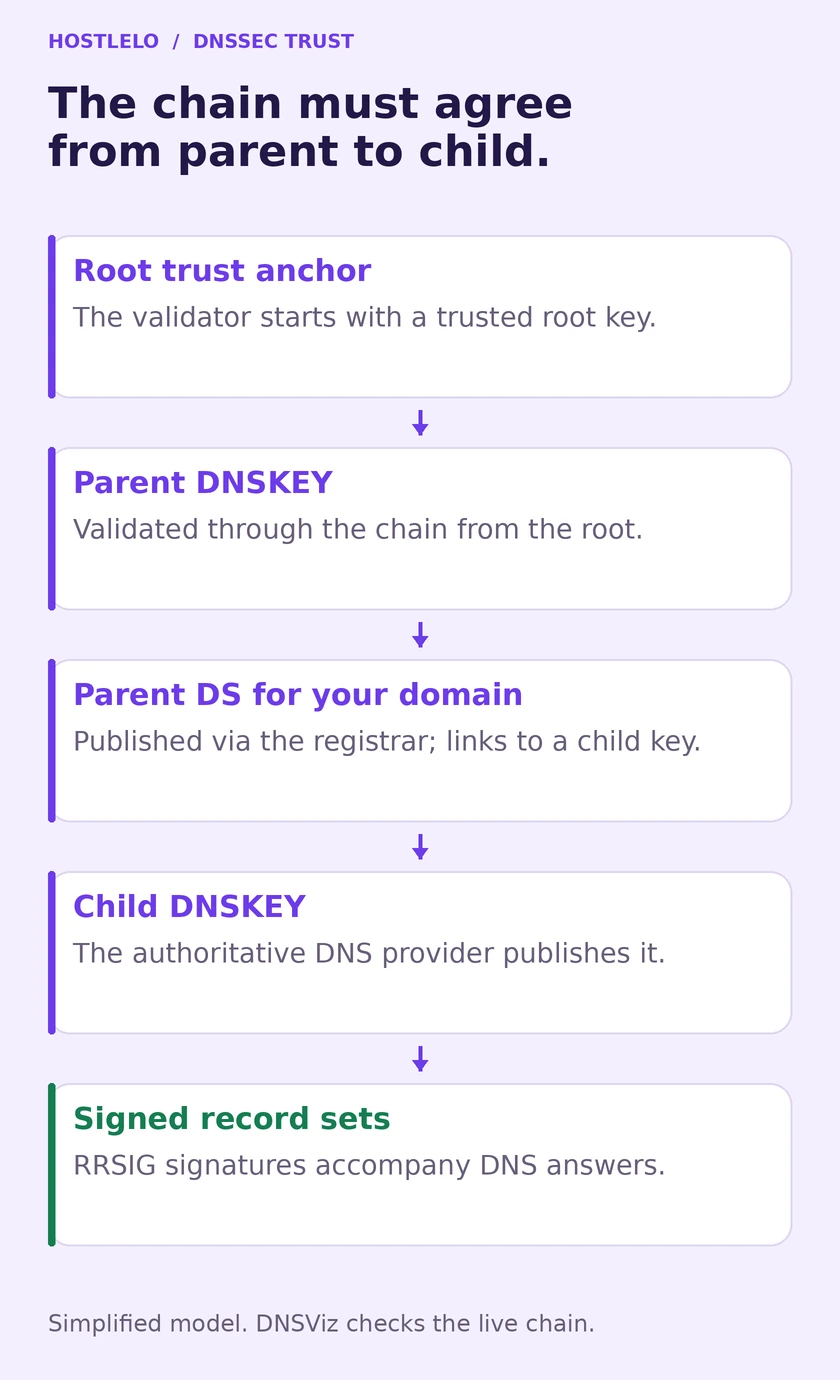
The registrar publishes the delegation data; the DNS provider signs the zone. The resolver checks that the two agree.
First, establish the current state
Before changing anything, save the assigned nameservers, existing DS values and the Cloudflare zone's status. Also export or record the DNS records you need for the website and email. DNSSEC does not recreate a missing MX record during a migration.
Confirm which company holds the registration and which company answers authoritative DNS. They can be different. The place where you pay for web hosting may be neither.
Run these initial checks, replacing the example domain:
dig @1.1.1.1 example.com NS +dnssec
dig @1.1.1.1 example.com DS +dnssec
Read the response status and sections. An empty short answer alone does not prove there is no DS record. The query may have failed, timed out or returned a negative answer you have not inspected.
These commands ask a recursive resolver, which may use cached information. They do not directly interrogate the registry. Our DNS propagation guide explains why views can differ. To see the delegation path, use:
dig +trace example.com DSThe BIND dig manual documents tracing and DNSSEC options. +trace helps locate authoritative responses; it is not, by itself, a cryptographic validation report.
For a .com domain, a DNS administrator can then query a .com authoritative server shown in that trace:
dig @a.gtld-servers.net example.com DS +norecurse +dnssecThat server name is a .com example. Use your domain's actual parent servers, especially for endings such as co.uk or a delegated subdomain. Check the authoritative response and TTL rather than treating a recursive resolver's decreasing cache TTL as the registry's original value.
Decide which situation you have
Current state | Next action |
|---|---|
Cloudflare is active; parent has no DS | Follow the normal activation steps |
Cloudflare is active; parent DS matches its key | Verify the chain before changing anything |
Old provider still serves DNS; parent has a DS | Plan the DNSSEC migration first |
Cloudflare serves DNS; DS still belongs to the old provider | Investigate a possible validation outage |
A query fails or results disagree | Diagnose status, delegation and caches before enabling anything |
Do not delete a working DS record just because a tutorial tells every reader to start from zero.
Enable DNSSEC on an existing Cloudflare zone
1. Turn on signing
Select the correct domain in Cloudflare, open DNS > Settings, then click Enable DNSSEC. Open DS record on that card to retrieve the values again later.
Cloudflare's setup documentation describes this process. Copy the live values for this zone. Another domain's key tag or a sample digest from a blog is not usable configuration.
2. Copy the DS fields accurately
Field | What to enter |
|---|---|
Key tag | The value shown for this zone |
Algorithm | The exact algorithm shown; Cloudflare documents Algorithm 13 |
Digest type | The exact digest type shown, commonly 2 for SHA-256 |
Digest | The full hexadecimal value, without missing characters or inserted spaces |
Algorithm 13 may appear as ECDSA Curve P-256 with SHA-256 in a registrar's dropdown. The four values belong together. Do not choose another digest type to make a form accept a digest that was generated differently.
The key tag is a short identifier, not a secret. The digest is a hash associated with a DNSKEY and the zone name. Neither is the private signing key. If a form asks for additional key data, read that registrar's instructions instead of guessing.
3. Publish the DS through the registrar
Choose the instructions for where the domain is registered:
- Namecheap with custom nameservers: open Domain List > Manage > Advanced DNS, enable DNSSEC, enter the DS fields and save with the checkmark. Its custom DNS guide asks readers to allow 60 minutes.
- GoDaddy with external nameservers: open the domain in Domain Portfolio, then DNS > DS Records > Add. Enter the values and save. Its DS guide says changes usually take effect within an hour but can take up to 48 hours.
- Hostinger as registrar with external DNS: open the domain under Domains, then DNS / Nameservers > DNSSEC. Add the four values. Its official instructions note that availability depends on the domain ending.
- Cloudflare Registrar: use Manage Domains > Manage > Configuration > Enable DNSSEC. Cloudflare handles submission; you do not manually copy DS fields into another registrar.
Cloudflare Registrar scans CDS/CDNSKEY records and submits information to the registry. Its Registrar documentation allows one to two days for this process. A successful click is not proof that the parent record is already published.
For another registrar, find its current DNSSEC or DS instructions. If the required algorithm is unavailable, ask support whether the registrar and registry support your provider's values. Do not change algorithms arbitrarily.
4. Confirm the state, then test independently
Cloudflare's card should move from pending toward active as the parent delegation is detected. Its state reference distinguishes signing from the presence of a parent DS record.
The dashboard is useful evidence, but the checks below give you a clearer picture of what resolvers actually see.
Prove it works: publication, signatures and validation
These are three separate observations. Passing the first two does not automatically pass the third.
Check A: Is the intended DS published?
dig @1.1.1.1 example.com DS +dnssecCompare the whole DS record with Cloudflare's current values. During a change, inspect the authoritative parent too, as described earlier. Multiple DS records can exist legitimately during a rollover; their presence alone is not a reason to delete one.
Check B: Are signed answers available?
Ask one of your assigned Cloudflare nameservers directly. Substitute the real server name:
dig @YOUR_ASSIGNED_CLOUDFLARE_NAMESERVER example.com DNSKEY +dnssec
dig @YOUR_ASSIGNED_CLOUDFLARE_NAMESERVER example.com A +dnssec
Look for DNSKEY and RRSIG records. This establishes that the authoritative server supplies signing material. dig displaying a signature does not mean it has verified the entire chain.
Check C: Does a validating resolver authenticate it?
dig @1.1.1.1 example.com A +dnssec
dig @8.8.8.8 example.com A +dnssec
For an ordinary signed A answer, look for status: NOERROR and an ad flag. The flag means that resolver reports authenticated data. Its absence needs interpretation: an unsigned delegation, resolver behavior or a CNAME chain into an unsigned zone may change what you see.
RFC 4035 defines DNSSEC resolver behavior. The +dnssec option requests DNSSEC data; it does not turn dig into a full validating resolver.
Finish with a fresh DNSViz analysis. Use Analyze or Update Now, and inspect the chain and errors. Record its time so a weeks-old result does not masquerade as today's check. Cloudflare's troubleshooting guide recommends DNSViz and explains the dig checks.
Test the website hostname you actually use, not only the bare domain. Check mail-related records if email is important to the business. Domain-wide delegation failures can affect more than your homepage.
Moving DNS providers without breaking validation
The old DS record links to the old provider's keys. A new provider usually signs with different keys. Cached old delegation data can therefore reject new answers even after the registrar interface looks updated.
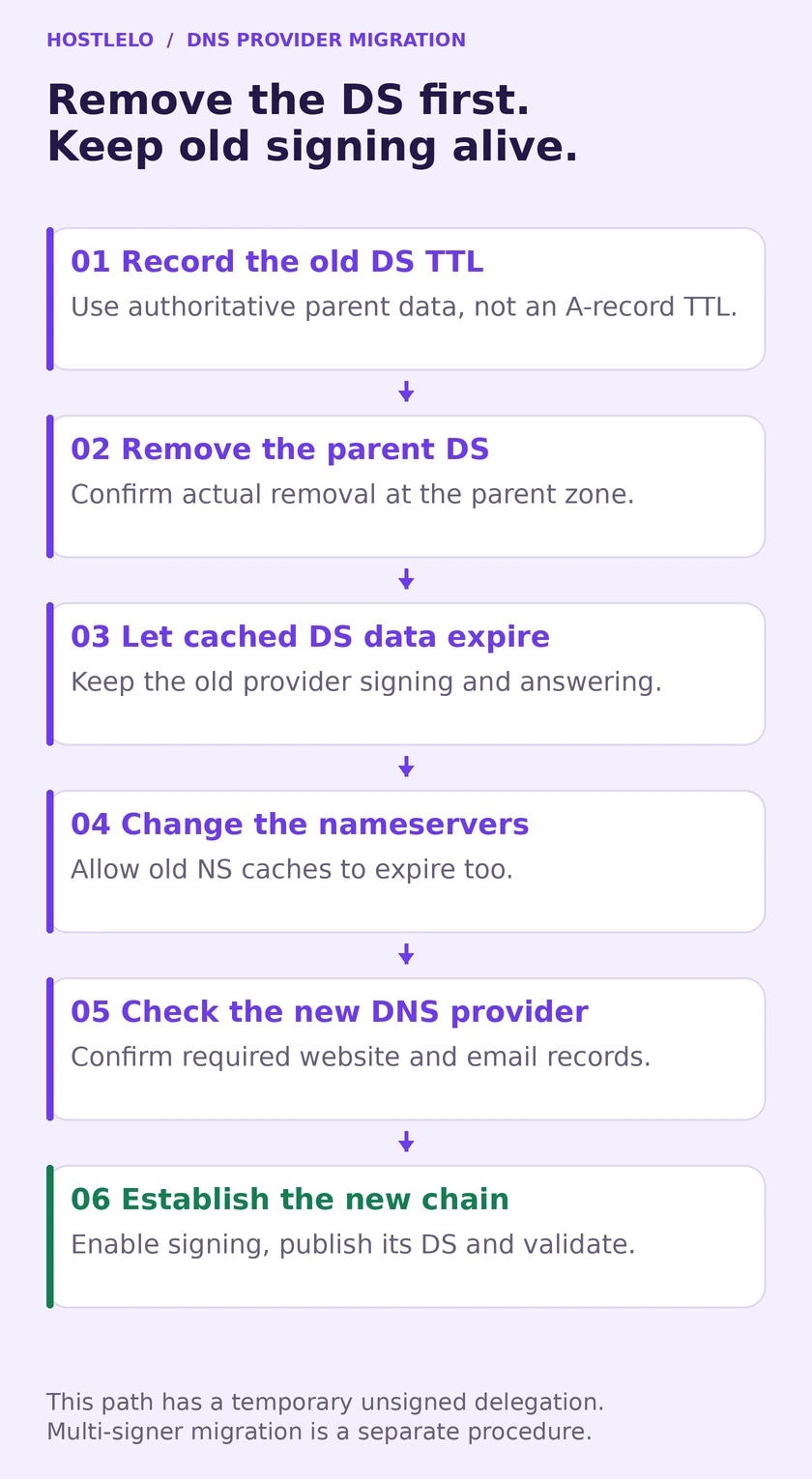
Keep the old signing service available while cached DS records expire. Changing the nameservers is a later step.
For the ordinary migration with a temporary unsigned delegation:
- Record the old authoritative DS TTL and keep the old DNS service signing and answering.
- Remove the old DS through the registrar. Confirm that the parent has actually removed it.
- Allow the full old DS cache lifetime to expire from confirmed removal. An empty answer at one resolver does not flush every other cache.
- Change nameservers and allow the old delegation's NS caches to expire. Check that the new provider serves the required records.
- Enable the new signing setup, publish its DS and run the validation checks again.
Cloudflare documents this order in its migration section. The wait is based on delegation TTLs, not your website's A-record TTL. Lowering an A-record TTL to five minutes does not shorten a registry DS record's cached lifetime.
If uninterrupted DNSSEC protection is a requirement, Cloudflare documents an active multi-signer migration. It requires compatible providers, cross-published keys and carefully timed removal. It is a separate change plan, not a shortcut consisting of “add both DS records.”
Keep the old provider available until the planned migration window is complete. Canceling it immediately removes the very signing material some resolvers may still need.
SERVFAIL after a change: diagnose before deleting
Compare a normal validating query with checking disabled:
dig @1.1.1.1 example.com A +dnssec
dig @1.1.1.1 example.com A +dnssec +cd
If the first fails and the second returns usable data, DNSSEC validation is a strong lead. It is not proof that every SERVFAIL is a stale DS record. Bad signatures, missing keys, an expired signature or another broken point in the chain can also need investigation.
Use DNSViz and compare the parent DS with the current authoritative keys. Capture the evidence before changing it.
Finding | Sensible action |
|---|---|
DS belongs to the old provider after a nameserver move | Restore a matching chain or arrange removal/correction at the registrar |
A copied field does not match the live DS values | Correct the registrar entry and allow cached data to expire |
Correct DS but missing or invalid signing data | Contact the authoritative DNS provider with the DNSViz result |
Queries still fail with +cd | Investigate delegation, reachability and DNS records too |
Cloudflare is pending for longer than expected | Check actual parent publication, then contact the registrar |
Disabling checks on one laptop is not a public fix. If a registrar correction is needed, document exactly which record changes and when; repeated toggling makes the state harder to understand.
Turn DNSSEC off safely
Remove the parent DS first and keep the zone signing until the old DS cache lifetime has expired. Confirm parent removal and allow the recorded TTL window before deleting keys or moving away. For Cloudflare Registrar, use its documented disable control and account for registry submission time.
Cloudflare can continue serving DNSKEY and RRSIG records in its disabled state. That alone is not an outage or a reason to delete everything. Complete removal of signing records is a separate API operation; Cloudflare's troubleshooting instructions advise additional waiting before that operation. Most site owners do not need it just to roll back the delegation.
Leave a useful record for the next change
Store the registrar, DNS provider, assigned nameservers, DS values, authoritative DS TTL, activation date and latest validation result in your domain runbook. Add who can authorize a change and how to reach both providers.
Routine A, AAAA, MX or TXT edits on a managed signed zone normally do not require a manual DS edit. A signing-key rollover or provider move is different: follow that provider's rollover procedure and verify the chain afterward. Do not keep reusing an old saved digest without checking it against the live zone.
The practical goal is straightforward: any future domain change should begin with “what is the current chain?” and end with “which independent check proves it still works?” For another DNS control with a different purpose, see our CAA guide to choosing certificate authorities.
Reader questions
Where should the DS record go?
For your domain's delegation, publish it through the registrar to the parent zone. A DS record added at the apex in Cloudflare's ordinary DNS record editor does not create that parent link.
Does DNSSEC encrypt DNS queries or replace HTTPS?
No. DNSSEC authenticates signed DNS data for validating resolvers. DNS privacy and HTTPS are separate protections. It also does not secure the registrar or DNS dashboard login.
Does dig +dnssec validate the entire chain?
No. It requests DNSSEC data. Check a validating resolver's response and use a current DNSViz analysis to inspect the chain. Merely displaying an RRSIG is not proof that the parent DS matches.
Why does my domain work on one network and fail on another?
DNSSEC validation behavior and cached delegation data can differ. A stale DS or broken signature chain can cause validating resolvers to return SERVFAIL while another path still resolves. Compare normal and +cd queries, then inspect the chain before changing records.
Can I lower my A-record TTL to speed up DS removal?
No. The parent DS record has its own TTL. Record that authoritative TTL before a change, confirm parent removal and allow its old cache lifetime to expire. The website's A-record TTL controls a different record.
Do normal DNS record edits require a new DS?
Usually not on a managed signed zone. A-record, MX or TXT changes are signed by the provider. A signing-key rollover or provider migration needs the relevant procedure and independent validation; do not blindly reuse an old saved digest.
Was this guide helpful?
Help us make the next update better.
Sources & further reading
What changed
Corrected recursive-versus-parent DNS checks and removed misleading empty-answer, timing and diagnostic guarantees. Added a state-based setup decision, authoritative TTL checks, Hostinger registrar instructions, separate publication/signature/validation tests, cache-aware migration and rollback, and a useful domain runbook. Added a new cover and two original diagrams.
Originally published . About our editorial updates.