Website Down Only for Some Users? Check Cloudflare Radar
Cloudflare explained its Radar redesign on 8 October. Use this 9 October guide to compare networks, check DNS and HTTP, and send a useful outage support ticket.
The short answer
If a website is down only for some users, test the same URL on two independent networks, record the error and time, compare DNS and HTTP results, then check Cloudflare Radar for a matching regional event. Confirm the cause with website, CDN or provider logs; a public outage map alone cannot diagnose your hosting server.

Reading options
On this page
- A customer says your website is down. Your laptop says it is fine.
- Why this is timely on 9 October 2026
- First, describe the failure precisely
- Compare two networks before you change the website
- Check Radar for the affected place and provider
- Separate a DNS problem from an HTTP problem
- Capture the HTTP result without hiding the error
- A fictional Dubai–Mumbai example
- Send a support ticket that an engineer can act on
- Verify recovery from the network that failed
- Reader questions
- Sources & further reading
Before you start
A public URL you own or manage, access to two independent networks and your provider support channel. Terminal checks are optional and require dig and curl; use macOS, Linux or WSL for the shown commands.
A customer says your website is down. Your laptop says it is fine.
A Dubai customer cannot open your shop on office Wi-Fi. Your phone loads it on mobile data. A colleague in Mumbai can browse the homepage, but nobody has checked the product page that the customer actually needs.
Is your hosting down, or is the problem somewhere between that customer and your website?
If a website is down only for some users, compare the same URL on two independent networks, record the exact error and time, then check DNS, HTTP responses and regional outage evidence. Cloudflare Radar can show wider network disruption; your website and server logs establish what happened to your own requests.
This guide gives small website owners a practical investigation sequence, a fictional example and a support-ticket template. It does not report an active UAE or India outage.
Why this is timely on 9 October 2026
On 8 October 2026, Cloudflare explained its Radar redesign. Its landing page puts an interactive map, traffic and outages first, with deeper charts organised into tabs. The article explains the design; it does not give a precise rollout date.
For a shop, agency or WordPress owner, the useful question is how to bring that regional view into an actual support investigation. The workflow below is our original editorial framework, based on public documentation reviewed on 9 October 2026.
First, describe the failure precisely
Write down the full public URL, the visible error, your location, the network provider and the time including its timezone. A browser message such as “DNS address could not be found” is different from a Cloudflare 522 page, a login rejection or a checkout button that does nothing.
Keep the first screenshot before clearing caches or changing settings. It may contain the only useful request identifier. Share private account details only through your provider's secure support channel.
For UAE and India teams, a single incident can be recorded in different local times:
Same example instant | Timestamp |
|---|---|
UTC | 2026-10-09 08:30 UTC |
Dubai | 2026-10-09 12:30 UTC+04:00 |
India | 2026-10-09 14:00 UTC+05:30 |
These are illustrative timestamps, not an observed outage. Converting them to one time basis prevents a support engineer from searching the wrong log window. The Radar Outage Center labels its event timestamps in UTC.
Compare two networks before you change the website
Open the same public URL on the same device over Wi-Fi and mobile data, where possible. This holds the browser and device relatively constant while changing the network. Record whether a VPN, corporate proxy or browser secure DNS setting is in use.
Then ask someone on an independent provider to test it. Two devices on the same office Wi-Fi are still using substantially the same network path. A VPN changes the path too, but “works through a VPN” alone cannot identify the failed component.
Test a public homepage and the specific failing page. A cached homepage may work while a dynamic product page fails. If the complaint is a payment failure, record the failed step without repeatedly submitting payments as a connectivity test.
Observation | Working hypothesis | Next useful evidence |
|---|---|---|
Same device fails on Wi-Fi, works on mobile | Resolver, network path or policy differs | DNS results, provider identity and exact error on both networks |
Multiple independent networks fail on the same URL | Shared website dependency may be failing | Hosting/CDN status, response codes and server logs |
Homepage works, one dynamic page fails | Application, backend or security rule may differ by path | Exact URL, request identifier and application log entry |
Only logged-in users fail | Session, account, personalised response or policy issue | Affected account scope and a redacted authenticated error |
IPv4 works but configured IPv6 fails | Address-family path or configuration may differ | A/AAAA records and separate IPv4/IPv6 tests |
These hypotheses guide the next test. None is a diagnosis by itself.
Check Radar for the affected place and provider
Open Cloudflare Radar and then its Outage Center. Choose a time range that includes the customer's first failure. Look for the affected country and, when available, the network's ASN: the identifier of an autonomous system, which represents a network rather than your hosting account.
Cloudflare's outage documentation describes event fields including location, ASN, type, scope, likely cause and start/end times. Compare the event's actual scope with your customer reports. An event affecting one provider should not be described as a whole country being offline.
Capture the event link, its time window, affected network and verification state if shown. Also check your hosting provider's incident page and Cloudflare Status if Cloudflare is in your delivery path. Those pages answer different questions: regional internet conditions, your host's services and Cloudflare's own services.
A matching Radar event supports a network hypothesis; it does not prove why your individual request failed. An empty outage list does not prove your website is healthy. In its explanation of outage detection, Cloudflare describes both corroboration and gaps in reported disruptions. Treat public telemetry as one source of evidence, alongside your own tests.
You can use Radar as an external reference even when your domain is not proxied through Cloudflare. It is not a substitute for a monitor that repeatedly tests your own hostname from your customers' locations.
Separate a DNS problem from an HTTP problem
If you have a terminal with dig, replace example.com with your own public hostname and run these queries on the affected network:
dig example.com A +time=3 +tries=1
dig @1.1.1.1 example.com A +time=3 +tries=1
dig example.com AAAA +time=3 +tries=1
The first query uses the terminal's configured resolver; the second explicitly queries Cloudflare's public resolver. The third checks IPv6 records. This syntax is documented in ISC's BIND dig manual.
Record the response status, answer records, TTL and responding resolver. Different IP addresses can be legitimate with a CDN or distributed DNS. A missing AAAA answer can also be normal for a site without IPv6.
A terminal DNS result may differ from the browser's resolver when secure DNS is enabled. A direct query to 1.1.1.1 may be blocked by the network. Neither observation automatically means your domain records are wrong. Avoid changing the whole office's DNS simply to collect a comparison.
If you recently changed nameservers or DNSSEC, include that change and its time in the ticket. Hostlelo's DNSSEC setup guide explains the relationship between the zone and registrar DS record.
Capture the HTTP result without hiding the error
On macOS, Linux or WSL with curl available, this bounded GET request saves response headers and reports basic measurements. Replace the URL with your own public page. Run it once from each network and label the results.
curl --silent --show-error --location \
  --connect-timeout 5 --max-time 15 \
  --output /dev/null --dump-header headers.txt \
  --write-out 'http=%{http_code} remote=%{remote_ip} dns_s=%{time_namelookup} first_byte_s=%{time_starttransfer} total_s=%{time_total}\n' \
  'https://example.com/'
printf 'curl_exit=%s\n' "$?"
The options and timing fields come from the official curl manual. Timings are cumulative from the request start, not independent stage durations. With redirects, interpret them alongside the saved headers. A proxied connection's remote IP is not necessarily your hosting server.
http=000 is not an HTTP status returned by the site. Read curl's error and exit code to see whether resolution, connection, TLS or the time limit prevented a response. This command deliberately does not use --fail, so an HTTP 503 can still have curl_exit=0; transport success and application success are different.
An early timeout in this 15-second probe does not establish which server component failed. Retain the browser's original evidence too. Before sharing headers.txt, redact cookies and other private values.
Result or symptom | What it suggests | What to request next |
|---|---|---|
DNS error or SERVFAIL | Name resolution did not complete normally | Resolver results, authoritative DNS and any recent DNSSEC change |
HTTP 403 or a challenge | A request reached a policy or access-control layer | Matching WAF/access event and request identifier |
Cloudflare 522 | Connection to the origin timed out | Origin availability, firewall/rate limits and the configured origin address |
Cloudflare 524 | Origin connection succeeded, but a read or write timed out | Slow application work, backend dependencies and resource pressure |
HTTP 200 on the homepage | That request returned successfully | The actual failing URL and required user journey |
The 522 and 524 meanings are documented separately in Cloudflare's 522 guide and 524 guide. The error code narrows the investigation; it does not identify the underlying cause alone.
A fictional Dubai–Mumbai example
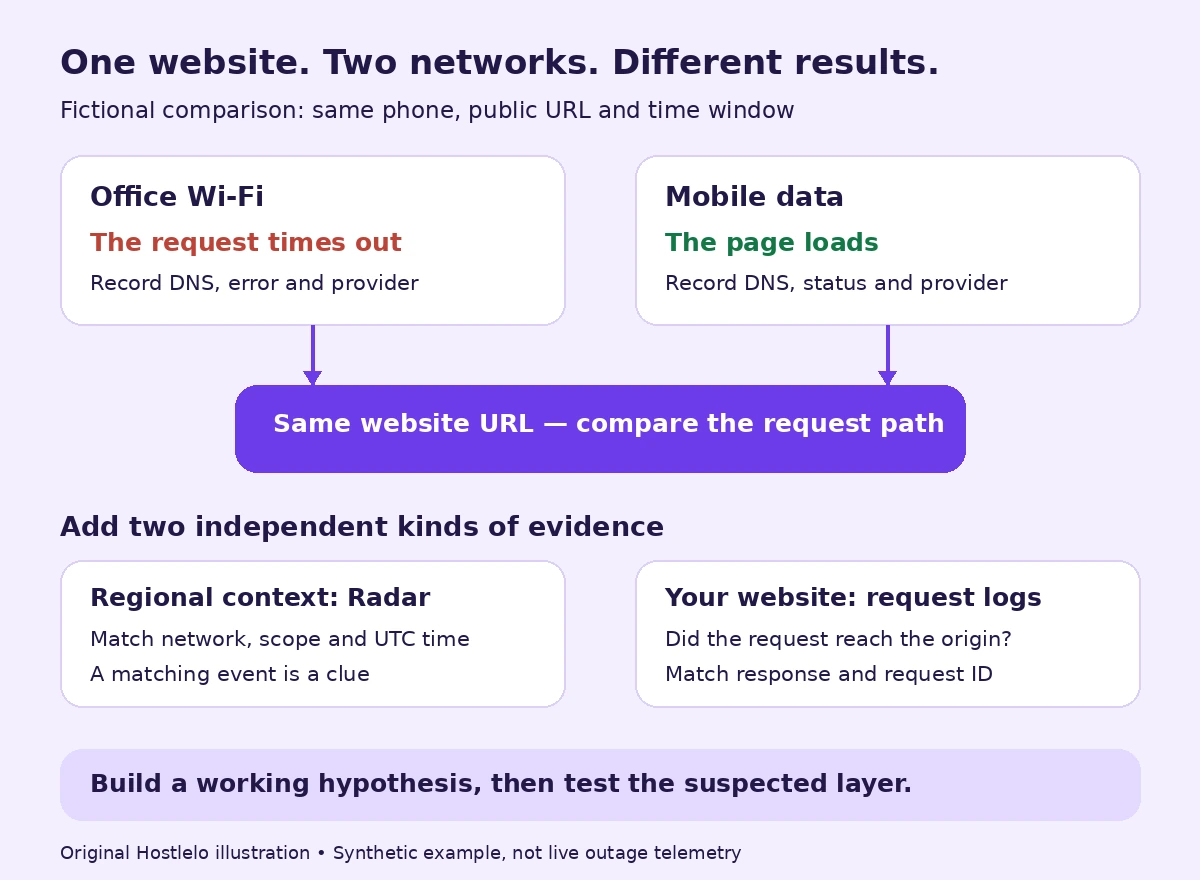
Suppose a Dubai visitor reports a timeout at 08:30 UTC. The same phone loads the same product URL over mobile data. An independent Mumbai tester also loads it. A Radar entry overlaps the time and names the affected Dubai visitor's provider.
That combination supports investigating the affected network path. It is a stronger ticket than “your server is down,” but the overlap is still correlation. The provider can check routing and resolver behaviour while the host checks whether requests from the affected network reached the origin.
Now change one observation: both testers receive 524 on the product page, while the homepage still returns 200. Investigate the dynamic page and origin/backend path even if there is a regional event. Two incidents can overlap. A public map cannot clear your application of responsibility.
These invented observations demonstrate the workflow; they are not measurements of Hostlelo, Cloudflare or any named network.
Send a support ticket that an engineer can act on
Copy this template and replace every bracketed field. Attach redacted screenshots or headers through your provider's ticket system.
Subject: Partial website failure — [hostname] — [UTC time window]

Affected public URL: [full URL, without private tokens]
First failure / last test: [timestamps with timezone]
Visible error / HTTP code: [exact text and code]
Affected location and provider: [city, country, ISP, ASN if known]
Comparison: [same device + URL on independent network; result]
DNS evidence: [resolver, status, A/AAAA answers, query time]
HTTP evidence: [curl result, exit code, redacted headers]
Request identifier: [Ray ID or other ID, if shown]
Radar/status evidence: [event link, scope and overlapping time]
Recent changes: [deploy, DNS, firewall, certificate; time or none known]

Please check whether these requests reached the origin, correlate
access/error/security logs, and identify the failing layer.
Next update requested: [time or agreed support interval]
The host can check origin logs and resources; the CDN can check its request/security events; the ISP can investigate its resolver and path. Start with the provider that owns the strongest observed clue, and include the other evidence so the ticket can be escalated accurately.
Verify recovery from the network that failed
After a targeted fix or an upstream recovery, repeat the same URL from the originally affected network. Confirm the real customer journey as well as the homepage. Keep before/after timestamps and note exactly what changed.
For future monitoring, choose probes in the places where your customers actually browse, plus an independent comparison location. Hostlelo's UAE hosting and latency guide covers testing from the audience's location when selecting infrastructure.
A useful incident record ends with a reproducible recovery result and an identified owner for follow-up. A green global map alone is not that result.
Reader questions
Why is my website down on Wi-Fi but working on mobile data?
The two connections may use different DNS resolvers, routes or security policies. Test the same URL on the same device, record the exact error and compare DNS and HTTP results. The difference narrows the investigation but does not prove that the ISP or hosting provider is responsible.
Can Cloudflare Radar tell me whether my hosting server is down?
Radar provides regional and network outage context. It does not establish the health of every website or server. Compare its event scope and time with your own URL tests, provider status and origin logs.
Can I use Cloudflare Radar if my website does not use Cloudflare?
Yes. The public Radar site can be used as an external reference for regional internet conditions. Your own website still needs independent availability checks from relevant customer locations.
Does no outage in Radar mean my website is working?
No. A website-specific failure or a disruption not reflected in the public event list can still affect visitors. Reproduce the failing URL from the affected network and inspect your own request evidence.
What should I send my host when only some visitors cannot open my website?
Send the exact public URL, error, timestamp and timezone, affected location and provider, a comparison from an independent network, DNS/HTTP results, any request identifier, overlapping status evidence and recent changes. Redact private tokens and cookies.
Was this guide helpful?
Help us make the next update better.
Sources & further reading
- Cloudflare Radar redesign — 8 October 2026
- Cloudflare Radar Outage Center
- Cloudflare Radar outage fields and API documentation
- Cloudflare Status
- Cloudflare explanation of internet outage detection
- ISC BIND 9 dig manual
- Official curl command-line manual
- Cloudflare Error 522 documentation
- Cloudflare Error 524 documentation
What changed
Public primary documentation reviewed on 9 October 2026. Comparison scenario, evidence diagram and timestamps are fictional. The curl probe was checked against local HTTP fixtures; no live regional outage or provider production system was tested.
Originally published . About our editorial updates.