DMARC Reports: Read XML and Find Unaligned Senders
A DMARC report is evidence from one receiver, not your entire mail system. Read alignment, identify legitimate failing senders and plan enforcement carefully.
The short answer
Open a local copy of the aggregate report and identify its reporter, time window and policy. For each record, compare source IP, message count, visible From domain, DMARC-aligned SPF/DKIM results and raw authenticated domains. Investigate known senders before changing DNS; either aligned SPF or aligned DKIM can satisfy DMARC, and reports are not complete delivery logs.

Reading options
On this page
- Start with what a report can prove
- Confirm where the reports should go
- Open the attachment without changing mail policy
- Read the report in two passes
- Why SPF can pass while DMARC still fails
- Make a sender worksheet before editing DNS
- Optional local reader for small XML and gzip files
- Enforcement needs a separate decision
- A support request that leads to a useful answer
- Reader questions
- Sources & further reading
Before you start
Access to your own DMARC report mailbox and current DNS record; a private local folder for attachments; a sender/service inventory. Optional reader needs Python 3.12 or newer. Reading does not change DNS; enforcement requires a separate reviewed change and rollback plan.
Publishing a DMARC record is only the beginning. The useful work starts when reports reveal an invoicing service, website form or newsletter that still authenticates as somebody else's domain.
This guide explains how to turn one aggregate XML report into a sender investigation. It complements our SPF, DKIM and DMARC setup guide; it does not repeat the initial DNS setup or assume that every reported failure is an attacker.
Start with what a report can prove
A report describes mail observed by a particular receiving organization during a stated interval. It is not a complete inventory of all mail sent from your domain. Some receivers do not report, attachments can arrive late, and your reporting mailbox can lose messages.
An IP address is also not necessarily the original application. It may belong to a shared sending platform or an intermediary. Treat it as a lead, then connect it to your own service inventory and logs.
The current standards are RFC 9989 for DMARC and RFC 9990 for aggregate reporting, both published in May 2026. This article was reviewed on 12 October 2026; those standards were not released today.
Confirm where the reports should go
Inspect the TXT answer for your domain:
dig +short TXT _dmarc.example.comOn Windows, the corresponding lookup is:
nslookup -type=TXT _dmarc.example.comA monitoring record can look like this illustrative value:
v=DMARC1; p=none; rua=mailto:dmarc-reports@example.comReplace the example domain and mailbox with your own. Confirm the answer from the authoritative DNS service, not just a panel where an old zone might be stored. Our DNS-zone verification guide explains why editing the wrong DNS service changes nothing publicly.
Check that the mailbox exists, can receive attachments and has enough space. If reports stop, investigate delivery and quota before concluding that nobody is spoofing your domain. Google's reporting guidance describes provider-generated reports and their interpretation.
External reporting addresses need authorization. For example, when example.com requests reports at reports@example.net, the reporting destination normally publishes authorization under:
example.com._report._dmarc.example.netThe destination provider supplies the appropriate TXT configuration. Verify it with that provider; ownership of your sending domain does not give you control of the report destination's DNS.
Open the attachment without changing mail policy
Keep the original report. Inspect a downloaded copy locally; aggregate data can expose sending infrastructure, business activity and volumes. Do not upload reports to an arbitrary online converter.
For a genuine gzip-compressed report, this command reads the decompressed XML without deleting the attachment:
gunzip -c -- 'report.xml.gz'An .xml file can be read directly. A .zip attachment needs a ZIP tool; renaming it to .gz does not convert it. Inspect archive members before extracting them into a dedicated folder.
RFC 9990 defines the namespace urn:ietf:params:xml:ns:dmarc-2.0. Older reports may lack a namespace. A parser that searches only for literal unqualified record tags can silently miss the new form.
Read the report in two passes
First inspect its identity and time window:
- Reporter organization and report ID.
- Beginning and ending timestamps; convert them to a timezone you understand.
- The domain and policy the receiver says it observed.
Then inspect each record:
source_ip: the connecting system observed by that receiver.count: messages represented by this particular record.identifiers/header_from: the visible From domain being evaluated.policy_evaluated/dkimandpolicy_evaluated/spf: DMARC alignment outcomes.auth_results: the underlying authentication results and domains.dispositionand any override reason: how policy was applied.
A single IP can appear in multiple records with different identifiers or outcomes. Do not reduce the entire IP to one pass/fail label, or add the same report twice when it is resent.
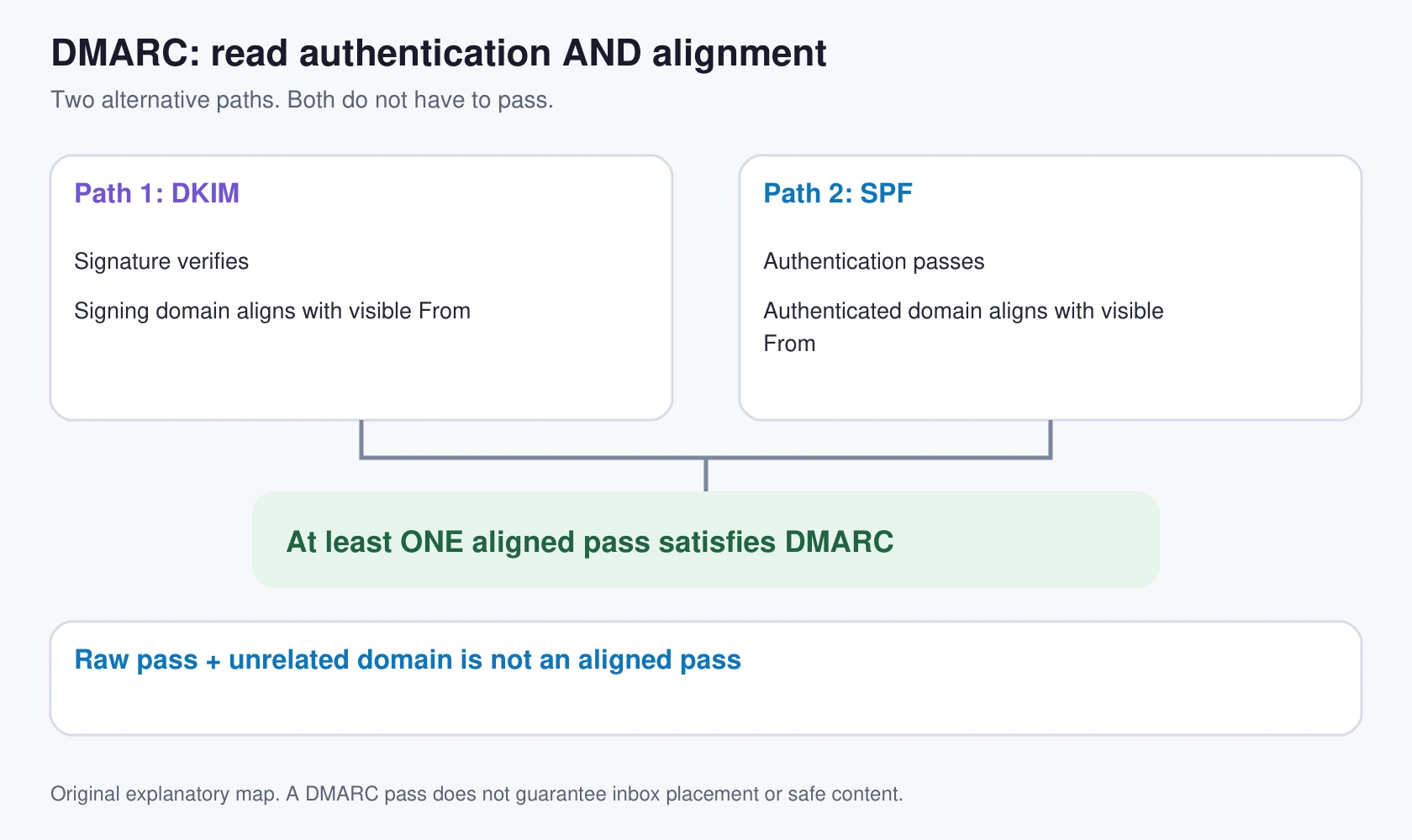
Why SPF can pass while DMARC still fails
This is an original synthetic record fragment, not a received report or a complete schema-valid document:
<record>
  <row>
    <source_ip>192.0.2.25</source_ip>
    <count>12</count>
    <policy_evaluated>
      <disposition>none</disposition>
      <dkim>fail</dkim>
      <spf>fail</spf>
    </policy_evaluated>
  </row>
  <identifiers>
    <header_from>example.com</header_from>
  </identifiers>
  <auth_results>
    <spf>
      <domain>bounce.vendor.example.net</domain>
      <scope>mfrom</scope>
      <result>pass</result>
    </spf>
  </auth_results>
</record>
The service authenticated its own bounce domain, while the visible From domain is example.com. Those example domains are unrelated, so that SPF result does not provide aligned authentication for the From domain. No aligned DKIM pass is shown either.
The next step is to ask the known sending service about DKIM signing with your domain or an aligned return path. Adding a random IP to SPF does not repair a domain-alignment mismatch.
Conversely, an aligned DKIM pass can satisfy DMARC even when SPF fails. SPF and DKIM are alternative paths to an aligned pass; both are not required for each message. A DMARC pass does not guarantee inbox placement, harmless content or a trustworthy sender.
Make a sender worksheet before editing DNS
For each important record, write down the reporter, interval, IP, From domain, raw authenticated domains, aligned results, volume, known service owner and next action.
Use four investigation groups:
- Known service, aligned pass. Confirm ownership and retain the evidence. Delivery problems still need their own investigation.
- Known service, no aligned pass. Check that service's domain-authentication settings and send a controlled test after correcting them.
- Intermediary or mailing list. Forwarding can affect SPF; message changes can affect DKIM. Inspect headers, override reasons and the legitimate mail path.
- Unidentified source. Investigate before authorization. Reverse DNS or an IP registration is a clue, not proof that you use the service.
A hypothetical invoice-platform failure is particularly important: regular newsletters may pass while monthly invoices remain untested. A week with no observed legitimate failures is not enough evidence to reject every future failure.
Optional local reader for small XML and gzip files
The following Python example prints key fields without uploading the report. It accepts one .xml or .xml.gz file, handles qualified and unqualified tags, caps the decompressed input at 5 MiB and rejects DTD/entity declarations. It is a small diagnostic reader, not an XML schema validator, complete report processor or hardened ingestion service.
import gzip
import sys
from pathlib import Path
import xml.etree.ElementTree as ET

LIMIT = 5 * 1024 * 1024
path = Path(sys.argv[1])
if path.suffix not in {".xml", ".gz"}:
    raise SystemExit("Use an XML file or a gzip-compressed XML file.")
opener = gzip.open if path.suffix == ".gz" else open
with opener(path, "rb") as stream:
    data = stream.read(LIMIT + 1)
if len(data) > LIMIT:
    raise SystemExit("Input is too large for this diagnostic reader.")
try:
    xml = data.decode("utf-8-sig")
except UnicodeDecodeError:
    raise SystemExit("This example accepts UTF-8 XML only.")
if "<!DOCTYPE" in xml.upper() or "<!ENTITY" in xml.upper():
    raise SystemExit("DTD/entity declarations are not supported.")
root = ET.fromstring(xml)

def local(tag):
    return tag.rsplit("}", 1)[-1]

def value(node, *names):
    for name in names:
        node = next((c for c in node if local(c.tag) == name), None)
        if node is None:
            return "-"
    return " ".join((node.text or "-").split())

if local(root.tag) != "feedback":
    raise SystemExit("Expected a feedback document.")
print("source_ip | count | aligned_dkim | aligned_spf | header_from")
for record in root:
    if local(record.tag) == "record":
        print(" | ".join([
            value(record, "row", "source_ip"),
            value(record, "row", "count"),
            value(record, "row", "policy_evaluated", "dkim"),
            value(record, "row", "policy_evaluated", "spf"),
            value(record, "identifiers", "header_from"),
        ]))
We executed this reader locally with Python 3.12.14 against synthetic XML and gzip fixtures, with and without the new namespace. The size limit, DTD rejection and wrong-root checks also passed. This did not process customer mail or validate full RFC schemas.
Save it as read_dmarc.py, then run:
python3 read_dmarc.py report.xml.gzMissing fields print -; that is unknown data, not an automatic failure. This reader does not deduplicate reports, validate identities or classify attackers. Python's XML security guidance explains why a production service needs a more deliberate parsing design.
Enforcement needs a separate decision
Before changing from monitoring to quarantine or reject, inventory every legitimate sending stream, validate alignment, observe its full business cycle and keep the current DNS value for rollback. Include invoices, marketing campaigns, support systems and website forms.
RFC 9989 specifically discusses extended monitoring and mailing-list interoperability. Its month-long monitoring/quarantine example is not a universal promise that enforcement is safe after a fixed number of days. Some legitimate streams occur less often; some forwarding/list workflows remain difficult.
The newer standard removes pct and introduces testing behavior through t; older operational documentation may still describe percentage rollouts. Do not treat a percentage value as a precise delivery guarantee across all receivers. Check your receiving ecosystems and current service guidance before changing policy.
Monitoring remains useful after enforcement. Preserve aggregate reports, review the observed policy and watch for a newly added sender that was never configured. Test important mail delivery directly too; reports alone do not establish end-to-end delivery.
A support request that leads to a useful answer
Sending service and business owner:
Report organization, ID and interval:
Visible From domain:
Source IP and represented message count:
Raw SPF domain/result:
Raw DKIM domain/result/selector, if present:
DMARC-aligned SPF and DKIM outcomes:
Disposition and override reason:
Result of a controlled send to the affected recipient service:

Please confirm domain-aligned authentication for this known sender.
We will review all legitimate streams before tightening DMARC policy.
Send relevant excerpts through your private support channel. For TLS delivery reports, see our separate MTA-STS and TLS-RPT guide; they answer a different question from DMARC alignment.
Reader questions
Does a DMARC aggregate report list all mail sent from my domain?
No. It covers messages observed and reported by a particular receiving organization during its stated interval. Missing receivers, late delivery and lost reports limit coverage.
Why can SPF pass but DMARC fail?
SPF may pass for a bounce domain that does not align with the visible From domain. Without an aligned DKIM pass as well, that raw SPF result does not satisfy DMARC.
Must both SPF and DKIM pass for DMARC?
No. At least one of the two must pass with domain alignment. A DMARC pass does not guarantee inbox delivery or safe message content.
Should I add every reported IP to SPF?
No. Identify the sender and its business owner first. Unknown IPs and unrelated authenticated domains need investigation, not automatic authorization.
Does a month of clean reports prove it is safe to publish p=reject?
No. Observe every legitimate sender's actual sending cycle, assess forwarding and mailing-list effects, and review rollout and rollback separately. A fixed interval is not a universal safety guarantee.
Was the included reader tested?
Yes, with Python 3.12.14 on synthetic plain/gzip XML fixtures with and without namespaces, plus size-limit, DTD and root rejection checks. It is not a complete schema validator or production ingestion service.
Was this guide helpful?
Help us make the next update better.
Sources & further reading
What changed
Rewritten and verified on 12 October 2026 before first publication. Clarifies report scope, raw authentication versus alignment, duplicates and enforcement limits. Adds an original cover, precise alignment map and locally tested Python 3.12.14 reader. No customer email or DNS was inspected or changed.
Originally published . About our editorial updates.