MTA-STS and TLS-RPT setup for a small business domain
Publish an MTA-STS policy and TLS-RPT record, validate HTTPS and SMTP TLS, and move from testing to enforce with a cache-aware recovery plan.
The short answer
MTA-STS publishes an HTTPS policy and DNS discovery record for supporting senders to validate receiving MX hosts and TLS. TLS-RPT requests aggregate transport reports. Start in testing, verify every MX and the policy endpoint, then enforce only after checks pass. Update the policy id after edits and account for cached policies during rollback or removal.

Reading options
On this page
- What MTA-STS and TLS-RPT actually are
- Keep the two TLS connections separate
- Before you start
- Step by step: MTA-STS on a cPanel account
- Variants for Google Workspace, Microsoft 365 and Cloudflare
- Moving from testing to enforce
- How to check it worked
- Troubleshooting
- When to ask your host or a developer
- The one message worth forwarding
- Reader questions
- Sources & further reading
MTA-STS publishes a policy for supporting senders to check your receiving MX hosts and their TLS connections. In enforce mode, a valid policy prevents compliant senders from delivering through connections that fail those checks. TLS-RPT requests aggregate reports of successful and failed sessions from participating senders. On a normal cPanel account you can set up both with one subdomain, one small text file and two DNS TXT records.
Here is the part most people do not know. When one mail server hands a message to another, encryption is usually optional, and the switch to encryption (called STARTTLS) is negotiated in plain text first. RFC 8461, the standard behind MTA-STS, says plainly that an attacker who can delete parts of that conversation, such as the "250 STARTTLS" line, can carry out a downgrade attack, and your mail ends up crossing the internet unencrypted.
By the end of this guide you will have MTA-STS running in safe testing mode, reports arriving in a mailbox, and a clear plan for switching to enforce mode while reducing the risk of delaying legitimate mail.
What MTA-STS and TLS-RPT actually are
Your SPF, DKIM and DMARC setup checks sending authorisation, signatures and domain alignment; it does not prove a person's identity. MTA-STS (Mail Transfer Agent Strict Transport Security) protects the trip itself: it helps protect SMTP transport to receiving servers for senders that implement and apply a valid policy. It is not end-to-end message encryption and does not guarantee first-contact protection before the sender discovers a valid policy.
Think of a courier told, "Only hand this parcel to staff wearing our badge, inside our locked building." Without that rule, anyone at the door in a convincing jacket could sign for it. MTA-STS is that rule, posted where every courier can read it.
It has two parts:
- A policy file on a web page at
https://mta-sts.example.com/.well-known/mta-sts.txtthat lists your real mail servers and how strict senders should be. - A DNS TXT record at
_mta-sts.example.comthat says "I have a policy" and carries anidthat changes every time the policy changes.
TLS-RPT (SMTP TLS Reporting, RFC 8460) is the feedback loop. You publish a TXT record at _smtp._tls.example.com with an address, and sending servers that support it email you a JSON report covering a full UTC day, listing successful and failed TLS connections.
MTA-STS only protects mail coming in to your domain. Your outgoing mail is protected when the receiving domain publishes its own policy. Microsoft, for example, says Exchange Online validates every outbound message sent to an MTA-STS domain, and Google says Gmail messages from your domain comply when the receiving server has a policy in enforce mode.
There are three modes:
testing: senders that support TLS-RPT report failures to you, but still deliver the mail as if nothing were wrong.enforce: senders must not deliver to a server that fails the MX name check, the certificate check or does not support STARTTLS.none: tells senders you no longer use MTA-STS, used when removing it.
Heads up: senders that do not support MTA-STS keep delivering as before. The receiver publishes the policy and the sender must support and apply it; the sender does not need to publish a policy for its own domain. Enforce failures can delay delivery while the sender retries.
Keep the two TLS connections separate
Connection | Hostname to validate | Purpose |
|---|---|---|
HTTPS policy fetch | mta-sts.example.com | Fetch plain-text policy with HTTP 200 and no redirect |
SMTP STARTTLS delivery | Every MX hostname | Validate permitted MX and its trusted TLS certificate |
TLS report submission | Configured rua destination | Receive best-effort aggregate transport reports |
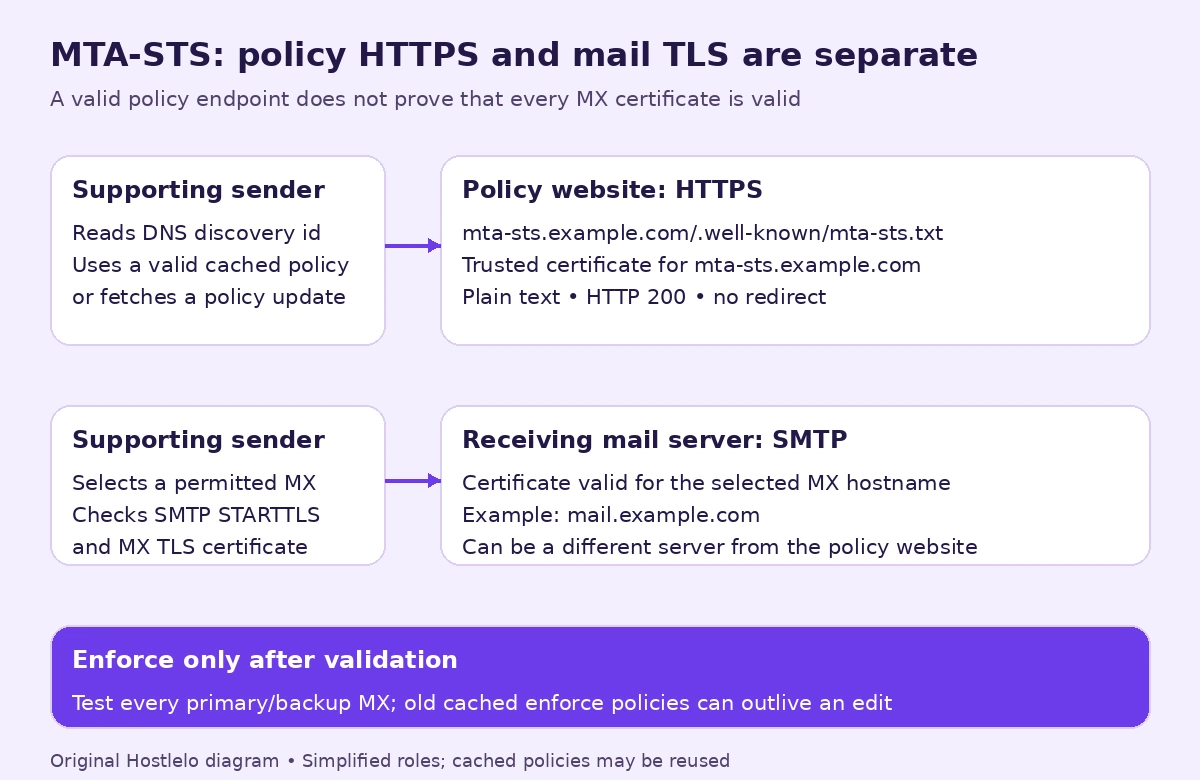
The policy website may be on a different server from the mailboxes. A working policy URL does not prove that the MX certificate is correct.
Before you start
Give yourself about 30 minutes for setup, then two weeks or so of patience before enforcing. Testing mode carries very little risk, because senders still deliver even when checks fail.
Here is your checklist:
- Your cPanel login, with access to Domains, SSL/TLS Status, File Manager and Zone Editor.
- Access to wherever your DNS is hosted. If your domain uses your host's nameservers, that is cPanel's Zone Editor. If it uses Cloudflare or your registrar, add records there. Not sure? Our guide to connecting a domain to hosting explains how to tell.
- A terminal with dig and curl installed, or a trusted DNS lookup tool. Availability varies by operating system.
- A mailbox for reports, such as
tlsrpt@example.com. Google says to set up an address for reports before you turn reporting on. - A note of who runs your mailboxes: your cPanel host, Google Workspace, Microsoft 365 or someone else.
Step 0: Find your real MX hosts
Your MX records name the servers that accept mail for your domain, and the policy file must list them exactly. Run this lookup to see them.
dig +short MX example.comYou should see one or more lines with a priority number and a host name.
10 mail.example.com.Write down every host name, without the trailing dot. If you see more than one, all of them go in your policy. Microsoft's guidance adds that if you use more than one email provider, you must include the MX hosts for each of them.
Quick tip: the certificate on each MX host must be valid for that exact host name. If your MX points to a server whose certificate shows a different name, fix that first, or enforce mode will block mail later.
Step by step: MTA-STS on a cPanel account
These steps use the cPanel interface. The MTA-STS standard does not mention cPanel; this is simply a reliable way to meet its rules (an HTTPS page, a valid certificate, a plain text file) on shared hosting.
Step 1: Create the mta-sts subdomain
The policy must live on a host called exactly mta-sts plus your domain. In cPanel, open Domains, click Create a New Domain, and in the Domain box type mta-sts.example.com.
Untick Share document root with "example.com" so the subdomain gets its own folder, and accept the suggested Document Root (the current documented cPanel Domains workflow places it inside publichtml). Click **Submit**. If the path is under another site's publichtml, check inherited redirect/access rules later. Use its own folder and scope inherited rules to the intended hostname. Ask the host about separate policy hosting if stronger isolation is needed.
Afterwards mta-sts.example.com appears in the domains list with its own document root. Note that path for Step 3.
If your DNS is not hosted on this cPanel server, add an A record for mta-sts at your DNS provider pointing to your hosting server's IP address (for example 192.0.2.10). cPanel notes that new names can take time to become visible, and our DNS propagation guide shows how to check progress.
Step 2: Get a valid SSL certificate for the subdomain
Senders fetch the policy over HTTPS and, per RFC 8461, the certificate must be valid for mta-sts.example.com, chain to a trusted root and be unexpired. A self-signed certificate will not do.
Go to cPanel > Security > SSL/TLS Status. Find mta-sts.example.com and, if it is not yet covered, click Run AutoSSL if your provider exposes that action; otherwise ask the host for certificate coverage. cPanel shows an "AutoSSL is in progress" message while it works.
When it finishes, the subdomain should show an AutoSSL DV certificate. If it does not, choose the Has AutoSSL Problems filter; cPanel's own example of a problem is a domain that does not resolve to an IPv4 address on the internet, which usually means the DNS from Step 1 has not spread yet.
Keep renewal automated for both the policy website and every MX server. Confirm the renewal owner and certificate coverage for each; AutoSSL availability depends on the host. An expired policy-site certificate can prevent new fetches while cached policies may continue to apply. Our SSL renewal guide covers the operational checks.
Step 3: Create the .well-known folder and policy file
Open File Manager, click Settings, tick Show Hidden Files (dotfiles) and click Save. Folders that start with a dot are hidden until you do this.
Go into the subdomain's document root from Step 1. Click + Folder, name it .well-known, and click Create New Folder. Open that folder, click + File, name it mta-sts.txt, and click Create New File.
Select mta-sts.txt, choose Edit, and paste the policy below. It starts in testing mode, lists one MX host, and asks senders to cache it for one week (604800 seconds, the value both Microsoft and Google use in their examples).
version: STSv1
mode: testing
mx: mail.example.com
max_age: 604800
Replace mail.example.com with your own MX host names, one mx: line each. If you have three MX hosts, you need three mx: lines. Save the file.
A few rules from RFC 8461 worth knowing:
- version must be STSv1, with mode and max_age. An mx line is required for testing/enforce; mode: none is the exception.
- A wildcard is allowed only as the whole leftmost label, so
*.example.netmatchesmail.example.netbut notexample.netora.b.example.net. Microsoft warns against wildcards in general and uses one only for its own Exchange Online hosts, so list exact names unless your provider tells you otherwise. max_ageis in seconds, with a maximum of 31557600 (about one year). Google's page also gives a minimum of 86400 (one day) for its own setup.
Test it right away in a browser by opening https://mta-sts.example.com/.well-known/mta-sts.txt. You should see your four lines as plain text, with a valid HTTPS certificate and no warning. Use the curl check below to inspect status and content type.
Step 4: Publish the TLS-RPT record
Google recommends adding TLS reporting first, so you are already collecting data when MTA-STS goes live. In Zone Editor, click Manage next to example.com, then Add Record, and create a TXT record with these values.
_smtp._tls.example.com. 3600 IN TXT "v=TLSRPTv1; rua=mailto:tlsrpt@example.com"In the cPanel form, the name is _smtp._tls.example.com., the type is TXT, and the record value is the text inside the quotes. Click Save Record.
Heads up: cPanel warns that the TXT field accepts invalid data without complaint, so check every character. RFC 8460 allows only mailto: and https: addresses, and you can list several separated by commas.
Step 5: Publish the MTA-STS record with an id
This record announces the policy to supporting senders; it does not change your SMTP server configuration or force every sender to comply. The id can be 1 to 32 letters or digits, and it must change every time you change the policy. A date and time stamp works well, so here we use 10 October 2026 at midnight.
_mta-sts.example.com. 3600 IN TXT "v=STSv1; id=20261010000000;"Add it the same way in Zone Editor and save it. Keep exactly one TXT record at _mta-sts; if senders find more than one valid record, RFC 8461 says they skip new policy discovery. A previously cached valid policy is not automatically erased by a missing or unusable discovery record.
Quick tip: always upload the policy file before you change the TXT record. RFC 8461 recommends this order so senders who see the new id do not cache your old policy by mistake.
Variants for Google Workspace, Microsoft 365 and Cloudflare
The steps above are the same everywhere: you host the policy file yourself and publish two TXT records. What changes is the list of MX hosts and where you check your work.
Google Workspace
Google does not host the policy for you. Its help pages say to upload the file to a public web server in your own domain, under a subdomain starting with mta-sts and a .well-known folder, which is exactly what Steps 1 to 3 do. Use the MX host names your dig lookup returned.
Google recommends testing mode for about two weeks, with a max_age of 604800 to 1209600 seconds (one to two weeks) while testing. You add both TXT records at your DNS host, not inside the Google Admin console.
To check your setup, go to Apps > Google Workspace > Gmail > Compliance, scroll to MTA-STS and click Validate your MTA-STS configuration here. You need the Gmail Settings administrator privilege. It checks the _mta-sts record, the policy file and the _smtp._tls record, and suggests a fix for anything wrong.
Microsoft 365 (Exchange Online)
Microsoft is direct about this: Exchange Online cannot host MTA-STS policy files for customers, so you publish the policy yourself. Your cPanel subdomain from Steps 1 to 3 is a perfectly good place for it. Microsoft's own documented options are Azure Static Web Apps (its recommended choice) or Azure Functions.
Microsoft's Exchange Online guide includes this provider-specific example. Confirm your actual MX setup before using it:
version: STSv1
mode: testing
mx: *.mail.protection.outlook.com
max_age: 604800
Microsoft stresses that this wildcard is specific to Exchange Online and must not be used as general guidance. If your domain also receives mail through another provider, add their MX hosts too.
On the sending side, Microsoft says enforce failures produce bounce codes 5.4.8 (the MX host was not the one the policy expected) and 5.7.5 (the certificate failed validation). If your own staff see those when writing to another company, a failed recipient MX/certificate check is a clue. Compare the recipient policy, sender's cached version and delivery diagnostics before assigning responsibility.
Cloudflare DNS
If your DNS is on Cloudflare, add both TXT records in the dashboard's DNS Records page. Cloudflare's docs say TXT records are always DNS-only, so there is no proxy setting to worry about for them.
For the mta-sts A record, Cloudflare explains that DNS-only means visitors get your server's real IP and connect straight to it. DNS-only is one simple option. A proxied HTTPS policy host can also work when the exact path serves trusted HTTPS, plain-text HTTP 200 and no redirect or bot challenge. Validate after deployment and prevent stale policy content. This concerns the policy website; mail-server DNS has separate requirements.
Moving from testing to enforce
Give testing mode at least two weeks, as Google suggests, and read the reports. Each one is a JSON file (often gzip-compressed, ending in .json.gz) with counts of successful and failed sessions. Reports are best-effort and depend on participating senders and traffic. A quiet inbox is not evidence that all TLS paths are healthy.
Here is a made-up example. Imagine Sara runs a small accounting firm on example.com. After a week of testing, a report shows 412 successful sessions and 9 failures marked certificate-host-mismatch. She checks and finds her backup MX uses a certificate for a different name. She fixes the certificate, waits for clean reports, and only then enforces.
Do not enforce merely because the report inbox is quiet. Verify every primary/backup MX, STARTTLS, certificate hostname/chain/expiry and policy delivery. Confirm support with the mail provider, coordinate MX changes and test receipt from independent senders. Reports supplement those checks.
When the checks pass and testing evidence is satisfactory, switch in this order:
- Edit
mta-sts.txtand changemode: testingtomode: enforce. Save it. - Load the policy URL in a browser and confirm you see the new mode.
- Change the
_mta-stsTXT record to a newid, for examplev=STSv1; id=20261024000000;, and save.
Microsoft explains why step 3 matters: if you do not update the id, senders keep using their cached policy until its max_age runs out. RFC 8461 also notes that the old policy stays in use until both endpoints are updated and the TXT record's TTL has passed.
Once you are confident, you can raise max_age. RFC 8461 suggests values of weeks or more, because a long cache limits the moments an attacker can interfere, up to the 31557600 second maximum. Change the id again whenever you do.
Need to back out during an incident? Microsoft's advice is to set mode: testing, upload the file, and change the id. A sender stops enforcing only after obtaining the updated policy. Cached enforce policies and DNS caches can remain active. Restore compliant MX/TLS service while monitoring delivery and reports; a new shorter max_age does not retroactively shorten old cached policies.
How to check it worked
Check the policy file
This command fetches the policy and prints the response headers above the file, so you can see the status code and content type.
curl -sS -i https://mta-sts.example.com/.well-known/mta-sts.txtYou want HTTP/1.1 200 OK or HTTP/2 200 on the first line, a Content-Type that starts with text/plain, and then your policy lines. Any 301 or 302 is a problem, because RFC 8461 says senders must not follow redirects.
Check the DNS records
These two lookups show the TXT records senders will find.
dig +short TXT _mta-sts.example.com
dig +short TXT _smtp._tls.example.com
Expect "v=STSv1; id=20261010000000;" and "v=TLSRPTv1; rua=mailto:tlsrpt@example.com". If you get nothing back, wait for DNS to update and try again.
Check your MX certificate
This command connects to your MX host, upgrades to TLS with STARTTLS, and stops with an error if the certificate does not verify. If it just hangs, your network may not allow outgoing connections on port 25, so try it from a server instead.
openssl s_client -connect mail.example.com:25 -starttls smtp \
  -servername mail.example.com -verify_hostname mail.example.com \
  -verify_return_error -brief
The -verifyhostname option checks the MX hostname; -servername supplies SNI and is not a hostname check. Repeat for every MX using the correct trusted CA store. This diagnostic is not an end-to-end delivery test. [OpenSSL documents these verification options](https://docs.openssl.org/3.6/man1/openssl-sclient/).
Troubleshooting
The policy URL redirects
Symptom: curl -i shows 301 Moved Permanently or 302 Found instead of 200. Cause: a redirect rule, often a "force www" or "force HTTPS" rule in public_html/.htaccess. Apache applies .htaccess rules to the folder they sit in and every folder below it, so a subdomain folder inside public_html can inherit them. Fix: limit the rule to your main host name, or add an exception for mta-sts.example.com, then retest. Back up .htaccess first by downloading a copy from File Manager.
Wrong content type
Symptom: the Content-Type header says text/html or application/octet-stream. Cause: server or plugin settings. RFC 8461 says senders should check for text/plain. Fix: create a .htaccess file inside the .well-known folder with the line below, which maps .txt files to plain text.
AddType text/plain .txtCertificate does not match the host
Symptom: browser warning on the policy URL, or TLS-RPT reports with sts-webpki-invalid. Cause: the server is showing the main domain's certificate or a self-signed one. Fix: rerun AutoSSL for mta-sts.example.com, check the Has AutoSSL Problems filter, and confirm the subdomain's A record points to your hosting server.
MX host not listed in the policy
Symptom: reports show failures for one MX host, or, in enforce mode, Microsoft senders see bounce code 5.4.8. Cause: the mx: lines do not match your real MX records, often after a change of mail provider. Fix: run dig +short MX example.com again, update the policy, then change the id.
The id was not updated
Symptom: you changed the policy, but checkers or senders still act on the old one. Cause: the _mta-sts TXT record still has the old id, so senders see no reason to refetch. Fix: publish a new, unique id. RFC 8461 says there is no ordering, it only has to be different, though a timestamp keeps things tidy.
The cache time is rejected
Symptom: a checker says the policy is invalid. Cause: max_age is above 31557600, contains something other than digits, or (for Google's checker) is below 86400. Fix: use a plain number in range, such as 604800 while testing.
No reports arrive
Symptom: the report mailbox stays empty. Possible causes include sender participation, traffic volume, a typo in rua or report-mailbox delivery/filtering. Fix: recheck the _smtp._tls record, and give it time; Google itself notes reports may be sparse.
When to ask your host or a developer
Ask for help if your MX hosts belong to your hosting company and their certificate does not match the host name. Only the server owner can fix that, and you should not enforce until they do.
Also ask before removing MTA-STS. RFC 8461 suggests first publishing mode: none with a short max_age such as one day, changing the id, and keeping policy HTTPS and TXT discovery available until the longest relevant previously published cache lifetime has elapsed. Do not count only the newly shortened max_age: older cached policies can remain active. Coordinate removal with the mail provider.
The one message worth forwarding
Copy this to your IT person or host:
"Hi, I am turning on MTA-STS and TLS-RPT for example.com. The policy is at https://mta-sts.example.com/.well-known/mta-sts.txt in testing mode, listing our MX hosts, with TXT records at _mta-sts and _smtp._tls. Can you confirm that every MX host presents a trusted certificate matching its own name, and tell me before you ever change our MX records, so I can update the policy and its id first?"
Takeaway: publish in testing mode, actively validate all MX/TLS paths and review available reports before enforcing, and change the id every single time you touch the policy.
Reader questions
Do I still need SPF, DKIM and DMARC if I use MTA-STS?
Yes. SPF, DKIM and DMARC cover sending authorisation, signatures and domain alignment. MTA-STS protects receiving SMTP transport for supporting senders; it does not replace those controls or encrypt messages end to end.
Will MTA-STS stop me receiving mail from servers that do not support it?
Servers that do not support MTA-STS ignore the policy. For supporting senders, a valid enforce policy can block or defer delivery when its checks fail, including a previously cached policy. Other SMTP delivery failures remain possible independently of MTA-STS.
Does MTA-STS protect the email my business sends out?
Only indirectly. Your policy protects mail coming in to your domain; your outgoing mail is protected when the receiving domain publishes its own policy and your provider honours it, as Microsoft and Google say their services do.
Can I use a free hosting service or a different server for the policy file?
Yes, any web host works as long as it serves the file at https://mta-sts.yourdomain/.well-known/mta-sts.txt with a trusted certificate for that exact name, an HTTP 200 response and no redirects.
How do I turn MTA-STS off safely?
Publish mode:none and a new id, keeping HTTPS policy hosting and TXT discovery available while older policies expire. Wait for relevant previous max_age lifetimes, not only the new shorter value. Coordinate with the provider; a DNS edit is not an instant universal rollback.
Who sends TLS-RPT reports and what do they look like?
Large mail providers that support RFC 8460 send them, usually once per UTC day, as JSON files that are often gzip-compressed. Each report counts successful and failed TLS sessions and names failure types such as certificate-host-mismatch.
Can I send TLS-RPT reports to a third-party reporting service?
Yes. The rua tag accepts mailto and https addresses, and you can list more than one separated by commas, so you can send copies to your own mailbox and to a service that turns the JSON into readable charts.
Was this guide helpful?
Help us make the next update better.
Sources & further reading
- RFC 8461: SMTP MTA Strict Transport Security (MTA-STS)
- RFC 8460: SMTP TLS Reporting
- Microsoft Learn: Enhancing mail flow with MTA-STS
- Google Workspace: About MTA-STS and TLS reporting
- Google Workspace: Create an MTA-STS policy
- Google Workspace: Turn on MTA-STS and TLS reporting
- Google Workspace: Check your MTA-STS configuration
- cPanel Docs: Create a New Domain
- cPanel Docs: SSL/TLS Status
- Cloudflare Docs: Proxy status
- OpenSSL s_client: SNI and certificate verification
- cPanel Zone Editor
What changed
Verified against RFC 8461/8460, Microsoft, Google, cPanel and OpenSSL documentation. Corrected certificate checks, provider constraints, reporting limits, enforcement gates and cached-policy rollback. Added a comparison table, original cover and transport diagram. No live mail system was tested.
Originally published . About our editorial updates.