Disable TLS 1.0 and 1.1:Verify the Edge and Origin Safely
An OpenSSL failure is not always proof that old TLS is disabled. Check the client, CDN edge and origin separately, then verify the application still works.

On this page
- Start with the endpoints and the clients
- Establish a working modern-TLS baseline
- Test old versions without a false all-clear
- Interpret the handshake, not just the exit status
- Change the component that terminates TLS
- Verify the edge and origin separately
- Finish with application and service checks
- Handle failures without making legacy TLS permanent
- Reader questions
- Sources & further reading
The short answer
Reject TLS 1.0 and 1.1 at every relevant TLS endpoint while retaining properly configured TLS 1.2 and supported TLS 1.3. Test the public edge, authorised origin and other services separately. A failed legacy probe is inconclusive if the client or network prevented a valid handshake offer.
Before you start
Authorised administrator access, a list of TLS endpoints and dependent clients, configuration backups outside auto-loaded directories, a change window and an existing administrative recovery route. Examples are unexecuted and must be adapted.
Disabling old TLS should end with two clear findings: clients cannot negotiate TLS 1.0 or 1.1, and the application still works for its supported clients. A failed command by itself establishes neither.
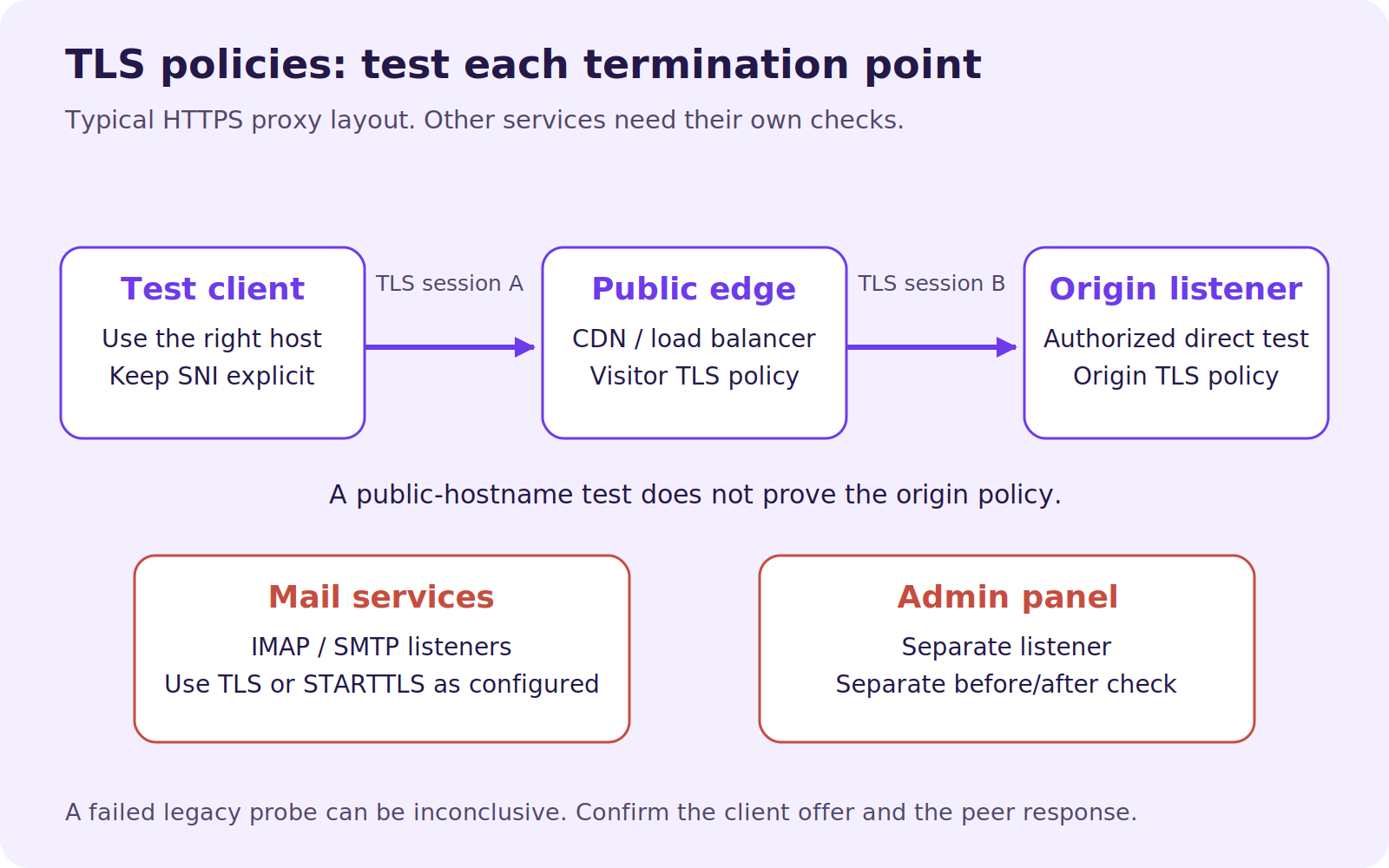
The easiest mistake is testing the wrong endpoint. If a CDN terminates HTTPS, a public hostname test usually examines the CDN edge. Your origin, mail server and hosting-panel service can each have a separate TLS policy.
This guide explains how to identify those endpoints, collect useful evidence and change the appropriate configuration. Commands are unexecuted examples for an authorised administrator, not a scan result or certification for your website.
Documentation checked: 16 October 2026. The underlying deprecation is not new: RFC 8996, published in March 2021, retired TLS 1.0 and TLS 1.1. RFC 9325 recommends support for TLS 1.2 and preference for TLS 1.3 when implemented. Removing TLS 1.2 is a separate decision; this guide does not require it.
Start with the endpoints and the clients
List your public web hostnames, CDN or load balancer, origin listeners, mail services and administrative interfaces. For each, record the owner and which clients depend on it. Pay particular attention to partner callbacks, scheduled integrations and embedded devices that might not appear during a quick browser test.
Review available connection logs or provider analytics before the change. Agree a change window and a way to confirm real customer tasks. Someone should be able to reach the server through an existing administrative route if the web application stops working.
A certificate renewal, an HTTPS redirect and a minimum TLS version solve different problems. Replacing a certificate does not automatically disable old protocols. For related work, see our HTTPS redirect guide and safe HSTS setup.
Establish a working modern-TLS baseline
Record your local implementation first:
openssl version -aThese examples use the OpenSSL command-line interface. An executable with a similar name on another platform may have different options or policies.
Test the hostname with TLS 1.2:
openssl s_client -connect example.com:443 \
  -servername example.com -tls1_2 -brief </dev/null
If supported by your client and endpoint, repeat with -tls1_3. Look for the negotiated protocol in the output. Treat a certificate-verification error separately from the question of which protocol negotiated; s_client is a diagnostic utility, not a substitute for a complete HTTPS validation.
The explicit -servername sends SNI, which identifies the intended hostname on a shared listener. The OpenSSL s_client manual documents these options.
If modern TLS does not work, investigate that first. A timeout, wrong IP, client-certificate requirement or unrelated listener is not evidence that the old-version policy is correct.
Test old versions without a false all-clear
An OpenSSL client can refuse a legacy handshake because of its own security policy. The OpenSSL security-level documentation explains restrictions on TLS 1.0 and 1.1 at higher security levels. Build and operating-system policies can add restrictions too.
For an authorised compatibility probe, an administrator can allow the old algorithms within this single diagnostic command:
openssl s_client -connect example.com:443 \
  -servername example.com -tls1 \
  -cipher 'DEFAULT:@SECLEVEL=0' -brief </dev/null
Repeat for TLS 1.1:
openssl s_client -connect example.com:443 \
  -servername example.com -tls1_1 \
  -cipher 'DEFAULT:@SECLEVEL=0' -brief </dev/null
This option relaxes the test process's policy. It is not a server setting, an application workaround or a guarantee that your client can make the probe. Do not copy it into the production service configuration or use these probes to transmit credentials.
Interpret the handshake, not just the exit status
Result | Interpretation | What to do |
|---|---|---|
Output shows TLSv1 or TLSv1.1 negotiated | This endpoint accepted that old version in this probe | Change its protocol policy |
Peer sends a protocol-version alert after a valid offer | Evidence the peer rejected the offered version | Confirm with another capable test and effective config |
Local error says protocols or ciphers are unavailable | The client may not have made a usable offer | Treat as inconclusive; use a capable test environment |
Timeout, reset or generic handshake failure | Several network, client and server causes are possible | Diagnose before claiming the old version is disabled |
Modern TLS works and legacy probes are rejected | Useful before/after evidence for the tested endpoint | Check all other relevant endpoints and clients |
Keep the command, output, timestamp, hostname, resolved address and test-client version. A second independent test is particularly useful when the first failure is ambiguous. Test IPv4 and IPv6 listeners where both are published; they can lead to different front ends.
No single handshake is a complete security audit. A negotiated version tells you something specific about one connection, not that every hostname, port and backend is configured identically.
Change the component that terminates TLS
Back up the effective configuration and record the previous panel or CDN setting. Store file backups outside directories automatically loaded by configuration includes. Do not assume a .bak filename will always be ignored.
The snippets below assume maintained server packages and libraries with TLS 1.2/1.3 support. Upgrade unsupported software rather than treating an old protocol as a permanent compatibility solution.
Cloudflare or another CDN
For a normal proxied Cloudflare zone, open SSL/TLS > Edge Certificates and set Minimum TLS Version to TLS 1.2. Verify whether any hostname-specific setting applies. This governs visitor-to-edge connections, so it does not establish the origin's accepted versions.
Cloudflare documents exceptions: this zone setting does not apply to R2 custom domains, and minimum-version configuration is not available for Cloudflare Pages hostnames. Use the appropriate product documentation for those services. See Cloudflare's minimum-TLS guide.
For other CDNs or load balancers, select the corresponding security policy with the service owner. Test the public endpoint after the change; a correct origin configuration cannot override a different policy at the edge.
Nginx
In the effective http context, a current two-version policy is:
ssl_protocols TLSv1.2 TLSv1.3;Review included files and server-level overrides. Nginx warns that the default server's protocol value can be used during virtual-server selection, so adding a line to one site is not always sufficient. The ssl_protocols reference explains the context and library requirements.
Validate first:
sudo nginx -tOnly after success, reload through your server's normal service-management procedure. A standalone Nginx installation also supports:
sudo nginx -s reloadDo not reload after a failed syntax check. The Nginx command reference documents testing and reload signals.
Apache
For a compatible maintained Apache/OpenSSL installation, configure the intended scope with:
SSLProtocol -all +TLSv1.2 +TLSv1.3Inspect the global configuration and name-based virtual hosts. Apache documents per-virtual-host protocol behaviour for version 2.4.42 or later when linked with OpenSSL 1.1.1 or later and SNI is supplied. Defaults and inherited settings still matter. See the SSLProtocol reference.
Test, then use a graceful reload if appropriate for your installation:
sudo apachectl configtestsudo apachectl gracefulThe apachectl documentation explains both operations. Panel-managed servers may regenerate these files; use the supported panel configuration instead of editing generated output.
cPanel/WHM and LiteSpeed
In WHM, review Service Configuration > Apache Configuration > Global Configuration for the website protocol policy. cPanel web services, Dovecot and Exim have separate interfaces and service-specific setting formats. Do not paste an Apache protocol string into an Exim field. The cPanel service guide lists the correct controls.
For a standalone LiteSpeed configuration, inspect the relevant HTTPS listener's SSL Protocol > Protocol Version choices and retain TLS 1.2/1.3 while excluding older versions. LiteSpeed's listener reference describes that control. Confirm whether a hosting panel owns the configuration before using WebAdmin changes.
Plesk for Linux
Plesk documents this inspection command:
sudo plesk sbin sslmng --show-configIts server-wide command for limiting the Plesk-managed service policy is:
sudo plesk bin server_pref -u -ssl-protocols 'TLSv1.2 TLSv1.3'That scope includes multiple services, not just one website. Inventory mail and panel clients first, save the inspection output securely, and follow the current Plesk instructions for your system. Do not apply it as an isolated per-domain tweak.
Verify the edge and origin separately
Repeat the modern and legacy probes against the public hostname after the change. Then test an origin you are authorised to reach, preserving SNI:
openssl s_client -connect 192.0.2.10:443 \
  -servername example.com -tls1_2 -brief </dev/null
192.0.2.10 is a documentation placeholder. Use your actual origin address, and repeat the old-version probes with the same destination and hostname. If the origin permits only approved edge networks, test from an existing authorised route. Do not expose the origin or weaken its firewall for this check.
A public-edge pass and an origin failure are two separate findings. Correct the affected layer. If the application connects onwards to another TLS backend, that outbound connection needs its own review as well.
Finish with application and service checks
Check login, forms, checkout and important integrations using supported clients. Review handshake failures and support reports across a period that includes infrequent partner jobs. A page opening in your browser is not enough to validate a nightly callback.
Mail and administrative services need their own before/after checks, using the correct implicit-TLS or STARTTLS mode and actual listener port. For example, a submission service configured for SMTP STARTTLS on port 587 can be checked with:
openssl s_client -connect mail.example.com:587 \
  -starttls smtp -servername mail.example.com \
  -tls1_2 -brief </dev/null
Use an authorised diagnostic client and do not authenticate or send messages during a protocol probe. Our business email setup guide explains why incoming and outgoing service settings must be checked separately.
Handle failures without making legacy TLS permanent
If configuration validation fails, correct the error or restore the known configuration before any reload. If a supported client breaks, determine whether the cause is a typo, wrong listener, certificate problem or genuinely obsolete client.
For an obsolete integration, involve its owner and plan an upgrade or replacement. Restoring an old configuration may restore the deprecated exposure too; any emergency exception needs an explicit owner, restricted scope and expiry. A generic “turn everything back on” instruction is not a remediation plan.
Your completion record should name the endpoints tested, versions accepted and rejected, configuration owner and application checks performed. That gives the next administrator evidence they can repeat after an upgrade, rather than a claim that the whole server is secure.
Reader questions
Is a failed TLS 1.0 OpenSSL test proof that the server disabled it?
Not by itself. Local protocol or cipher policy, network failures and unrelated handshake errors can prevent a usable test. Distinguish a valid peer rejection from an inconclusive client failure.
Should I disable TLS 1.2 as part of this change?
This guide does not require that. RFC 9325 calls for TLS 1.2 support and preference for TLS 1.3 when implemented. TLS 1.2 still needs appropriate cipher and other security settings.
Why can a CDN scan pass while the origin still accepts old TLS?
The CDN and origin terminate different connections and can use different policies. Test the origin only through an authorised route with the intended hostname in SNI.
Can I change old TLS support from an ordinary shared-hosting account?
Usually the relevant web-server or panel service policy belongs to the hosting administrator. Ask the host to identify the terminating endpoint and provide before/after evidence.
Will changing a website's TLS settings also fix mail and panel services?
Not automatically. Separate listeners and services may have independent configuration. Some panel-wide commands affect several services, so confirm scope before making the change.
What if an old integration breaks after TLS 1.0 and 1.1 are removed?
Identify the affected client and involve its owner in an upgrade or replacement. Any emergency exception needs controlled scope and an expiry; restoring a deprecated policy is not a permanent fix.
Sources & further reading
- IETF RFC 8996: Deprecating TLS 1.0 and 1.1
- IETF RFC 9325: Recommendations for secure TLS use
- OpenSSL 3.5: s_client
- OpenSSL 3.5: Security levels
- Cloudflare: Minimum TLS version
- Nginx: ssl_protocols
- Nginx: Command-line parameters
- Apache: SSLProtocol
- Apache: apachectl
- cPanel/WHM: Cipher and TLS configuration
- LiteSpeed: Listener SSL settings
- Plesk for Linux: Protocol configuration scope
What changed
Reworked the diagnostic steps and clarified client-side failures, connection boundaries and before/after checks. Current primary documentation reviewed; original cover and explanatory diagram added.
Originally published . About our editorial updates.