Bricksforge CVE-2026-85097:Patch First, Then Check for Compromise
Bricksforge’s exploited upload flaw needs a verified patch and a separate investigation. Check the version guidance, preserve evidence and test your forms after updating.

On this page
- Start with the exact product and version
- Why you may see two severity scores
- Keep patching and investigation as separate work items
- Apply a verified update without forcing an unplanned major migration
- Record the installed build again after updating
- Review uploads and historical activity
- Know what checksum verification can and cannot establish
- If compromise is found, treat it as recovery work
- Retest what the forms actually do
- A short handoff for your hosting team
- Reader questions
- Sources & further reading
The short answer
Wordfence lists Bricksforge versions through 3.1.8.9 as affected by CVE-2026-85097 and names 3.1.8.10 as patched. The vendor separately documents a Pro Forms upload security fix in 4.0.1. Patch promptly using a verified release for your branch; an updated version does not establish that an exposed site is free of earlier compromise.
Before you start
Access to the affected WordPress installation or an authorized hosting operator; the installed Bricksforge version and Pro Forms state; access to vendor updates and relevant logs. Use trusted tools and a reviewed environment for command-line checks. If compromise is suspected, coordinate containment and evidence preservation with your host.
Your Bricksforge update finishes, the website loads, and the contact form still works. That is progress. It answers one question: did the update complete?
It does not answer a second question: was anything planted while the site was exposed?
Fresh reporting on 12 October 2026 has brought renewed attention to CVE-2026-85097, an unauthenticated file-upload vulnerability in Bricksforge. This guide is a response to that coverage, with a practical patch-and-audit checklist for website owners and hosting teams.
The underlying warning is older. Patchstack published its advisory on 8 October, reporting exploitation attempts first observed on 7 October at 21:47 UTC. The vendor’s security release is also dated 8 October. We are not presenting either as a vulnerability discovered today.
Start with the exact product and version
Bricksforge is a plugin that extends Bricks Builder. This CVE concerns Bricksforge, rather than every WordPress installation or every site using the Bricks theme.
Check Plugins → Installed Plugins, record the installed version, and note whether Pro Forms is active. Include public staging copies, old client installations and sites managed by another agency.
The sources give two important pieces of guidance:
- Wordfence’s advisory: affected versions are through 3.1.8.9; the listed patched version is 3.1.8.10.
- The vendor’s changelog: 4.0.1, dated 8 October 2026, fixes a security issue in Pro Forms file upload.
Do not treat the narrower 3.x range as an automatic all-clear for an older 4.x installation. Follow the vendor’s security guidance for the branch you actually run, and ask the vendor to confirm a backport if you cannot obtain it.
The vendor specifically says that the Pro Forms issue affects sites with the feature active even when their forms have no upload fields. Removing a visible upload widget is therefore not sufficient evidence that the vulnerable feature is unreachable.
Why you may see two severity scores
Wordfence’s CVE record gives a CVSS 3.1 score of 9.8, Critical. Patchstack displays 10.0, Critical.
Those are source-specific ratings. Track the product, CVE identifier, installed version and verified fix instead of combining the scores into a claim that one is universally authoritative.
At a high level, the flaw allows attacker-controlled upload metadata to result in executable PHP being written on vulnerable installations. An attacker does not need a WordPress login. This article provides defensive checks, not an exploit demonstration.
Keep patching and investigation as separate work items
A useful incident note has separate fields for:
- Exposure closed: installed build, source of the package, update time and any temporary containment.
- Investigation completed: evidence reviewed, suspicious findings, cleanup or recovery work, and remaining gaps.
- Service verified: the actual forms and business actions tested after the change.
One green update message should not fill all three fields.
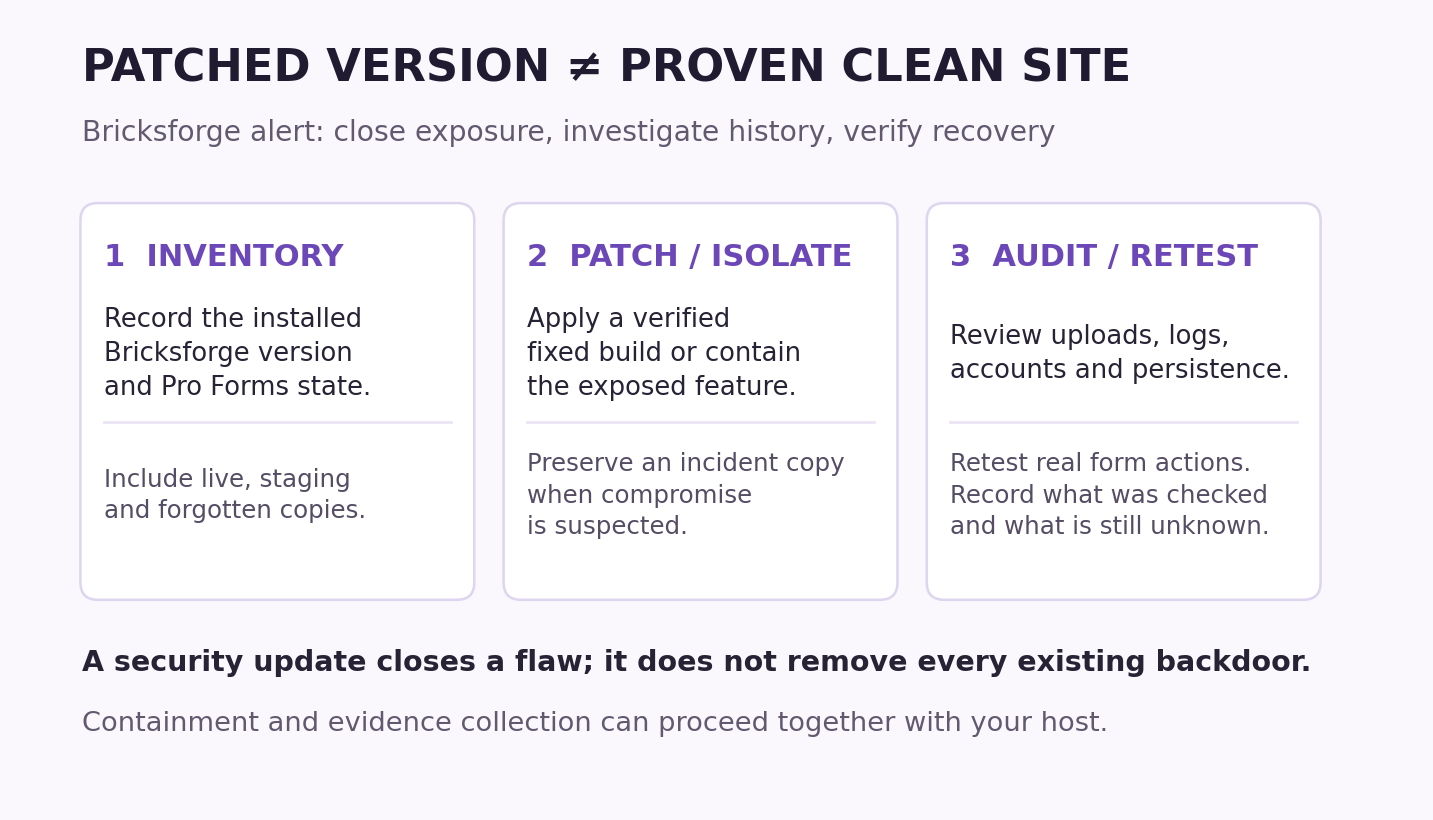
If you already have evidence of compromise, work with the host to restrict the affected service and preserve an incident copy. Containment and evidence collection can proceed together; do not leave an exposed service online indefinitely while preparing a perfect backup.
Keep incident copies private and label them clearly. A copy taken after suspicious activity may be useful evidence, but it is not automatically a clean restore point.
Apply a verified update without forcing an unplanned major migration
Use the vendor’s legitimate update channel or authenticated download. Confirm the package contains the intended fixed build. A missing update notice, expired entitlement or “no updates available” message does not prove the installed release is safe.
For a 3.x installation, the advisory names 3.1.8.10 as the fixed release. Verify availability and support with the vendor. For a 4.x installation, the vendor documents the fix in 4.0.1. Follow current vendor guidance if a later fixed release is available.
Changing major branches can introduce compatibility work. If a compatible security fix cannot be installed promptly, agree a temporary containment plan with the hosting operator or vendor, then complete the upgrade. Record what the containment actually blocks and how customers can still reach you.
Do not assume that a generic WAF subscription includes the specific mitigation or protects an origin reachable outside that WAF. Check deployment, coverage and request paths. A mitigation can reduce exposure; it does not remove an existing malicious file.
Our WordPress auto-update and recovery guide covers files/database backups and business-function testing. An emergency security fix still needs an explicit owner and completion check.
Record the installed build again after updating
Reload the plugin list and capture the version from the installation you just changed. An agency should record the hostname, site path, version and timestamp for every affected copy.
An authorized operator can list plugin versions with WP-CLI:
wp plugin list --fields=name,status,version --format=table --skip-update-check --skip-plugins --skip-themesRun this in the correct WordPress directory using a trusted WP-CLI installation and reviewed configuration. The command reference documents these fields and options.
The skip flags do not turn a compromised environment into a safe forensic environment: must-use plugins can still load. When the site or tooling is untrusted, ask the hosting or response team to inspect an isolated copy or the filesystem instead.
Keep the before-and-after evidence. An update attempt and a confirmed installed version are different records.
Review uploads and historical activity
Patchstack identifies suspicious upload/form traffic and unexpected PHP files under paths such as wp-content/uploads/bricksforge/tmp/ as investigation leads.
Ask the operator to correlate:
- Form requests and any retained request-body evidence.
- New or changed files in upload areas.
- Requests that subsequently reached suspicious files.
- Unauthorized changes around the same period.
A normal form request to a familiar endpoint does not prove exploitation. Many access logs do not retain POST bodies, so a clean search of those logs may leave a major visibility gap. An unexpected PHP file is a lead to inspect, not an instruction to delete every matching filename.
Use your actual uploads location, including any customized path. Preserve suspect files and metadata for review instead of opening them through a public URL to “see what happens.”
File modification times and extensions are also incomplete evidence. They can change during deployments or be manipulated. Combine file review with logs, known-good packages and account/configuration checks.
Know what checksum verification can and cannot establish
For a trusted operator, a WordPress core comparison is one useful integrity check:
wp core verify-checksums --include-rootThe official core command compares files against WordPress.org’s checksums and runs before WordPress is loaded. Use the correct core version and locale where required. Investigate warnings; legitimate custom files can also require explanation.
A successful core check does not certify uploads, the database, premium plugins or every persistence location.
Plugin checksum verification uses WordPress.org’s checksums. Do not interpret unavailable checksums for a commercial package as either a malware finding or a clean bill of health. Obtain a trusted package for the exact vendor release and have the operator compare it appropriately.
Keep TLS verification enabled when retrieving reference data. A download failure means the check could not complete.
If compromise is found, treat it as recovery work
Replacing the vulnerable plugin closes an entry point. A previously installed backdoor, changed account or stolen credential may remain.
WordPress’s incident guidance recommends documenting symptoms, checking with the host, preserving a snapshot before cleanup and reviewing access controls.
Give the responder enough scope to investigate persistence across plugins, must-use plugins, themes, uploads, configuration and database content. Review unexpected users and access paths rather than relying only on the normal Users screen.
Recover from trustworthy software and a reviewed restore point. Preserve newer legitimate orders or submissions before restoring older data. Rotate exposed credentials and invalidate relevant sessions as part of a coordinated recovery plan, using a clean workstation.
After cleaning, recheck the original entry point and the evidence that indicated compromise. Record the limits of the investigation. “No suspicious item found in the locations checked” is more accurate than an unsupported promise that the entire server is clean.
Retest what the forms actually do
A form can submit successfully while its notification email, webhook or stored entry fails. Test the actions enabled on your site:
- Contact form submission and delivery to the intended mailbox.
- The stored submission, if that is part of the workflow.
- Authorized file upload, where used.
- Any relevant webhook, integration or confirmation message.
Use synthetic data and a test destination wherever possible. For payment-related actions, use the provider’s sandbox rather than charging a real customer.
Check desktop and mobile behavior for the forms customers use. If a temporary containment rule blocked a form, verify the rule’s final state and the alternative contact route before announcing recovery.
The cPanel backup and test-restore guide can help prepare a better recovery path for future incidents.
A short handoff for your hosting team
Fill in what you know and label the gaps. Do not include passwords, tokens or full customer submissions in a public ticket.
Site / hostname:
Bricksforge version before and after:
Pro Forms active:
Verified patch package source:
Update / containment time and timezone:
Earliest retained logs:
Suspicious files or account changes:
Evidence copy retained:
Forms and integrations retested:
Unresolved visibility or recovery gaps:

Please confirm the installed security fix and investigate
whether earlier exposure left unauthorized changes.
Record the scope of the review separately from patch status.
If Bricksforge is absent, this specific plugin alert does not establish exposure. If it is present, the most useful response is a verified fixed build plus a documented investigation appropriate to the site’s history.
Review note: facts and version references were checked on 12 October 2026. Examples here were reviewed against documentation; they were not executed on a customer’s WordPress server.
Reader questions
Which Bricksforge version fixes CVE-2026-85097?
Wordfence and Patchstack identify 3.1.8.10 as the fixed 3.x release. The vendor separately documents a Pro Forms file-upload security fix in 4.0.1. Confirm a supported fixed build for your branch with the vendor, especially when update access or backport availability is unclear.
Am I safe if my forms have no upload field?
The vendor says the Pro Forms upload issue affects sites with Pro Forms active even when their forms do not contain upload fields. A missing visible upload widget is not sufficient evidence of protection.
Is this a vulnerability disclosed on October 12?
No. October 12 brought renewed reporting. Patchstack’s advisory and the vendor’s 4.0.1 security release are dated October 8; Patchstack reports exploitation attempts first observed on October 7 at 21:47 UTC.
Does the alert apply to all WordPress or Bricks sites?
This CVE concerns the Bricksforge plugin. Having WordPress or the Bricks theme alone does not establish exposure to this specific flaw. Inventory the installed plugin and feature state.
Does installing the patch remove an existing infection?
A patch closes the vulnerability; it does not establish that earlier unauthorized files, users or access paths are gone. Investigate the exposed period and perform recovery work if compromise is found.
Does a successful WordPress checksum check prove my site is clean?
No. Core verification covers a defined set of WordPress files. It does not certify the database, uploads or all premium plugin code. Document what was actually checked and any unavailable reference data.
Sources & further reading
- Bricksforge: vendor changelog and 4.0.1 security release
- Wordfence: CVE-2026-85097 affected and patched versions
- Patchstack: 8 October advisory, telemetry and defensive checks
- The Hacker News: renewed coverage on 12 October 2026
- WordPress: manage and update plugins
- WordPress: incident and recovery guidance
- WordPress: hardening, trusted packages and backups
- WP-CLI: plugin inventory and skip-flag limits
- WP-CLI: core checksum verification and scope
- WP-CLI: plugin checksum verification
What changed
New defensive guide checked on 12 October 2026. Separates renewed reporting from 7–8 October events, attributes differing scores and version guidance, and distinguishes patch completion from post-compromise investigation. Includes an original cover and readable response checklist.
Originally published . About our editorial updates.