WordPress Application Passwords:Test Access and Revocation
Give each integration a revocable API credential, choose the user's capabilities first, create a draft and verify that a revoked password stops working.

On this page
- What application passwords do, and what they do not
- Choose permissions before generating a key
- Check HTTPS and the REST route first
- Generate one password per integration
- Test identity with a password prompt
- Prove draft creation before enabling publishing
- Verify revocation deliberately
- Troubleshoot by response, not by guesswork
- Keep interactive login and API access separate
- Reader questions
- Sources & further reading
The short answer
Use a dedicated WordPress user with the capabilities the integration needs, then create a separate application password for each tool. Authenticate to the final trusted HTTPS REST endpoint, verify the user, test an authorized draft operation and verify revocation with the old credential. Core application passwords inherit user permissions; they are not per-key scopes or replacements for interactive login security.
Before you start
An authorized WordPress user-management workflow, verified HTTPS, a staging site or permission to create a temporary draft, a trusted terminal with curl, and an approved secret store. Configuration changes require host support, a backup and rollback access.
An integration needs a way to authenticate to WordPress. Sharing your administrator login makes that access difficult to track and retire. An application password gives the integration a separate credential that you can revoke independently.
The crucial detail is the user behind it: a new password does not automatically mean narrow permissions. This guide starts with that decision, then checks identity, creates a draft and verifies revocation.
What application passwords do, and what they do not
WordPress introduced application passwords in 5.6, released in December 2020. They authenticate API requests, including REST API and XML-RPC, rather than ordinary interactive wp-admin logins. The REST authentication handbook documents Basic authentication with application passwords over HTTPS.
Core application passwords are tied to a user account. They are not independent per-key permission scopes. The resulting API request is subject to that user's capabilities, endpoint permission checks and installed plugins. Creating a password named read-only does not make it read-only.
Basic authentication encodes credentials; it does not encrypt them. HTTPS and certificate verification protect the connection. Use the final trusted HTTPS hostname, rather than sending a password to an HTTP address and hoping a redirect makes it safe.
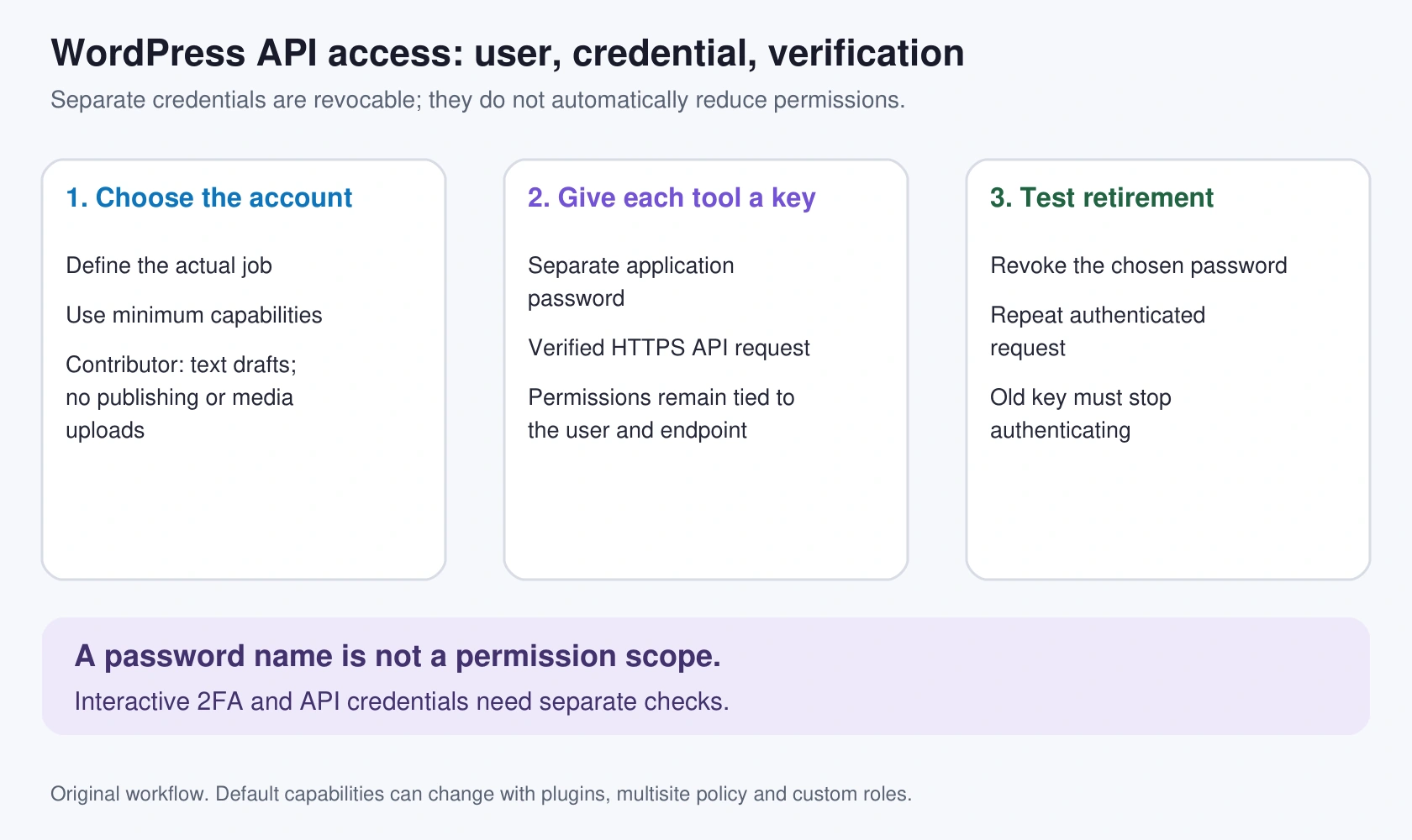
Choose permissions before generating a key
Create a dedicated integration user with an email address your organization controls. Give it the minimum capabilities required for the actual workflow.
- Read public posts: first check whether anonymous REST access is enough. A password may be unnecessary.
- Create text drafts for human review: the default Contributor role is a useful starting point. It can create its own drafts but cannot publish posts or upload media.
- Create and publish its own posts: Author can fit, but that is materially broader access.
- Manage other people's content: Editor is broader still.
- Upload media but never publish: review a custom capability set with a developer rather than choosing Administrator for convenience.
These are default-role examples from WordPress's capabilities documentation. Plugins, multisite policy and custom roles can change the effective permissions. Verify what the integration can actually do.
Separate accounts can reduce the effects of compromise, but public-content access and all capabilities of the chosen account remain relevant. Our AI-agent access guide discusses the same issue for automated website tools.
Check HTTPS and the REST route first
Use your own site's final URL in these examples:
curl --silent --show-error --dump-header - --output /dev/null \
  https://example.com/
Inspect the status and any Location header. Certificate failures need investigation: expiry, wrong hostname, chain problems or your local trust/proxy configuration are different causes. Do not add -k to an authenticated request.
Then check the public REST index:
curl --silent --show-error https://example.com/wp-json/A JSON response establishes route access, not authenticated access. If /wp-json/ returns a theme 404, a useful rewrite diagnostic is:
curl --silent --show-error 'https://example.com/?rest_route=/'If the query route works and the pretty route fails, investigate permalink/rewrite configuration with the host. Do not change credentials to fix a missing route.
Generate one password per integration
In Users, open the profile/edit screen for the dedicated integration user. Find Application Passwords, enter a descriptive name such as draft-import on staging, and generate a new password.
Store the displayed credential in your approved password or secrets manager immediately. The application-password reference describes password disclosure on creation; it is not a retrievable clear-text secret later. If it is lost, revoke the entry and create another.
Use a separate password for each independently managed tool or environment. Keep an owner, purpose and retirement date alongside it. Do not paste credentials into repository files, article screenshots, issue comments or support messages.
If the section is absent, check whether WordPress correctly detects HTTPS and whether a plugin or policy disables availability. Administrators and normal users have different management permissions; do not assume every user can manage every other user's passwords.
Test identity with a password prompt
For a manual test, let curl ask for the password instead of placing it in a command argument:
curl --silent --show-error --user api-draft-import \
  'https://example.com/wp-json/wp/v2/users/me?context=edit'
Replace api-draft-import with the integration username. At curl's prompt, enter the application password. The curl manual documents prompting when only a username is supplied.
Inspect the HTTP response when diagnosis needs a status code; add --dump-header - to the command. A successful result should identify the intended user. An HTML challenge or login page is not equivalent to authenticated REST JSON.
These Bash commands use line continuations for readability. On Windows PowerShell, call curl.exe and put the command on one line; Bash's trailing backslash is not PowerShell continuation syntax.
The prompt avoids typing the password into shell history or embedding it in the command's argument string. It does not remove the need for a trusted computer and appropriate secret handling. For unattended jobs, use the automation system's protected secret mechanism and prevent request-header logging.
Prove draft creation before enabling publishing
Run this only against a site you control, preferably staging. It creates a database record even though the post is not public:
curl --silent --show-error --user api-draft-import \
  --request POST 'https://example.com/wp-json/wp/v2/posts' \
  --header 'Content-Type: application/json' \
  --data '{"title":"Integration verification draft","content":"Temporary draft for an authorized API check.","status":"draft"}'
The Posts reference documents the create route and draft status. Record the returned ID, then open the WordPress post list and confirm the status and author. Delete the temporary draft through the normal editorial workflow when the check is complete.
Do not substitute publish for this test. An accidental publication can trigger RSS, indexing, subscriptions or connected workflows. Draft-only access and an editorial review gate are separate controls; confirm both if that is your intended design.
For media or custom post types, run a separate authorized test. Successful text-draft creation does not prove access to uploads, private posts or plugin-defined endpoints.
Verify revocation deliberately
For an initial setup check, use a disposable test application password. After the identity test works, revoke that specific entry from the user's Application Passwords section. Repeat the same identity request with the old credential and confirm it no longer authenticates.
If the credential still authenticates, investigate whether a different password, cached response, browser cookie or separate authentication layer is being used. Do not declare revocation effective from a successful button click alone.
Create the operational password separately after the test. Revoking one application password does not delete its user, revoke all that user's other passwords or undo changes the integration already made.
The API also exposes password-management and introspection routes. Use its returned UUID and current reference when automating management. Prefer the UI for a one-off revocation; a bulk-delete route is unnecessary for this check.
Troubleshoot by response, not by guesswork
A 401 or authentication error
Possible causes include an incorrect username/password, a revoked credential, disabled application passwords, dropped Authorization headers or another access layer requiring authentication. Read the WordPress JSON error code and compare with server/WAF logs. A 401 alone does not prove that the web server stripped the header.
Check the final hostname and the dedicated user first. Do not send the credential to an unrelated endpoint to “test” it.
A 403 or permission error
Authentication may have succeeded while the operation is not allowed. Review the capability required by that endpoint, the current user's role and security-plugin/WAF policy. Raise permissions only when the workflow justifies them. Switching every failing integration to Administrator hides the design problem.
Authorization does not reach PHP
Have the host confirm the header path before editing server configuration. Never include the real header value in a ticket or diagnostic log.
On an Apache CGI deployment, WordPress's REST API FAQ discusses forwarding the header to PHP. In a permitted .htaccess context, an administrator may use:
<IfModule mod_setenvif.c>
  SetEnvIf Authorization "(.*)" HTTP_AUTHORIZATION=$1
</IfModule>
Back up the file and keep access to restore it. Confirm permitted overrides/modules with the host; a skipped IfModule block does not establish that authentication is fixed. Panel-generated rules may already handle this.
For Nginx and PHP-FPM, request parameters are a different direction from response headers. An administrator reviewing an affected PHP location may need:
fastcgi_param HTTP_AUTHORIZATION $http_authorization;The Nginx FastCGI documentation explains parameter passing and inheritance. Review existing includes and parameter definitions before adding it. fastcgi_pass_header Authorization concerns response-header forwarding; it is not a replacement for ensuring the request credential reaches PHP.
Validate the configuration, then reload through the server's normal change process only if validation passes. On managed cPanel, Plesk or DirectAdmin hosting, ask where supported custom directives belong rather than editing generated configuration.
Keep interactive login and API access separate
Enable strong interactive login protection for people; our hosting and WordPress 2FA guide covers that path. Do not assume browser 2FA prompts will also challenge application-password requests. Review how your actual security plugin handles API credentials.
WordPress records metadata such as last use and last IP, but these fields are not a complete audit trail or immediate activity feed. Keep appropriate application/server audit evidence for consequential operations.
For a handoff, record the integration owner, dedicated account, effective capabilities, secret location, tested operations and revocation procedure. Give the tool the access its job requires, and give the humans a way to turn it off.
The HTTP examples in this guide are proposed checks against your own installation. We did not execute them against a customer WordPress account or create a production API user during this editorial review.
Reader questions
Can an application password log in to wp-admin?
Core application passwords authenticate API requests, including REST and XML-RPC. They are not ordinary interactive wp-admin login passwords.
Can I make one application password read-only by naming it read-only?
No. Core application passwords are tied to the user's capabilities and endpoint permission checks. A name does not create a separate permission scope.
Which default role fits text-draft imports?
Contributor is a starting point for creating its own text drafts without publishing or uploading media. Verify effective capabilities because plugins, multisite and custom roles can change them.
Does browser two-factor authentication protect API passwords automatically?
Do not assume so. Check how the actual security plugin and API authentication path handle application passwords; interactive login and API credentials are distinct.
Does a 401 prove that Authorization was stripped?
No. Incorrect or revoked credentials, disabled availability, a missing header and another authentication layer are possible causes. Inspect the response and relevant host evidence before changing configuration.
How do I verify revocation?
First prove a disposable credential authenticates. Revoke that specific entry, then repeat the same authenticated identity request using the old credential and confirm it no longer authenticates.
Sources & further reading
- WordPress REST authentication
- WordPress 5.6 release, 8 December 2020
- WordPress roles and capabilities
- WordPress Application Passwords reference
- WordPress Users REST reference
- WordPress Posts REST reference
- WordPress REST API FAQ
- Nginx FastCGI parameter and header behavior
- curl manual: authentication and options
What changed
Rewritten and verified on 12 October 2026 before first publication. Corrects default-role advice, credential prompting, revocation checks and Nginx request-header handling. Adds an original cover and permissions diagram. Bash syntax checked; remote API examples were not executed against a customer's site.
Originally published . About our editorial updates.