VPS for n8n:Docker Setup, Private Database and Recovery Planning
Plan a self-hosted n8n VPS with a Docker Compose template, PostgreSQL, HTTPS, current webhook settings, protected keys and a realistic recovery process.
On this page
The short answer
A VPS for n8n needs enough memory for the complete workflow stack, persistent storage, an HTTPS endpoint and a recoverable database and encryption key. Workflow count alone is not a sizing rule. Start with one instance, test representative executions, and add queue workers only when measurements justify the added operational complexity.
Before you start
Authorized Linux VPS access, Docker Engine and Compose, a domain, reviewed compatible image versions and private secrets. The deployment example is unexecuted.
The easiest installation is not always the easiest system to recover. A workflow can look fine in the editor while its public webhook points to the wrong address, its execution history fills the disk, or its saved credentials depend on a key that was never backed up.
Decide whether self-hosting fits your team
The official n8n Docker Compose guide assumes server-administration skills. Someone must own updates, backups, access control and incident response. If nobody owns those tasks, compare a managed option rather than assuming a VPS is cheaper overall.
n8n's Sustainable Use License restricts permitted use. Do not assume that a self-hosted installation grants permission to sell hosted n8n access. Check the applicable license and commercial arrangement for your business model.
Size the jobs, not the number of workflows
Workload characteristic | What to measure | What may need attention |
|---|---|---|
Large spreadsheet or document processing | Peak memory per active execution | Memory use, file handling and concurrency |
Many scheduled jobs at the same minute | Simultaneous executions and completion delay | Scheduling spread, CPU and downstream API limits |
File-heavy automations | Stored binary data and disk growth | Retention, permitted storage backend and backups |
Slow external APIs | Waiting time, retries and queue depth | Timeouts, retry policy and idempotent actions |
There is no tested RAM recommendation in this article. A useful pilot runs your actual workflow with representative data, including an expected busy period. Record peak usage before picking the production plan.
Example: one n8n instance, PostgreSQL and Caddy
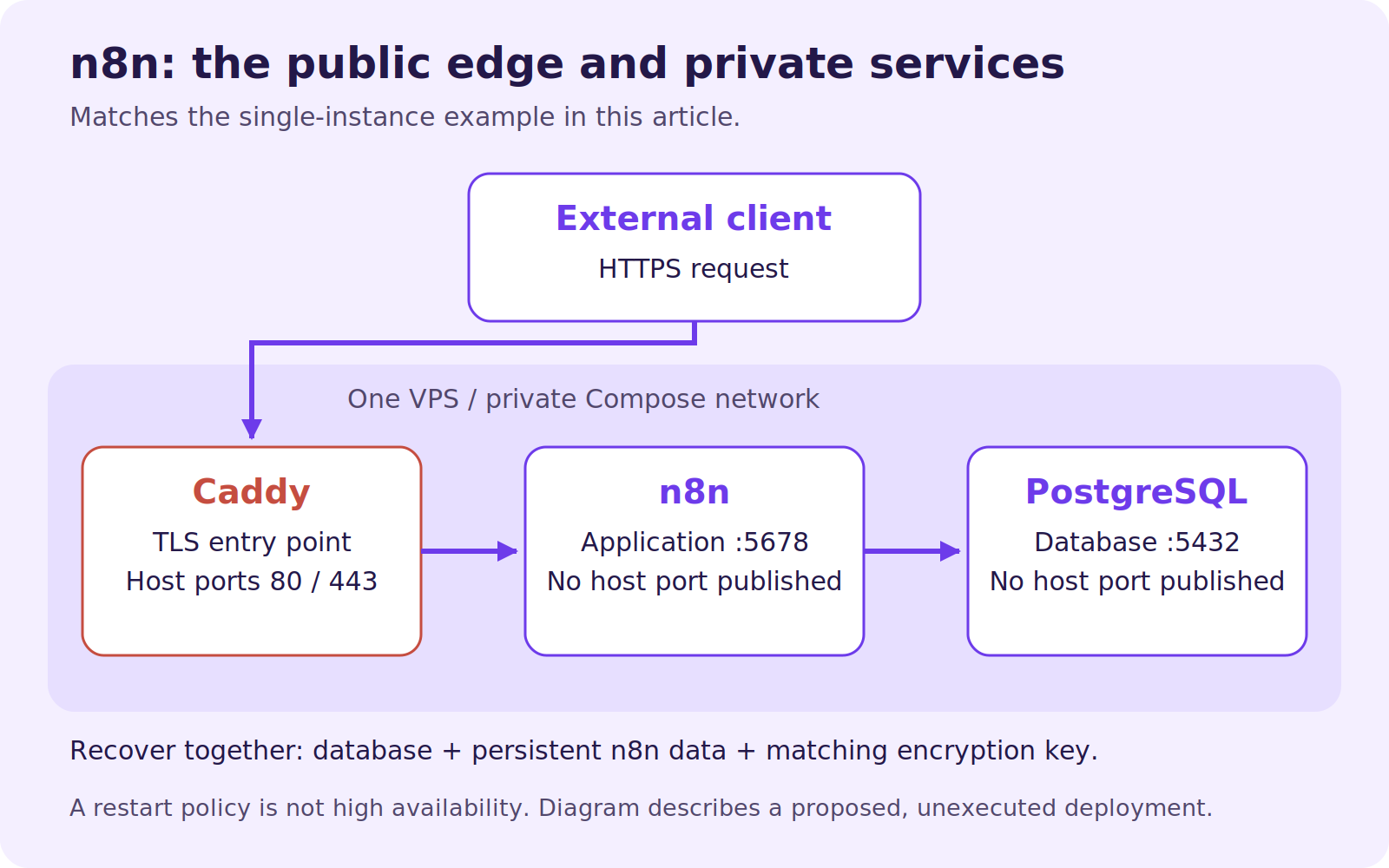
The following is an unexecuted deployment template, not a tested Hostlelo installation. It assumes a current compatible n8n release with N8N_WEBHOOK_URL support, supported PostgreSQL, Docker Engine and the Compose plugin on Linux. Select reviewed, pinned image versions or digests before use. The placeholders deliberately prevent a blind deployment using unspecified versions.
Use a new hostname such as n8n.example.com, point its DNS to the VPS and allow inbound HTTPS plus the HTTP access needed for your chosen certificate validation. Review IPv6 records too. Keep SSH restricted through your normal access policy.
Create a private .env file containing these keys and real values; do not commit it:
N8N_IMAGE=docker.n8n.io/n8nio/n8n:REPLACE_WITH_REVIEWED_VERSION
POSTGRES_IMAGE=postgres:REPLACE_WITH_SUPPORTED_VERSION
CADDY_IMAGE=caddy:REPLACE_WITH_REVIEWED_2_X_VERSION
N8N_DOMAIN=n8n.example.com
POSTGRES_PASSWORD=REPLACE_WITH_A_LONG_RANDOM_SECRET
N8N_ENCRYPTION_KEY=REPLACE_WITH_A_SEPARATE_LONG_RANDOM_SECRET
Use separate secrets and preserve the encryption key through upgrades and restores. n8n encrypts stored credentials; a restored database without its matching key is not a complete credential recovery.
Save this as compose.yaml:
services:
  postgres:
    image: ${POSTGRES_IMAGE:?Set POSTGRES_IMAGE}
    restart: unless-stopped
    environment:
      POSTGRES_DB: n8n
      POSTGRES_USER: n8n
      POSTGRES_PASSWORD: ${POSTGRES_PASSWORD:?Set POSTGRES_PASSWORD}
    volumes:
      - postgres_data:/var/lib/postgresql/data
    healthcheck:
      test: ["CMD-SHELL", "pg_isready -U n8n -d n8n"]
      interval: 10s
      timeout: 5s
      retries: 10
  n8n:
    image: ${N8N_IMAGE:?Set N8N_IMAGE}
    restart: unless-stopped
    depends_on:
      postgres:
        condition: service_healthy
    environment:
      DB_TYPE: postgresdb
      DB_POSTGRESDB_HOST: postgres
      DB_POSTGRESDB_PORT: "5432"
      DB_POSTGRESDB_DATABASE: n8n
      DB_POSTGRESDB_USER: n8n
      DB_POSTGRESDB_PASSWORD: ${POSTGRES_PASSWORD:?Set POSTGRES_PASSWORD}
      N8N_ENCRYPTION_KEY: ${N8N_ENCRYPTION_KEY:?Set N8N_ENCRYPTION_KEY}
      N8N_HOST: ${N8N_DOMAIN:?Set N8N_DOMAIN}
      N8N_PORT: "5678"
      N8N_PROTOCOL: https
      N8N_WEBHOOK_URL: https://${N8N_DOMAIN}/
      N8N_PROXY_HOPS: "1"
      GENERIC_TIMEZONE: Asia/Dubai
      TZ: Asia/Dubai
    volumes:
      - n8n_data:/home/node/.n8n
  caddy:
    image: ${CADDY_IMAGE:?Set CADDY_IMAGE}
    restart: unless-stopped
    environment:
      N8N_DOMAIN: ${N8N_DOMAIN:?Set N8N_DOMAIN}
    ports:
      - "80:80"
      - "443:443"
    volumes:
      - ./Caddyfile:/etc/caddy/Caddyfile:ro
      - caddy_data:/data
      - caddy_config:/config
volumes:
  postgres_data:
  n8n_data:
  caddy_data:
  caddy_config:
This PostgreSQL volume target is for a compatible image using that data layout, such as PostgreSQL 16 or 17. The official image documentation changes the default layout from PostgreSQL 18; check the chosen image before substituting a different major version. This minimal example gives n8n the database's bootstrap account. Before a production deployment, create a separate least-privilege application role and keep its credentials separate from the administrator's.
Save a Caddyfile beside it:
{$N8N_DOMAIN} {
    reverse_proxy n8n:5678
}
Only Caddy publishes host ports. PostgreSQL and n8n communicate on the Compose network. Read Caddy's reverse-proxy documentation and the n8n proxy settings when adapting this topology. N8N_PROXY_HOPS=1 assumes exactly this one-proxy path; adding a CDN changes the trust design.
After replacing every placeholder and reviewing release compatibility:
chmod 600 .env
docker compose config --quiet
docker compose pull
docker compose up -d
docker compose ps
docker compose logs --tail=100 n8n
Avoid printing resolved configuration or posting logs publicly: they can contain secrets or workflow data. Complete owner-account setup promptly and restrict editor access appropriately.
Verify the public workflow path
Create a harmless test workflow that receives a unique identifier and records or returns it. Use its production webhook URL with the workflow published or active as required by the chosen release. Do not confuse the editor's temporary test URL with the production endpoint.
Check HTTPS, the displayed webhook hostname and an external request. Confirm one intended execution. Then retry deliberately and check that the workflow cannot duplicate a consequential business action. Do not test using a real payment or a destructive production operation.
The current proxy documentation uses N8N_WEBHOOK_URL; older tutorials commonly use WEBHOOK_URL. Verify the supported setting for the release you deploy rather than mixing generations of configuration.
Back up enough to restore
Back up PostgreSQL with a database-consistent method, preserve n8n's persistent data and retain the matching encryption key through a protected secret-backup process. Include configuration, required file data and pinned version information. Store a recovery copy separately from the VPS.
A workflow export is useful, but it is not a complete database, credential and execution-state backup. Test recovery in an isolated environment with outbound workflows disabled before reconnecting production credentials.
Review execution-data retention. Decide what evidence you need to troubleshoot and how long sensitive payloads should remain. Do not keep everything indefinitely by accident.
Scale after finding the bottleneck
Queue mode adds Redis and workers sharing database access and the correct encryption key. Follow its current database, binary-data and feature requirements. A larger worker pool cannot fix a downstream API quota.
Before ordering a Cloud VPS, describe your workflow sizes and operating responsibilities. For the broader design, read hosting AI-agent applications.
Reader questions
How much RAM does n8n need on a VPS?
It depends on workflow data, concurrent executions and the surrounding services. Measure a pilot including the database and proxy; workflow count is not a reliable memory estimate.
Does Docker automatically back up n8n?
No. Volumes persist data across container replacement, but you still need a consistent backup, protected keys and a tested restore procedure.
Why does the editor work but my webhook fail?
Check the public URL setting, proxy path, DNS, TLS and whether you are using an enabled production webhook. An accessible editor does not prove the external trigger path works.
Sources & further reading
Originally published . About our editorial updates.