TypeSafe Jev and Cloudflare Clef: System One AI explained with demos
Understand TypeSafe Jev, Cloudflare Clef and System One AI with current pricing, API demos, hosting use cases, calibration examples and runnable Python examples.
The short answer
TypeSafe Jev and Cloudflare Clef turn a state and typed questions into structured decisions and probabilities. Use Choice for routing, Score for a defined rubric, and Noul for a yes/no judgment. Jev currently evaluates text; Clef adds vision and open weights. This guide explains their working, current prices and limits, five demos, hosting use cases and how to validate confidence before enabling automation.

Reading options
On this page
- What are TypeSafe, Jev and System One?
- Why use a decision model when you already have an LLM?
- The input is a state, not just a prompt
- The three question types: Choice, Score and Noul
- Demo 1: classify a hosting ticket with Jev
- Probability, confidence and calibration are different things
- Demo 2: turn answers into a controlled routing decision
- What is Cloudflare Clef, and how does it work?
- Jev vs Clef vs Clef-flash: current facts
- Demo 3: use the same questions with Cloudflare Workers AI
- Demo 4: a screenshot judgment with local Clef
- Is Clef better? Read the benchmark as evidence, not a verdict
- Practical hosting and business use cases
- How to evaluate and deploy this properly
- Demo 5: a minimal Python adapter you can run
- Which should you try first?
- Reader questions
- Sources & further reading
Disclosure: This post covers TypeSafe Jev, a product by the author (Juber Shaikh). It describes the system's design and capabilities from the creator's perspective, rather than an independent review.
Fact-checked on 3 October 2026. Prices are in USD. Product limits and model aliases can change.
A hosting customer writes: “My website opens, but checkout has been failing for an hour. I cannot take orders.”
Your application needs several answers immediately. Is this urgent? Which team owns it? How much customer impact is there? A chat model can write a useful reply, but those decisions should also be values your software can inspect.
That is where TypeSafe's Jev and Cloudflare's Clef fit. You send the situation and a set of typed questions. They return bounded answers and probabilities. Your application uses those answers to choose its next step.
This guide explains the idea, compares the products, and builds a small hosting-support demo. The hosting scenarios are proposed designs, not claims that Hostlelo already runs these models in production. All example probabilities are explicitly illustrative.
What are TypeSafe, Jev and System One?
TypeSafe AI is the company and API platform. Jev is its flagship decision model. System One is the term TypeSafe uses for models that make fast, focused judgments for software instead of generating conversational text. Here, TypeSafe means TypeSafe AI; it is not a TypeScript type-checking utility.
The useful contract is: provide context, define the permitted answers, receive structured results. Jev does not write the support reply or execute a refund. It supplies judgments that your code can combine with ordinary checks. TypeSafe introduction · System One concept.
The name draws on the fast-versus-deliberate thinking distinction popularised by Daniel Kahneman. That is an engineering analogy. It is not evidence that these models reproduce human cognition.
Consider a support workflow with three possible destinations: a fixed knowledge-base answer, a specialist reasoning model, or a person. A decision model can select among them. The receiving handler still has to do the work.
Why use a decision model when you already have an LLM?
The choice depends on the task, not the size of the model.
Task | Sensible starting point | Reason |
|---|---|---|
Check whether a certificate expires in seven days | Ordinary code | The expiry date and comparison are exact |
Understand whether a message asks for a migration | Decision model | The same intent appears in many phrasings |
Write a migration plan and explain trade-offs | Generative or reasoning model | The answer is open-ended |
Diagnose a fresh production incident | Tools, telemetry and an engineer or reasoning model | Evidence must be gathered and hypotheses tested |
Decide whether an action is authorised | Permission and policy checks in code | Model confidence cannot grant access |
An LLM with constrained JSON output can also classify messages. That is a valid baseline. The reason to test a specialised decision model is its output contract, measured quality, latency and total cost on your workload. JSON syntax alone says nothing about whether a classification is right.
Likewise, a conventional classifier trained on your own labels may be the better choice for a stable, narrow task. Decision models are especially interesting when you want to describe changing categories in a request and avoid building a separate classifier for every small judgment.
The practical architecture is a combination: deterministic code for exact facts, a decision model for narrow language judgments, a reasoning model for difficult synthesis, and a person where judgment or authority is needed.
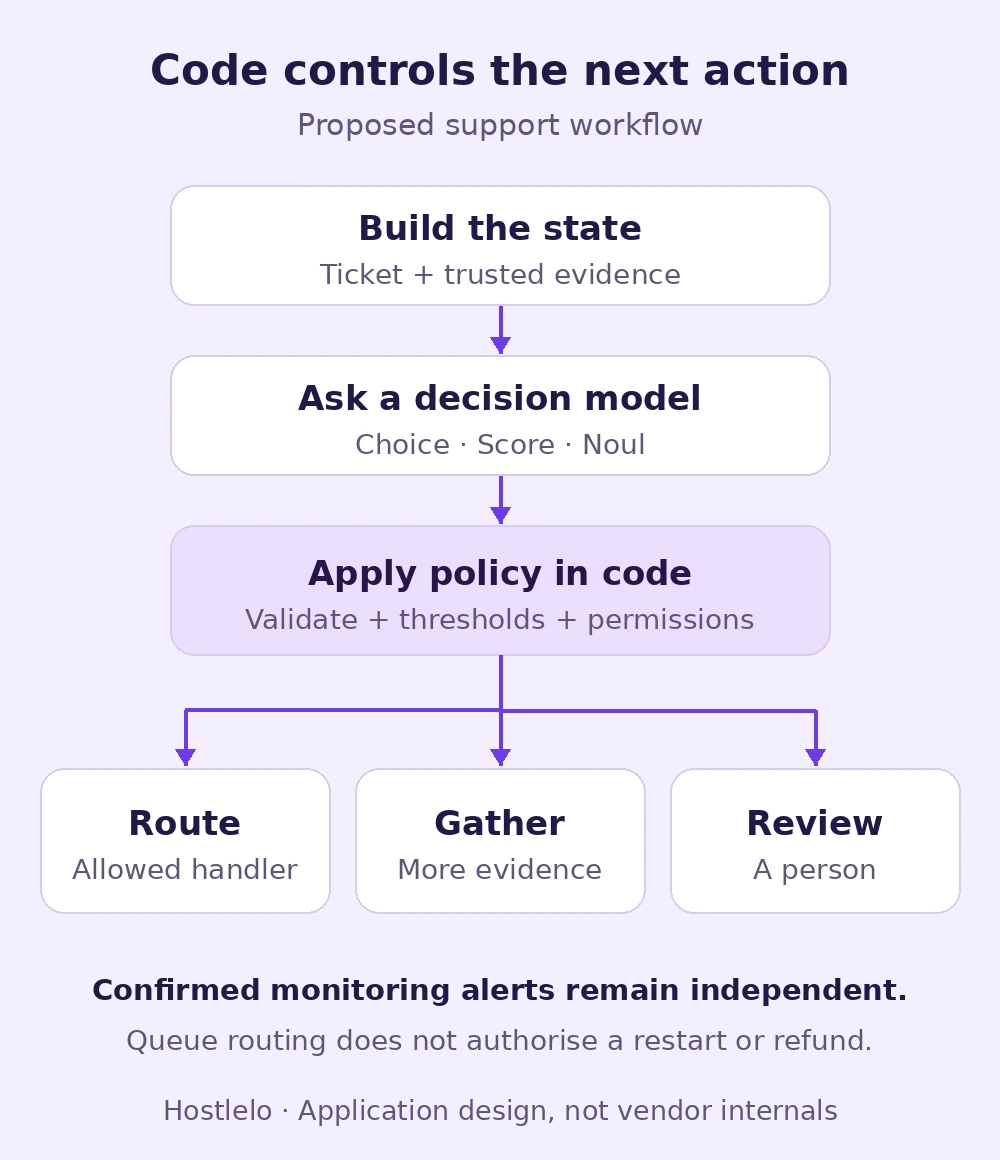
An application design, not a diagram of either vendor's internal model. The policy gate belongs to your software.
The input is a state, not just a prompt
State is the situation being evaluated. Give the model the material needed to answer the question, with clear boundaries between customer text, trusted telemetry and policy. TypeSafe accepts text and structured JSON as state. State documentation.
For our example, the state can be:
{
  "ticket": {
    "message": "Checkout has failed for an hour. Customers cannot pay."
  },
  "monitoring": {
    "checked_at": "2026-10-03T13:55:00Z",
    "confirmed_outage": true,
    "checkout_http_status": 503
  },
  "policy": {
    "automatic_actions": ["tag_ticket", "assign_support_queue"],
    "restricted_actions": ["restart_server", "refund", "change_dns"]
  }
}
The monitoring fields are invented demo data. In a real integration, populate them from your monitoring system, with timestamps and the relevant service identity. A customer's statement that “all servers are down” is a report to investigate, not the same evidence as a verified health check.
Do not paste the entire account history into every request. Select the current conversation, necessary facts and relevant policy. Fresh, compact context is easier to debug. Exact entitlement, balance and permission checks should remain in code even if those facts also appear in the state.
The three question types: Choice, Score and Noul
TypeSafe's primitives describe different answer spaces. They can be mixed in one request. Primitive overview.
Primitive | Question in a hosting app | Useful result |
|---|---|---|
Choice | Which queue should receive this ticket? | One allowed label plus probabilities for every label |
Score | What level of customer impact does the evidence describe? | A position on an ordered rubric, with a distribution over its levels |
Noul | Does this message request a human? | A number from 0 to 1 representing the probability of “yes” |
Choice: pick an option your code understands
Define technical, billing, sales and other. Describe what each includes. Always consider a fallback for requests outside your categories. Without one, a model may confidently choose the least unsuitable answer.
For overlapping responsibilities, ask more than one question. “Which queue owns the main issue?” and “Does billing also need to review it?” express the workflow better than forcing a multi-team ticket into one label. Choice reference.
Score: describe every level
A four-level impact rubric might be:
- No customer-visible impact.
- A minor inconvenience with a working alternative.
- A core feature is blocked for some customers.
- A core feature is blocked broadly, with no working alternative.
The API indexes these levels from zero. A returned score can be between levels because it is probability-weighted. It is not automatically an integer incident priority. Your application maps the rubric to its own incident policy. Score reference.
Avoid a vague rubric such as “bad, okay, good”. Two engineers should be able to look at a labelled example and explain why its level is appropriate.
Noul: ask one clear yes/no proposition
“Does the customer explicitly ask to speak to a person?” is clearer than “Does this need escalation?” The latter combines urgency, technical complexity, policy and tone.
A Noul of 0.5 means similar probability for yes and no. It does not mean medium severity. Noul has no separate confidence field. Noul reference.
One subtle point: TypeSafe says questions in a batch are evaluated independently. If question B depends on the answer to A, handle that dependency in your application or make a second request. Do not assume the model runs your questions as a sequential program.
Demo 1: classify a hosting ticket with Jev
Create ticket-request.json with the following content. The questions ask for bounded judgments; none requests an essay or permission to change infrastructure.
{
  "model": "jev-1.13.0",
  "state": {
    "ticket": {
      "message": "Checkout has failed for an hour. Customers cannot pay."
    }
  },
  "questions": {
    "department": {
      "type": "choice",
      "instructions": "Which queue owns the main issue in `ticket.message`?",
      "criteria": {
        "technical": "Outages, application errors and configuration issues.",
        "billing": "Invoices, charges and refund requests.",
        "sales": "Plans, quotes and upgrades.",
        "other": "Unclear or outside these queues."
      }
    },
    "urgent": {
      "type": "noul",
      "instructions": "Does `ticket.message` report an ongoing failure blocking a core customer activity?"
    },
    "impact": {
      "type": "score",
      "instructions": "Rate the customer impact described in `ticket.message`.",
      "criteria": [
        "No customer-visible impact",
        "Minor inconvenience with a working alternative",
        "A core feature blocked for some customers",
        "A core feature broadly blocked with no working alternative"
      ]
    }
  }
}
Load your key through your normal secret manager into TYPESAFE_API_KEY. Keep it on the backend. Then call the documented endpoint:
curl --fail-with-body --max-time 30 \
  https://api.typesafe.ai/v1/systemone \
  -H "Authorization: Bearer $TYPESAFE_API_KEY" \
  -H "Content-Type: application/json" \
  --data-binary @ticket-request.json
The request and response contract is in the HTTP API reference. A versioned ID is useful for reproducibility. jev-latest is convenient for exploration, but it can change when a release ships.
Here is a hand-written, illustrative excerpt of the answer shape. These are not recorded Jev results; the excerpt omits the impact answer and usage metadata.
{
  "model": "jev-1.13.0",
  "answers": {
    "department": {
      "type": "choice",
      "choice": "technical",
      "probabilities": {
        "technical": 0.96,
        "billing": 0.01,
        "sales": 0.01,
        "other": 0.02
      },
      "confidence": 0.9466667
    },
    "urgent": {
      "type": "noul",
      "noul": 0.99
    }
  }
}
Your code could tag this ticket as technical and put it into a priority queue. It should still verify the incident against telemetry before making operational changes. This distinction prevents “the customer sounds urgent” from becoming “restart a production service”.
Probability, confidence and calibration are different things
The probability of the selected answer is one number in a distribution. TypeSafe's Choice confidence is a separate summary of how far the top probability exceeds an even split. Its documented formula is:
Choice confidence = (p_max - 1/n) / (1 - 1/n)Here, n is the number of options. With four options and a top probability of 0.75, confidence is about 0.667, not 0.75. Confidence documentation.
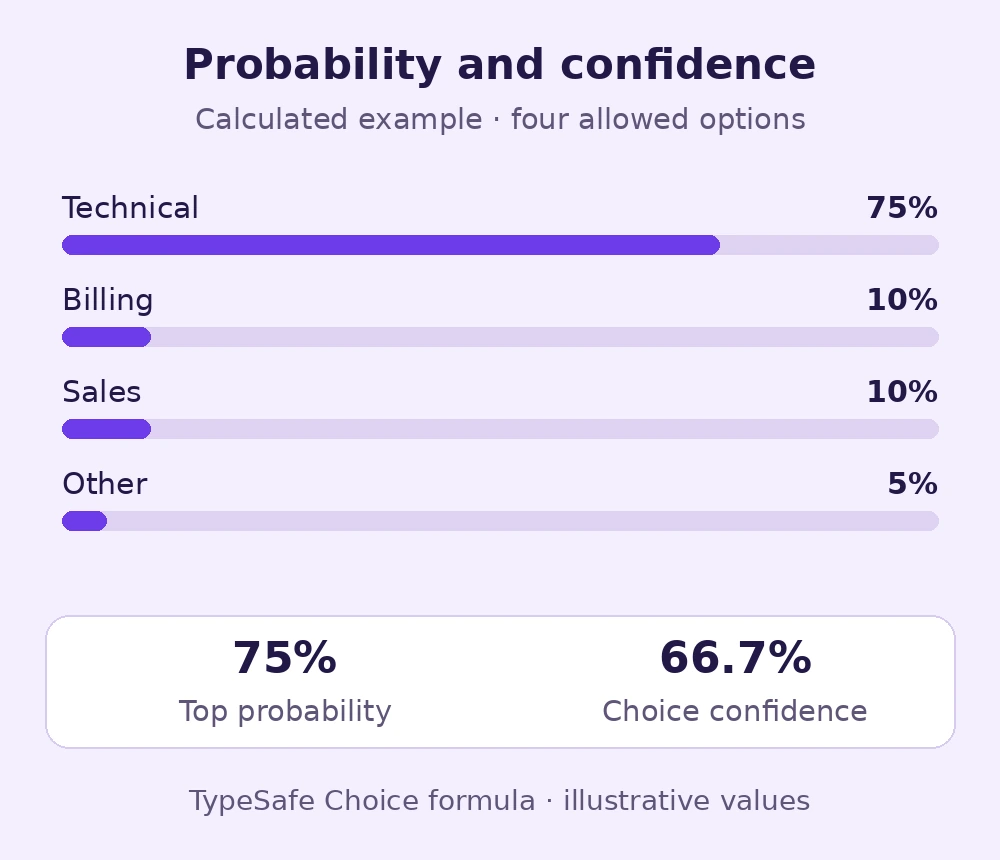
Calculated example, not a vendor benchmark. Confidence is a distribution statistic, not a guarantee that the label is correct.
Calibration concerns many predictions. If a model assigns an event probability near 80% across a comparable set of cases, the event should occur about 80% of the time. That is a statistical property to measure, not a promise about one ticket.
TypeSafe describes Reinforcement Learning for Calibrated Decisions, or RLCD, as its training approach. The goal is to make probabilities useful to software rather than optimise a fluent answer. TypeSafe AI primer.
Our engineering recommendation is to measure both accuracy and calibration on your own labels. A model can rank cases well yet need a different threshold. Changing the wording, categories, language or model version can change that behaviour.
Demo 2: turn answers into a controlled routing decision
This Python function handles the answer excerpt above. It deliberately uses the full probability distribution and a top-versus-second-place margin. Its thresholds are demo settings, not certified operating limits.
import math

ALLOWED = {"technical", "billing", "sales", "other"}

def decide(answers, confirmed_outage=False):
    # Trusted monitoring can trigger an incident even if AI is unavailable.
    if confirmed_outage:
        return "technical_incident_queue"
    try:
        result = answers["department"]
        probabilities = result["probabilities"]
        urgent = answers["urgent"]["noul"]
        if set(probabilities) != ALLOWED:
            return "human_review"
        values = list(probabilities.values()) + [urgent]
        if any(isinstance(v, bool) or not isinstance(v, (int, float))
               or not math.isfinite(v) or not 0 <= v <= 1 for v in values):
            return "human_review"
        if not math.isclose(sum(probabilities.values()), 1.0, abs_tol=0.001):
            return "human_review"
        ranking = sorted(probabilities.items(), key=lambda x: x[1], reverse=True)
        department, top = ranking[0]
        if result["choice"] != department:
            return "human_review"
    except (KeyError, TypeError, AttributeError, ValueError):
        return "human_review"

    if department == "other" or top < 0.90 or top - ranking[1][1] < 0.35:
        return "human_review"
    if 0.20 < urgent < 0.90:
        return "human_review"
    priority = "priority" if urgent >= 0.90 else "normal"
    return f"{department}_{priority}_queue"
The monitor override comes before model validation so that a broken model response cannot suppress a confirmed outage. To exercise this gate, try mock responses for a clear ticket, an ambiguous ticket, an outside-category request, invalid probabilities and a provider failure. Keep those illustrative values separate from recorded provider outputs.
The output is a queue name. A separate service performs a permitted assignment. A restart, refund, account suspension or DNS change needs its own permission checks, evidence, limits and approval policy.
For an ambiguous message such as “You charged me again and now my site does not open”, a sensible result is review or a request for more evidence. Which incident actually needs urgent attention cannot be established from phrasing alone.
What is Cloudflare Clef, and how does it work?
Cloudflare announced Clef and Clef-flash on 1 October 2026. Both are decision models available through Workers AI, with open weights under Apache 2.0. Cloudflare also announced a hands-on fine-tuning service; its self-service platform was described as future work in the launch post. Cloudflare announcement.
Clef's published design uses a Qwen backbone to read the input, then a specialised head to score the allowed answers. It does a prefill-only backbone pass and scores schema options without generating a token-by-token explanation. The launch description includes attention routing, low-rank adapters and calibration-oriented training.
Put simply: the model represents the situation, connects evidence to the typed questions, and assigns scores to the permitted options. Converting those scores into probabilities gives the application a usable distribution. Fast decision output still involves substantial neural-network computation; it is not a lookup table.
The larger Clef uses Qwen3.8-27B; Clef-flash uses Qwen3.5-9B. The model cards publish a joint schema head and a dedicated SystemOne interface. Clef model card · Clef-flash model card.
A useful difference is vision. Clef can judge visual evidence, such as an error screenshot or receipt, whereas the current Jev API accepts text. For a hosting portal, that opens a practical path from “customer attached a screenshot” to a bounded question such as “is a certificate warning visible?”
Jev vs Clef vs Clef-flash: current facts
Property | Jev 1.13 | Clef | Clef-flash |
|---|---|---|---|
Provider | TypeSafe AI | Cloudflare | Cloudflare |
Hosted selector | jev-1.13.0 | @cf/cloudflare/clef | @cf/cloudflare/clef-flash |
Request model value | jev-1.13.0 | clef | clef-flash |
Current documented input | Text and JSON | Text, JSON and vision | Text, JSON and vision |
Context limit | 64k total; state plus longest question ≤32k | 65,536 tokens hosted | 65,536 tokens hosted |
Listed input price per million tokens | $0.042 | $0.24 | $0.09 |
Published backbone size | Not established here | 27B | 9B |
Published weights | No public weights verified here | Apache 2.0 release | Apache 2.0 release |
Sources: TypeSafe models, Workers AI Clef, Workers AI Clef-flash. This table is a dated snapshot, not a quotation for a particular account. TypeSafe states that output tokens are free.
The Jev context distinction matters. You cannot infer that one 60k-token state fits just because the total request budget is 64k. Check both limits. Similarly, a local Clef loader's configured length is not automatically the hosted limit; the model card documents separate encoding settings.
For a hypothetical 10,000 requests averaging 1,200 billed input tokens, total input is 12 million tokens. Applying the listed rates gives $0.504 for Jev, $2.88 for Clef and $1.08 for Clef-flash. This arithmetic excludes other services, account allowances, retries and any vision-specific accounting. Actual billing follows provider metering.
Your complete budget includes context fetching, any OCR, reasoning-model calls, monitoring, storage and human review. A low input-token price is useful, but it does not describe the cost of the whole workflow.
Demo 3: use the same questions with Cloudflare Workers AI
The decision schema is compatible, but the hosted endpoint, authentication, selector and response envelope are provider-specific. This is not a /v1/chat/completions request.
Save a copy of ticket-request.json as clef-request.json and change its model to clef-flash. With a Workers AI token and account ID supplied through your backend secret manager:
curl --fail-with-body --max-time 30 \
  "https://api.cloudflare.com/client/v4/accounts/$CLOUDFLARE_ACCOUNT_ID/ai/run/@cf/cloudflare/clef-flash" \
  -H "Authorization: Bearer $CLOUDFLARE_AUTH_TOKEN" \
  -H "Content-Type: application/json" \
  --data-binary @clef-request.json
Check the REST response's success indicator and extract its result before reading answers. In a Worker with an AI binding, call env.AI.run and use the returned model result directly. Clef-flash usage · Workers AI REST quickstart.
For the larger variant, change both the endpoint suffix to @cf/cloudflare/clef and the body's model to clef. Keep the questions constant when comparing providers. Record the returned model, the request configuration and wall-clock latency.
A provider swap should have an adapter and a regression evaluation. Compatible fields do not mean identical probabilities, calibration, limits or errors.
Demo 4: a screenshot judgment with local Clef
Suppose a customer uploads a screenshot of a browser warning. Ask whether a warning is visible and which category it belongs to. Do not ask the model to invent the site's certificate status; validate the certificate with a TLS check.
The local release uses its own loader and schema head. Once model and processor are loaded using the official release instructions, a visual record looks like this. See the dedicated schema-head source for the local interface:
from PIL import Image
from joint_schema_model import systemone

response = systemone(model, processor, {
    "model": "clef",
    "state": "Judge only the visible browser screenshot.",
    "images": [Image.open("browser-warning.png")],
    "questions": {
        "warning_visible": {
            "type": "noul",
            "instructions": "Is a browser security warning visibly present?"
        }
    }
})
print(response["answers"])
This is a local-library example, not a hosted request body. Workers AI uses its documented embedded-image format and does not accept remote image URLs for this model. Its current schema also limits images and request size. Check the provider reference before wiring up uploads.
The release card describes GPU testing, so a normal shared-hosting account is not the place to load 27B model weights. Call a hosted API from the application backend, or use an appropriately provisioned inference server. The screenshot example above was not GPU-executed for this article.
Do not assume Hugging Face's generic generated chat examples exercise Clef's decision head. Follow the release's dedicated joint_schema_model instructions. Multimodal capability in a model card also does not mean every hosted endpoint accepts arbitrary video files.
Is Clef better? Read the benchmark as evidence, not a verdict
Cloudflare reports strong results on its Decision Index run. The following small selection shows why a single winner label is not enough:
Task in Cloudflare's published run | Metric | Clef | Clef-flash | Jev |
|---|---|---|---|---|
BANKING77 | Macro-F1, higher is better | 94.2 | 90.9 | 79.7 |
API-Bank | Accuracy, higher is better | 91.9 | 93.1 | 88.2 |
When2Call | Accuracy, higher is better | 72.4 | 65.6 | 81.0 |
BRIGHT | nDCG@10, higher is better | 45.9 | 39.3 | 47.5 |
These are Cloudflare-reported results, not Hostlelo measurements. The Clef-flash release card describes the same comparative suite and metrics. Macro-F1, accuracy and retrieval ranking scores measure different things. Do not average this selection into a new leaderboard.
Separate evidence comes from a 29 September 2026 preprint evaluating Jev 1.13 across 37 datasets and 346,009 requests. It reports strong results on several classification and reasoning benchmarks, but weaknesses on low-resource languages, fine-grained labels and some rubric judgments. Its binary-probability results also show why a universal 0.5 cutoff is inadequate. Independent Jev evaluation.
A 28 September 2026 preprint proposes Sys1Cal-v1 and questions whether some binary outputs express uncertainty adequately. Its interpretation involves a missing “unknown” outcome. That is a research finding to investigate, not a universal proof of how Jev behaves on your tickets. Sys1Cal-v1 paper.
Neither paper is presented here as an established peer-reviewed conclusion. Together they support a sensible deployment habit: include unknown cases, test calibration, and measure the mistakes that matter to your application.
Practical hosting and business use cases

Original editorial illustration. The following workflows are implementation proposals.
1. Support queues and human handoff
Classify the main intent; separately check for a human request, repeated contact and an ongoing outage. A clear plan-upgrade question goes to sales. An explicit request for a person goes to a person. A mixed billing-and-availability complaint gets both the relevant evidence and an owner who can coordinate.
For WhatsApp support in the UAE, include representative English, Arabic, Hindi, Urdu and mixed-script messages in the evaluation. “Site nahi khul raha” and “checkout band hai” may describe different failures. Do not assume an English benchmark transfers unchanged to your customer base.
2. Retrieval and answer checking in a knowledge base
Retrieve candidate articles using your search system. Ask whether each passage addresses the user's specific question. Keep relevant passages for the answering model; return uncertainty when the evidence is missing.
Then compare important claims in the draft against the supplied source passages. “This source supports the claim” is a bounded judgment. “Find the newest policy on the internet” requires a retrieval tool. A decision model does not acquire fresh documents simply because its state contains a URL. TypeSafe publishes a citation-checking cookbook for the former pattern.
For example, a passage about installing SSL does not prove a particular customer's certificate renewed successfully. A runtime TLS check supplies that fact.
3. Tool selection in an agent
Present a closed menu: check certificate, inspect recent error logs, retrieve a knowledge-base article, or ask for more information. The model chooses a likely next diagnostic step; the application checks scope and executes only the permitted tool.
Keep tool arguments verifiable. A domain should come from a validated account record or a confirmed customer input, not an invented value. After the tool returns evidence, rebuild the state and ask the next narrow question. Selecting a tool is different from safely supplying all of its arguments.
4. Screenshot and document triage
Clef's vision support is interesting for visible error categories, invoice legibility, layout issues and whether a receipt contains a required field. A screenshot showing a timeout can justify a diagnostic route; it does not establish the network root cause.
For invoice processing, compare extracted amounts against exact invoice and payment records in code. Treat a visually plausible receipt as evidence to verify, not proof that funds arrived.
5. DevOps alerts and recovery proposals
Group an alert with recent deployment metadata and related errors. Ask whether the evidence resembles a known failure class, then attach a suggested runbook. A verified 503 spike should trigger the existing incident system even if the AI provider is unavailable.
Start with read-only diagnostics. Any automated recovery needs a separately designed execution policy: allowed service, action limits, lock ownership, rollback and post-action verification. The classifier is one component in that system, not the recovery mechanism itself.
6. Editorial and content operations
On a blog, decision models could flag unsupported pricing claims, classify article topics, identify a stale review date or route a technical draft for specialist review. Exact dates and links should still be checked by tools or code.
An AEO-oriented workflow might require a clear short answer, useful examples, named sources and visible uncertainty. A model can help flag missing pieces. It cannot promise search rankings or AI-answer citations. For broader context, see our guide to appearing in AI answers.
How to evaluate and deploy this properly
Build a labelled sample from the actual workload. Include easy cases, mixed intents, unknown categories, stale context, prompt-injection attempts and the languages customers use. Separate threshold tuning data from the final test set.
Compare four baselines where practical: current rules, a conventional classifier, your existing LLM with structured output, and the decision model. Use the same task definitions and evidence. Otherwise you are comparing prompts as much as models.
Measure:
- Accuracy or macro-F1 for the categories, plus the confusion matrix.
- Precision for automatically routed cases and the share of cases sent for review.
- Missed urgent incidents, false escalations and other costly errors separately.
- Calibration using probability bins and an appropriate scoring measure such as Brier score.
- p50 and p95 end-to-end latency, with retries and context fetching included.
- Total cost per completed workflow, including human review and downstream model calls.
The most useful operating curve is often automatic coverage versus error rate. Increasing a threshold may improve precision while sending more tickets for review. Choose an acceptable trade-off with the team that owns the consequences, then keep monitoring it.
Put the system in shadow mode first: record what it would route without changing live assignments. Review disagreements, update category definitions and only then enable bounded automation. Pin the model and version the question schema. Re-evaluate when either changes.
Keep keys in backend secrets, remove unnecessary personal data, bound request size and handle timeouts and rate limits. Inspect each provider's current data-handling terms rather than assuming identical retention policies. A customer message or screenshot is untrusted input even when it sits inside a structured state.
Demo 5: a minimal Python adapter you can run
For a small text-only experiment, save this as call_decision_model.py beside the ticket-request.json from Demo 1. It uses only Python's standard library. Configure the provider environment variables described above before making a live request.
import json
import os
import re
import sys
import urllib.request
from pathlib import Path

provider = sys.argv[1] if len(sys.argv) > 1 else "jev"
if provider not in {"jev", "clef", "clef-flash"}:
    raise SystemExit("Use jev, clef or clef-flash")

body = json.loads(Path("ticket-request.json").read_text())
if provider == "jev":
    body["model"] = "jev-1.13.0"
    url = "https://api.typesafe.ai/v1/systemone"
    token = os.environ["TYPESAFE_API_KEY"]
else:
    body["model"] = provider
    account = os.environ["CLOUDFLARE_ACCOUNT_ID"]
    if not re.fullmatch(r"[0-9a-fA-F]{32}", account):
        raise SystemExit("Invalid Cloudflare account ID")
    url = (f"https://api.cloudflare.com/client/v4/accounts/{account}"
           f"/ai/run/@cf/cloudflare/{provider}")
    token = os.environ["CLOUDFLARE_AUTH_TOKEN"]

request = urllib.request.Request(
    url, data=json.dumps(body).encode(), method="POST",
    headers={"Authorization": f"Bearer {token}",
             "Content-Type": "application/json"}
)
with urllib.request.urlopen(request, timeout=30) as response:
    payload = json.loads(response.read())
if provider != "jev":
    if payload.get("success") is not True:
        raise SystemExit("Cloudflare request failed")
    payload = payload["result"]
print(json.dumps(payload["answers"], indent=2))
Run python3 call_decision_model.py jev or replace jev with clef-flash or clef. These are live calls to a paid provider account. The adapter prints decisions; it does not change a ticket, server, payment or DNS record. Combine its answers with the routing gate in Demo 2 only after validating the response.
This deliberately small adapter omits production retry and observability features. On a timeout, a rate limit or an unusable response, your support workflow should still have a defined fallback. For a provider comparison, keep the request state and questions constant and record the returned model and token usage alongside end-to-end timing.
Verification scope: the offline routing logic, request construction and provider-envelope handling were tested locally. Authenticated provider inference and GPU inference were not run for this article. Mock probabilities demonstrate control flow; they measure no model's accuracy or speed.
Which should you try first?
For a narrow text-only decision, Jev is a reasonable first candidate to evaluate, especially at its current listed token price. For visual inputs, Cloudflare deployment or open-weight experimentation, test Clef and Clef-flash. Keep the same labelled task and measure the complete workflow before choosing.
The first useful feature for a hosting portal is usually a small one: route a ticket, detect missing evidence, or choose a diagnostic tool. Once that decision has clear labels and measurable behaviour, add the next. Good automation grows from verified decisions with explicit boundaries.
For a related view of responsibilities and permissions, read seven AI hosting assistant roles.
Reader questions
What is TypeSafe Jev?
Jev is TypeSafe AI's flagship decision model. It evaluates a supplied state against typed questions and returns structured answers and probabilities that application code can use. It does not write conversational replies or execute business actions.
What is a System One AI model?
System One is TypeSafe's term for a model designed for fast, focused software judgments. The application defines permitted answers through Choice, Score or Noul questions, then combines results with its own rules. The name is a cognitive analogy, not a claim that the model duplicates human thinking.
What is the difference between Jev and Cloudflare Clef?
The current Jev API evaluates text and JSON. Clef and Clef-flash support visual inputs and have Apache 2.0 weight releases. They share the typed decision schema, while their endpoints, selectors, limits, probabilities and deployment options differ. Compare them on your own labelled workload.
Can Jev or Clef replace a chatbot or reasoning model?
They can supply bounded judgments such as intent, relevance or a tool selection. A generative or reasoning model is still needed for open-ended writing and complex synthesis. Exact calculations, permissions and operational execution should remain in application code and tools.
Does a high confidence score guarantee a correct decision?
No. TypeSafe Choice confidence is computed from the option probabilities. Calibration is a statistical property across predictions, not a guarantee for one result. Measure accuracy, calibration and costly mistakes on your own data, then choose task-specific thresholds.
How much do Jev, Clef and Clef-flash cost?
On 3 October 2026, their listed input prices per million tokens were $0.042 for Jev 1.13, $0.24 for hosted Clef and $0.09 for hosted Clef-flash. Actual billing follows provider metering and account terms; downstream services, retries and review add to the total workflow cost.
Were the article's demo results measured from live models?
The offline routing logic and provider request/response handling were tested locally. Mock probabilities are hand-written examples, not model predictions. Authenticated provider inference and local GPU inference were not run for this article.
Was this guide helpful?
Help us make the next update better.
Sources & further reading
- TypeSafe: introduction
- TypeSafe: System One concept
- TypeSafe: state and evidence
- TypeSafe: primitive overview
- TypeSafe: Choice
- TypeSafe: Score
- TypeSafe: Noul
- TypeSafe: confidence formula
- TypeSafe: AI primer and RLCD
- TypeSafe: current models, pricing and context limits
- TypeSafe: HTTP API reference
- Cloudflare: Clef announcement, 1 October 2026
- Cloudflare Workers AI: Clef model and API
- Cloudflare Workers AI: Clef-flash model and API
- Cloudflare Workers AI: REST API quickstart
- Cloudflare: Clef release model card and evaluations
- Cloudflare: Clef-flash release model card
- Cloudflare: dedicated joint-schema model code
- Preprint: Evaluating and Benchmarking the System One Model Jev
- Preprint: Sys1Cal-v1 and uncertainty in Jev
- TypeSafe: citation-checking cookbook
Originally published . About our editorial updates.