Reflection Beam for WordPress: Setup, Hosting and Cost Checks
Reflection Beam’s 5 October launch status has changed: the API is in public beta and downloadable weights are published. Check the current model ID, account limits, plugin compatibility and hosting capacity before integrating.
The short answer
A WordPress backend can call Reflection Beam through its hosted API without loading the model weights locally. As of 25 October, the API is a public beta with daily limits and a current model ID `Beam-1.0-501B-A23B`; models available may vary by organization. Published Apache-2.0 weights are a separate deployment path. Start with editor-only draft previews, confirm account access, limits and plugin endpoint compatibility, and do not assume hosting performance.

Reading options
On this page
- What changed on 5 October?
- Can Reflection Beam work with shared WordPress hosting?
- The smallest useful architecture
- Will an OpenAI-compatible WordPress plugin work?
- First check access from a trusted terminal
- A small WordPress PHP transport example
- The hosting trap: waiting inside a PHP worker
- What does Reflection Beam cost?
- Fix common failures without creating a retry loop
- Judge Beam on website work before switching providers
- Can Beam help produce SEO content?
- Reader questions
- Sources & further reading
Before you start
For the examples: approved Reflection API access, a server-held API key, a WordPress staging environment and a developer who can inspect the integration. Commands and PHP have not been run against Beam. Confirm outbound HTTPS and actual execution limits with your host.
A new AI model arrives. Your next question is practical: can the WordPress site you already pay for use it, or do you need to rent a GPU server first?
For Reflection Beam, those are different projects. A WordPress backend can call a hosted model over HTTPS while the model runs on the provider's infrastructure. Whether your particular hosting plan and integration can do that reliably needs a small test.
Reflection announced Beam on 5 October 2026. This guide looks at the API route for website owners and developers: what is available, which plugin settings matter, where PHP requests can get stuck, and how to judge the result before changing hosting.
Source review: 25 October 2026. This remains a documentation-based integration guide, not a hands-on Beam performance review. We did not make an authenticated API request, download weights or measure latency for this review.
What changed on 5 October?
At its 5 October launch, Reflection described Beam as a mixture-of-experts model for coding, reasoning and agent tasks, with 501 billion total parameters and 23 billion activated per token. The launch page said API access was selective and that weights and supporting materials would follow later in October, with Apache 2.0 planned for the weights. That was the launch-day status.
Current check (25 October): Reflection's Models reference now lists the API model ID Beam-1.0-501B-A23B, a 1M-token context window and a 128K maximum output. The API is currently offered as a public beta: its beta-pricing page says access is free with daily limits. Model availability and some defaults can differ by organization or plan, so query that account's /models endpoint. Reflection's model card and Hugging Face repository now publish BF16, FP8 and NVFP4 weights, with the repository identifying Apache 2.0. These current resources establish availability in the docs, not that a particular account has access or that this model will run on a shared-hosting plan. For this WordPress guide the API route remains the relevant one. Reflection's launch comparisons describe generation compute, not the cost or performance of your website integration. Primary launch announcement · current Models reference · current model card · weights and license
The details that matter when connecting a site come from the developer documentation:
Setting | Documented value on 25 October 2026 |
|---|---|
API model ID | Beam-1.0-501B-A23B |
Compatible base URL | https://api.reflection.ai/openai/v1 |
Text-generation endpoint | POST /chat/completions |
API context window | 1,048,576 tokens, prompt and generated output combined (check your organization’s `/models` response) |
Maximum generated output | 131,072 tokens |
Input type | Text |
Reasoning | Always enabled; effort is configurable |
The Models reference lists a 1M context window and 128K maximum output for Beam; its context_length counts the prompt and generated output together. The example API response is organization-specific, and the available model list can differ between organizations and plans. Check your own /models response before deploying; do not infer account access from the public model page.
Can Reflection Beam work with shared WordPress hosting?
Potentially, yes, through its hosted API. Your server sends text and receives text; it does not need to keep Beam's model weights in memory. You need a Reflection API key for an organization that lists Beam, outbound HTTPS and enough execution time for the operation.
Use this table to separate the choices:
What you want to run | What your hosting does | What to check first |
|---|---|---|
An occasional editor-only draft tool | Sends a bounded HTTPS request from WordPress | Outbound access, PHP time limits and API access |
A public chat feature | Validates visitors, limits requests and calls the API | Abuse controls, concurrent PHP workers and a reliable fallback |
A scheduled batch of summaries | Queues work and processes it outside page loads | Real cron or a worker, job state and retry limits |
The Beam model itself | Loads and serves the actual weights | Published weights are available; review the Apache 2.0 license and verify engine and hardware support before downloading or deploying |
These are deployment patterns, not a claim that every shared plan supports them. A control-panel label such as “cPanel hosting” does not tell you the outbound network policy, worker capacity or permitted background jobs.
For a first trial, choose one logged-in editor requesting one draft. Keep live visitor traffic out of the experiment. Our AI-powered hosting guide explains the surrounding service choices.
The smallest useful architecture
Keep the API key on the server. Send only the facts the task requires. Return a preview for an editor to assess.
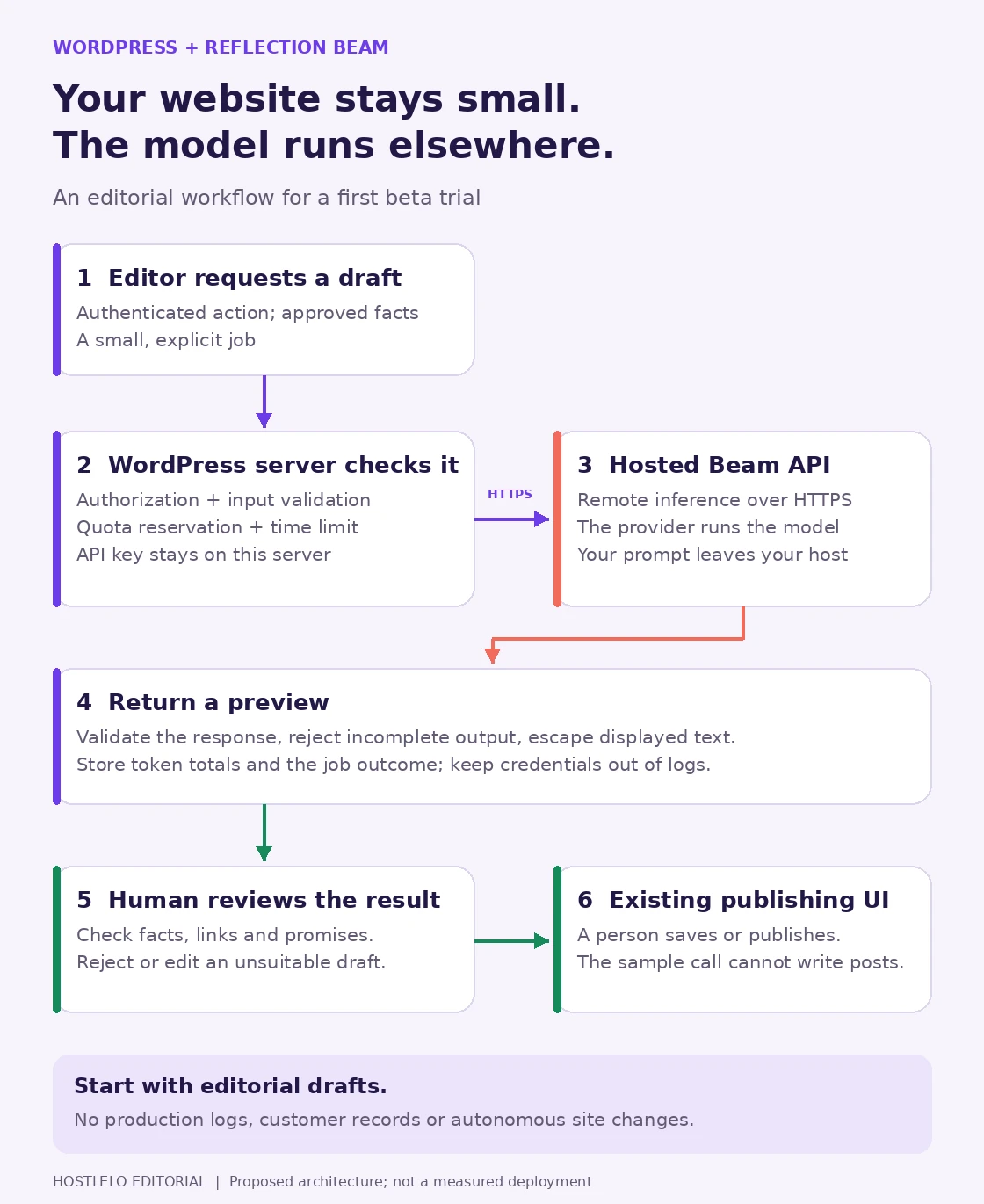
Proposed workflow. The transport example below handles one request; authentication in a browser UI, quota reservation, queuing and publishing require separate application code.
A good starter job is: “Suggest three FAQ questions from this approved service description. Leave out any price, refund or uptime promise that the description does not establish.”
Use synthetic or public information for the trial. A remote API means the submitted prompt leaves your web host. For private material, review the provider's terms and your own data requirements before connecting it.
The assistant does not need a WordPress administrator password, a hosting-panel login or SSH to perform this job. The application can receive text and let a person decide what to save.
Will an OpenAI-compatible WordPress plugin work?
Compatibility is specific to endpoints and request fields. Reflection documents Chat Completions and Models at its compatible endpoint. It does not document support there for Responses, Embeddings, Images, Audio, Files, Batch or Assistants. Compatibility reference
A plugin with a custom base-URL field is a candidate, not a confirmed integration. Inspect its actual request before buying an add-on or changing a working configuration.
Plugin check | What to look for |
|---|---|
Endpoint | It calls /chat/completions, rather than /responses |
Model | You can enter Beam-1.0-501B-A23B without a fixed model menu overriding it |
Credential | The Reflection key stays in server-side configuration |
Output budget | The plugin exposes max_completion_tokens |
Reasoning | The request does not force an unsupported effort value |
Hidden fields | It can omit unsupported parameters, such as user or metadata |
Start with a staging copy. Preserve the previous provider settings so you can return to them. If a plugin sends unsupported defaults you cannot disable, ask its maintainer about compatibility or use a small server-side adapter.
For document search, remember that the compatible endpoint does not supply embeddings. An existing retrieval feature may still need its own embedding model and storage. Replacing the answer model alone does not replace the whole search pipeline.
First check access from a trusted terminal
With a Reflection key already provided to your shell as REFLECTION_API_KEY, ask which models that account can use:
curl --fail-with-body --silent --show-error \
  --connect-timeout 10 --max-time 30 \
  --header "Authorization: Bearer ${REFLECTION_API_KEY}" \
  https://api.reflection.ai/openai/v1/models
Then try one small text task:
curl --fail-with-body --silent --show-error \
  --connect-timeout 10 --max-time 30 \
  --request POST \
  --header "Authorization: Bearer ${REFLECTION_API_KEY}" \
  --header "Content-Type: application/json" \
  --data '{
    "model": "Beam-1.0-501B-A23B",
    "messages": [{
      "role": "user",
      "content": "Suggest three FAQ questions about website backups. Questions only; do not invent service promises."
    }],
    "reasoning_effort": "low",
    "max_completion_tokens": 4096,
    "stream": false
  }' \
  https://api.reflection.ai/openai/v1/chat/completions
These are documented request formats with illustrative timeout and output budgets. They were not executed against Beam for this review. They require an API key for an organization with access and a sufficiently recent curl version for --fail-with-body. They print the response rather than checking its quality.
Read choices[0].message.content for the answer. Record finish_reason, token usage and the request ID. An HTTP success alone does not mean the task produced an acceptable draft.
Beam's reasoning documentation says reasoning consumes the completion budget too. A short final answer can follow substantial reasoning. If the budget runs out, finish_reason can be length and final content may be absent. Lower effort or a carefully increased budget may help; repeated blind retries spend more capacity without fixing the request.
A small WordPress PHP transport example
A developer can use WordPress's HTTP API for the same call. This helper belongs inside a trusted plugin or other bootstrapped WordPress code. It creates no public route and does not write posts.
Configure REFLECTION_API_KEY in the server environment available to PHP. A value exported only in your SSH shell may not reach PHP-FPM; confirm that with your host. Do not place the key in browser JavaScript.
<?php
function hostlelo_beam_preview( string $prompt ) {
    if ( ! current_user_can( 'edit_posts' ) ) {
        return new WP_Error( 'beam_forbidden', 'Editor access required.' );
    }
    if ( trim( $prompt ) === '' || strlen( $prompt ) > 8000 ) {
        return new WP_Error( 'beam_input', 'Use a short, non-empty prompt.' );
    }
    $key = getenv( 'REFLECTION_API_KEY' );
    if ( ! is_string( $key ) || trim( $key ) === '' ) {
        return new WP_Error( 'beam_key', 'Server API key is missing.' );
    }

    $response = wp_remote_post(
        'https://api.reflection.ai/openai/v1/chat/completions',
        [
            'timeout'     => 30,
            'redirection' => 0,
            'sslverify'   => true,
            'headers'     => [
                'Authorization' => 'Bearer ' . trim( $key ),
                'Content-Type'  => 'application/json',
            ],
            'body' => wp_json_encode( [
                'model'                 => 'Beam-1.0-501B-A23B',
                'messages'              => [
                    [ 'role' => 'user', 'content' => $prompt ],
                ],
                'reasoning_effort'      => 'low',
                'max_completion_tokens' => 4096,
                'stream'                => false,
            ] ),
        ]
    );

    if ( is_wp_error( $response ) ) {
        return new WP_Error( 'beam_transport', 'Request did not complete.' );
    }
    $status = wp_remote_retrieve_response_code( $response );
    if ( $status !== 200 ) {
        return new WP_Error( 'beam_http', 'Upstream status: ' . $status );
    }
    $data = json_decode( wp_remote_retrieve_body( $response ), true );
    if ( ! is_array( $data ) ) {
        return new WP_Error( 'beam_json', 'Invalid response body.' );
    }
    $choice = $data['choices'][0] ?? null;
    if ( ! is_array( $choice ) ) {
        return new WP_Error( 'beam_choice', 'Missing response choice.' );
    }
    $text = $choice['message']['content'] ?? null;
    if ( ( $choice['finish_reason'] ?? '' ) !== 'stop'
        || ! is_string( $text ) || trim( $text ) === '' ) {
        return new WP_Error( 'beam_output', 'No complete text preview.' );
    }

    return [
        'text'       => trim( $text ),
        'usage'      => is_array( $data['usage'] ?? null ) ? $data['usage'] : [],
        'request_id' => wp_remote_retrieve_header( $response, 'x-request-id' ),
    ];
}
The 8,000-byte input check is an application limit, not a token count. This starter helper deliberately makes one non-streaming request and returns an error for incomplete output.
A browser-facing button also needs a verified nonce, authorization and an account-wide usage cap before calling the helper. WordPress explains that nonces are not access control. Reserve quota atomically if multiple requests can run together. Escape preview text for its output context; for plain HTML text, use esc_html().
This is a reviewed example, not an installed or production-tested plugin. It does not implement a quota store, user interface or background worker. Test those pieces on staging before adding them.
The hosting trap: waiting inside a PHP worker
For an editor trying one request, a short synchronous call may be sufficient. For a public feature, the same design can tie up workers while the model is busy.
Illustrative arithmetic: if a site has four available PHP workers and four simultaneous requests each wait 20 seconds for an API response, all four workers may be occupied during that wait. Whether other visitors are delayed depends on the host's limits, caching and workload. This is a capacity example, not a Beam latency measurement.
Before increasing the PHP timeout, ask whether the job should be queued. A worker can process longer jobs while the site returns a job ID and shows progress. A timeout in your client also does not establish that upstream generation stopped.
For scheduled work, use a reliable trigger and prevent overlapping runs. Our WordPress cron guide covers that part. Keep generation out of ordinary cached page rendering.
What does Reflection Beam cost?
The official beta-pricing page says the API is currently a public beta, free subject to daily usage limits. That does not mean unlimited use or a permanent free price.
The page says the beta allocation resets at midnight Pacific Time. The current API rate-limit guide separately describes organization request/token/concurrency caps and a 00:00 UTC daily renewal. These official descriptions do not line up exactly; check the account dashboard and response headers, and do not schedule a batch around an assumed reset time until Reflection clarifies which rule applies to your account.
Measure a workload before putting a dollar figure on it. Here is a synthetic example, with all generation attempts included:
Trial measure | Made-up value |
|---|---|
Requested drafts | 200 |
Total input tokens across attempts | 200,000 |
Total completion tokens, including reasoning | 800,000 |
Drafts accepted after review | 160 |
If a future tariff were P_in per million input tokens and P_out per million completion tokens, charging reasoning at that same output rate, this workload's model charge would be:
0.2 × P_in + 0.8 × P_out
Divide that amount by 160 accepted drafts to compare cost per accepted result. If the actual tariff prices reasoning separately, use that structure instead.
Add hosting, queueing and review time when evaluating the full service. A free API beta can still consume paid server capacity and staff time. The useful number is what one acceptable result costs under your real workflow.
Set a trial ceiling your application can enforce. A short input, an output-token cap, bounded concurrency and a stop on exhausted allowance are different controls; one does not replace the others.
Fix common failures without creating a retry loop
Reflection's error reference describes which errors need a changed request and which may be retried.
What you observe | First action |
|---|---|
400 with unsupported_parameter or unsupported_value | Inspect the plugin's request and remove or correct the named field |
401 or 403 | Resolve the key or account-access issue |
404 with model_not_found | Check the account's Models response |
429 or exhausted daily allowance | Inspect Retry-After and x-should-retry; stop when retrying is declined |
502 or 503 | Retry only within a bounded policy, respecting Retry-After when present |
200 with length or missing final text | Treat the draft as incomplete; inspect reasoning effort and output budget |
For a queued job, record attempt count and a deadline. Never spin in a synchronous WordPress request waiting for a daily reset. Display a useful “Try later” state and preserve the user's input according to your data policy.
Keep credentials out of logs. Record the job outcome, HTTP status, upstream request ID and token totals so a failed draft can be investigated without printing its API key.
Judge Beam on website work before switching providers
Run a small, repeated comparison with the model you already use. Keep the facts, prompts and scoring rules the same.
Try approved service-description FAQs, a rewrite of a public support answer, and a proposed fix for a synthetic WordPress issue. An editor should score whether each output preserves facts, follows the requested format and is useful without substantial repair. For proposed code, review it and run relevant staging checks before accepting it.
Record acceptance rate, total token use, completion time and the errors that reached the user. Keep unsuccessful attempts in the totals. This is an evaluation plan, not a claim that Beam has passed these tasks.
For public support, start with draft replies for staff rather than unattended answers about billing, refunds or account changes. Our AI-agent access guide covers how to keep the integration's permissions proportional to the job.
Can Beam help produce SEO content?
It can be evaluated as a drafting tool. The editor still needs to establish facts, useful detail, working sources and originality. A fluent draft can misstate a service promise just as easily as it can explain one.
Google says standard SEO practices still apply to AI Overviews and AI Mode, with no special AI markup required. Publishing model-generated text does not guarantee indexing or visibility.
Use Beam for a narrow editorial trial first. If its accepted results and operating costs improve on your current workflow, expand the job gradually. If you are evaluating a Hostlelo plan, ask support to confirm outbound API access, execution limits and worker options for that exact plan before ordering an upgrade.
Visual credits: original Hostlelo cover created with an AI image generator; workflow diagram drawn from the architecture proposed in this article. Neither visual is a screenshot, benchmark or proof of a deployed Beam integration.
Reader questions
Can I use Reflection Beam on shared WordPress hosting?
Potentially, through the hosted API. The hosting plan needs outbound HTTPS and suitable execution limits, and the Reflection organization must list the model. Public-beta documentation does not prove a particular account or plugin works. Public or long-running features may need a queue.
Is Reflection Beam available to download now?
As checked on 25 October 2026, Reflection’s model card and Hugging Face repository publish Beam-1.0-501B-A23B weights in BF16, FP8 and NVFP4, with an Apache 2.0 license label. That differs from the 5 October launch-day promise. Verify the exact checkpoint, license, serving engine and hardware before self-hosting.
Is Reflection Beam free?
The official pricing page currently describes a public API beta, free subject to daily limits. It does not establish permanent pricing, unlimited capacity or access for every organization. Official reset-time descriptions differ; check the account dashboard and response headers before scheduling work.
What API base URL and model ID should I use?
The documented compatible base URL is https://api.reflection.ai/openai/v1 and the model ID is Beam-1.0-501B-A23B. Text generation uses POST /chat/completions. Check GET /models to confirm what your account can access.
Why does my WordPress AI plugin fail with Beam?
Check its actual endpoint and request fields. Reflection's compatible endpoint supports Chat Completions and Models; a plugin that requires Responses or Embeddings will need changes or separate services. Unsupported parameters and reasoning-effort values can also cause a 400 error.
Why did the API return success but no complete answer?
Beam uses reasoning tokens within the completion budget. If that budget is exhausted, finish_reason can be length and final content may be absent. Reject that preview, inspect the budget and effort settings, and test a deliberate adjustment instead of blindly retrying.
Was this guide helpful?
Help us make the next update better.
Sources & further reading
- Reflection — Beam announcement, 5 October 2026
- Reflection developer docs — API introduction
- Reflection developer docs — Models and beta token limits
- Reflection developer docs — OpenAI compatibility
- Reflection developer docs — Reasoning and token budgets
- Reflection — Beta pricing information
- Reflection developer docs — Rate limits
- Reflection developer docs — Error handling
- WordPress developer docs — wp_remote_post
- WordPress developer docs — Nonces and authorization
- Google Search Central — AI features and your website
- Reflection Beam model card
- Reflection Beam weights repository (Apache 2.0)
What changed
New guide based on Reflection's 5 October announcement and official documentation checked 6 October. Adds WordPress integration checks, a server-side transport example, PHP-worker capacity analysis, a synthetic cost-per-accepted-draft worksheet and the conflicting official reset-time descriptions.
Originally published . About our editorial updates.