Ollama VPS Hosting:Choose Hardware and Keep the API Private
Evaluate Ollama on a VPS with CPU/GPU and context-memory checks, a private Docker example, SSH tunneling and honest limits on performance claims.
On this page
The short answer
Ollama can run local models on a VPS if the selected model, context and concurrent requests fit its available resources. CPU-only inference is possible, but it is not a performance guarantee. For a private deployment, keep the local API off the public internet, use a compatible model and measure response time with your own prompts before buying a long hosting term.
Before you start
Authorized VPS and SSH access, Docker, a reviewed image and an approved local model with sufficient resources. Examples are unexecuted.
The common buying mistake is to compare a VPS's RAM with a model's download size and stop there. Runtime memory also depends on context, parallel work and the inference configuration. A model fitting on disk does not prove it will run comfortably.
Separate CPU inference from GPU inference
The Ollama Docker documentation provides both CPU-only and GPU deployment paths. A GPU deployment requires actual compatible hardware and the relevant drivers or container runtime; an ordinary VPS plan does not acquire a GPU when you install a driver.
Question | Why you need an answer |
|---|---|
Which exact model and quantization will run? | They affect memory use and output quality |
How much context will each request use? | A larger context increases memory demand |
How many requests may run together? | Parallel work changes capacity and waiting time |
Is compatible GPU hardware actually assigned? | CPU specifications alone do not establish GPU capability |
Is the model license suitable for this use? | The model and serving application have separate terms |
Use Ollama's hardware support list for compatibility. We have not benchmarked any Hostlelo server or model for this article.
Keep the API private first
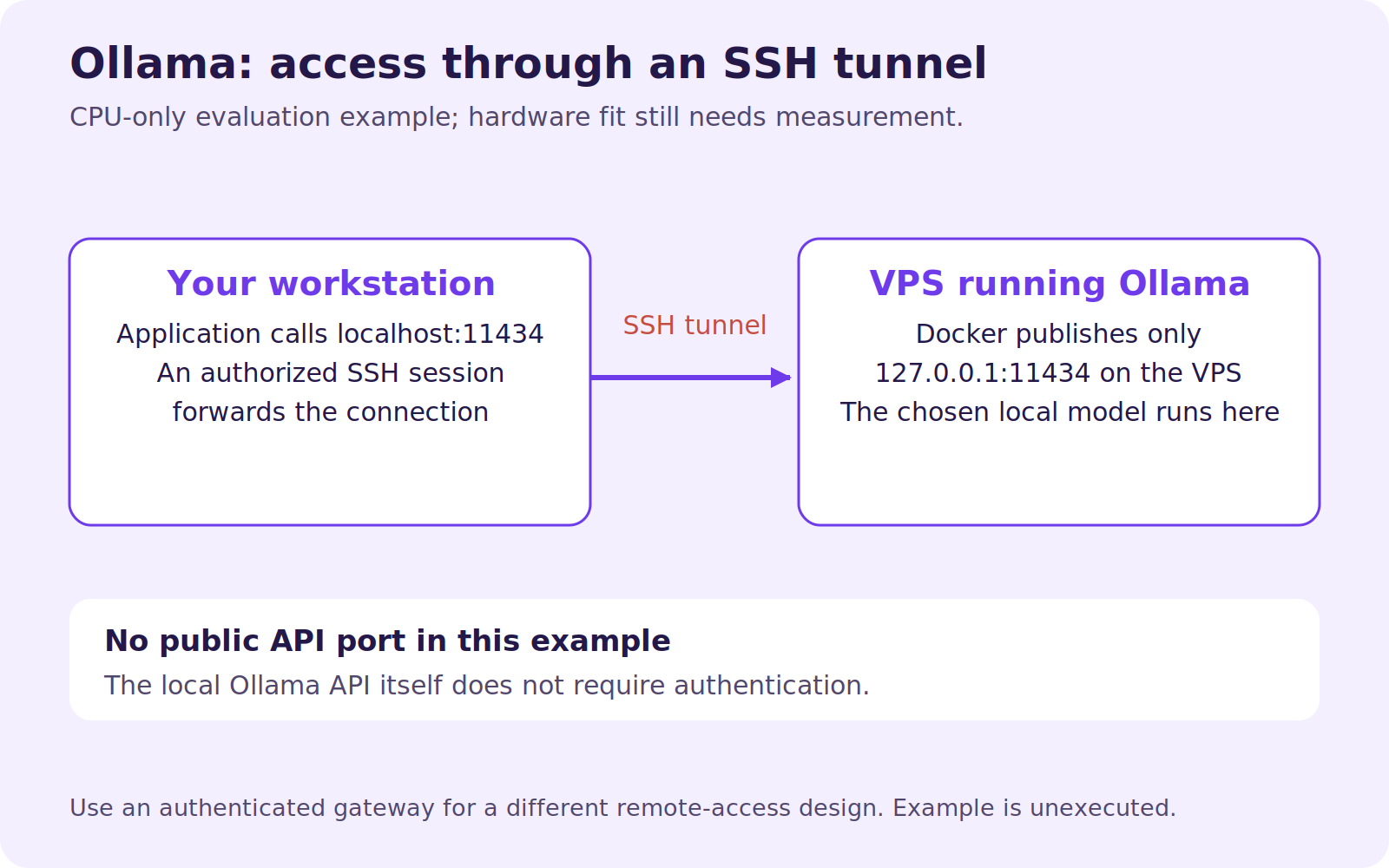
Ollama's authentication documentation states that its local API does not require authentication. Publishing that API openly can expose your inference resources and any functionality available through the service.
The following unexecuted CPU-only example adapts the official Docker approach by publishing only on the VPS loopback interface. It assumes an up-to-date Docker Engine, a reviewed Ollama image tag or digest and sufficient disk and memory. It is an evaluation setup, not a complete multi-user production gateway.
export OLLAMA_IMAGE='ollama/ollama:REPLACE_WITH_REVIEWED_VERSION'
docker run -d \
  --name ollama \
  --restart unless-stopped \
  -e OLLAMA_NO_CLOUD=1 \
  -v ollama_data:/root/.ollama \
  -p 127.0.0.1:11434:11434 \
  "$OLLAMA_IMAGE"
Replace the image placeholder before running it. OLLAMA_NO_CLOUD=1 selects the documented local-only behavior; it does not stop every possible outbound network request, including a deliberate model download. Apply an appropriate network policy if your requirements are stricter.
Use an SSH tunnel from your workstation:
ssh -N -L 11434:127.0.0.1:11434 youruser@your-vpsChoose a different local port if 11434 is already in use. This tunnel relies on an authorized SSH account and a properly secured server. It is not a public API endpoint for customer applications.
Docker's port-publishing documentation explains the difference between a loopback bind and publishing on all addresses. Check your Docker version and networking behavior, then verify exposure from a separate machine rather than trusting a firewall rule alone.
Download a model you have deliberately chosen
Pick an exact local-model tag from the official model catalog and read its model card and license. The placeholder below is intentionally not a model recommendation:
export LOCAL_MODEL_TAG='REPLACE_WITH_APPROVED_LOCAL_MODEL_TAG'
docker exec ollama ollama pull "$LOCAL_MODEL_TAG"
docker exec ollama ollama list
From the VPS, or your workstation with the tunnel active, substitute that same model tag in this request:
curl --fail-with-body http://127.0.0.1:11434/api/generate \
  -H 'Content-Type: application/json' \
  --data '{"model":"REPLACE_WITH_APPROVED_LOCAL_MODEL_TAG","prompt":"Return the word ready.","stream":false}'
This follows the documented generate API. A successful answer establishes basic operation, not business-task accuracy or acceptable performance under load.
Measure context and waiting time
Use a representative set of short and long prompts. Record model identity, configuration, cold-start time, warm response time, peak memory and concurrent-request behavior. Keep the test data non-sensitive.
Ollama's context guidance explains that increasing context consumes more memory. Inspect the running model with:
docker exec ollama ollama ps
docker stats --no-stream ollama
These are inspection examples, not results from a test we performed. Decide your acceptance limit before interpreting numbers: a background classifier and an interactive assistant can tolerate different delays.
Add a gateway only when it is needed
For application use beyond an SSH tunnel, place a separately authenticated HTTPS gateway in front of the private backend. Design user authorization, request-size limits, concurrency limits, logs, budgets and abuse controls. Keep credentials out of browser code.
CORS configuration is not user authentication. A reverse proxy providing encryption does not by itself decide which users may invoke the model. Never expose the raw local endpoint simply because a client cannot connect through your intended gateway.
Back up application configuration and business data separately from the model cache. Record the exact model identifiers needed to rebuild, and account for download time during recovery. Map data flows before claiming that the system is private: local models, cloud models, web-search features and external tools are different paths.
Our AI-agent architecture guide explains when keeping inference outside the VPS may be simpler. Ask the hosting provider to confirm actual hardware instead of inferring it from the plan name.
Reader questions
Can a cheap CPU VPS run a large model?
Possibly, if resources and the model configuration fit, but usefulness depends on response time and concurrency. There is no tested large-model capacity claim in this guide.
Is a model's download size its RAM requirement?
No. Runtime memory includes additional working state and context. Measure the actual configuration instead of sizing from the download alone.
Can I expose port 11434 directly to the internet?
The local API does not require authentication. Keep it private and use a properly authenticated access layer when remote application access is required.
Sources & further reading
Originally published . About our editorial updates.