Cloudflare Workers Now Give Streams Up to 20 Minutes to Drain
Cloudflare's 12 October update gives outgoing Workers runtimes more drain time. Learn what it changes for AI streams, SSE and WebSocket recovery.
On this page
- What changed during a Workers runtime update?
- Who should review their application?
- Keep three different clocks separate
- Design for a stream that stops halfway
- A small SSE contract you can adapt
- Run these interruption drills in staging
- Diagnose interruptions before changing limits
- What to change today
- Reader questions
- Sources & further reading
The short answer
Cloudflare Workers now allow pending requests and connections up to 20 minutes to drain during runtime updates, previously up to 30 seconds. This is a process-level grace period, not a per-request guarantee or a CPU-limit increase. Streaming applications still need durable state, explicit completion and safe recovery.
Before you start
For developers using Cloudflare Workers or evaluating streaming infrastructure. Application changes require staging access, an understanding of your authentication and durable storage, and disposable test operations. The protocol example is illustrative and was not deployed.
Cloudflare published this change on 12 October 2026. This guide was researched on 13 October 2026. Its value for a streaming application is additional time to finish existing work during a platform runtime update—and a reason to review what happens when that work still gets interrupted.
What changed during a Workers runtime update?
Cloudflare increased the maximum drain window for pending work from 30 seconds to 20 minutes. Once the replacement runtime is ready, it receives fresh HTTP requests; the outgoing processes finish work they already hold. The deadline belongs to an outgoing process, rather than granting every request a fresh allowance.
Work left on that process at the deadline is terminated. The official announcement describes a platform change; it does not specify an SDK upgrade or compatibility-date switch to enable it. Treat this as the documented behavior, not a rollout measurement from Hostlelo.
Who should review their application?
Start with Workers that proxy streamed AI responses, expose server-sent events (SSE), maintain WebSockets or perform long HTTP operations. A support assistant that sends an answer progressively should show a recoverable interruption instead of leaving the customer with an apparently complete half-answer.
Check whether your request actually passes through a Worker. Putting a conventional WordPress site behind Cloudflare's CDN does not, by itself, make its PHP requests Workers executions.
This announcement concerns Cloudflare updating its runtime. Deploying your own application code, losing the client's network and an upstream AI provider timing out are different events. Test each failure path separately; this announcement does not establish the same behavior for every one of them.
Keep three different clocks separate
The Workers limits documentation distinguishes CPU consumption, request duration and runtime-update handling.
- CPU budget: time executing your code; waiting for network I/O is different. Check your plan, configured CPU limit and invocation outcome.
- Connected HTTP duration: elapsed time while the client stays connected. Ordinary HTTP Workers have no hard wall-time cap for that connection; client, upstream and resource failures still matter.
- Runtime drain window: time for outgoing runtime processes to finish existing work. It is not extra CPU allocation.
Also, ctx.waitUntil() can extend work for up to 30 seconds after a response is sent or the client disconnects. Do not treat it as an unrestricted background-job runner.
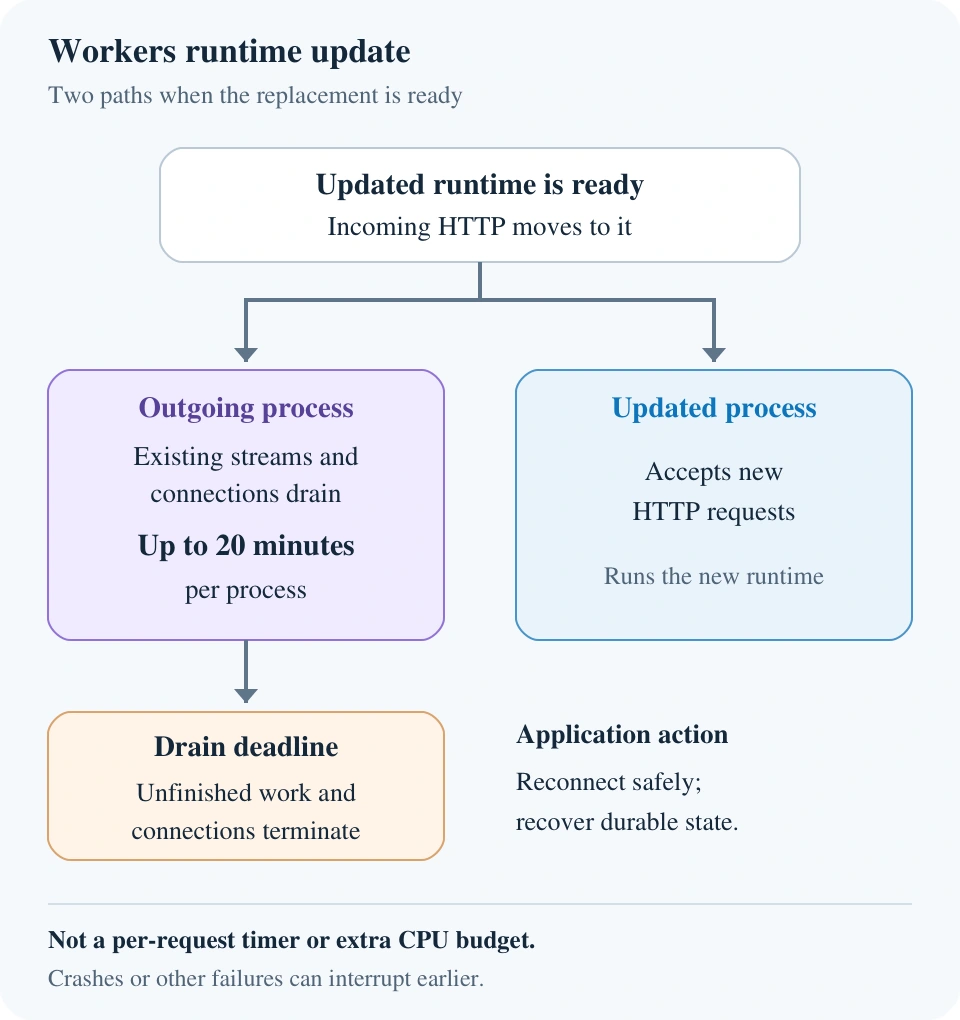
New requests and existing work take different paths during the runtime replacement. Recovery remains an application responsibility.
Design for a stream that stops halfway
The following is Hostlelo's proposed recovery checklist, not a new Cloudflare API or a tested deployment.
- Give the operation a durable identity. Create an operation ID before streaming. Store its owner, current status and any recoverable output outside process memory. Reconnecting to a socket must not silently create a second paid generation or repeat a business action.
- Separate delivery from work. Reading an operation's saved events should be different from starting that operation. For workflows that must outlive a connection, choose a durable execution mechanism with its own documented limits. Merely writing a job row does not keep the producer running.
- Record a usable cursor. If resumable delivery is required, persist ordered events before sending them. Define retention, replay authorization and what happens when a cursor has expired. A cursor without retained events cannot recover an answer.
- Make completion explicit. Show “complete” only after receiving and validating an application completion event, or checking a durable terminal status. A closed connection is not evidence that the answer finished.
- Bound retries and deduplicate effects. Use backoff, an attempt limit and a durable idempotency record for actions such as creating a ticket. Handle concurrent retries atomically. These controls do not automatically provide exactly-once execution.
For an AI response that cannot resume from saved output, preserve the partial text as interrupted. Offer an explicitly labelled new attempt instead of appending a fresh model response to the old fragment. A regenerated answer may differ, and retrying may incur additional provider charges.
For agents that can also change a website, combine recovery with bounded permissions and approval rules for hosting tools. Reconnection should not expand the agent's authority.
A small SSE contract you can adapt
Illustrative protocol only: the IDs, text and endpoint design below are synthetic. We have not deployed this stream or tested it against a Workers runtime replacement.
An authenticated operation-creation request could return an operation ID. A separate authorized GET endpoint then delivers events using Content-Type: text/event-stream. Here is a sample event body; each event ends with a blank line:
id: demo-42:7
event: chunk
data: {"operationId":"demo-42","seq":7,"text":"Partial answer."}

id: demo-42:8
event: complete
data: {"operationId":"demo-42","seq":8,"status":"completed"}

: end of illustrative example
The MDN SSE guide explains named events and native EventSource reconnection. The HTML Standard specifies the Last-Event-ID header used when reconnecting with a saved event ID. Neither mechanism stores application output for you.
For this proposed contract, the server must verify ownership of demo-42, validate the cursor and replay retained events after sequence 7. The client should ignore duplicate sequence numbers, detect gaps and close its EventSource after a valid terminal event. Specify how a reconnect retrieves terminal status if the completion event was missed. A page reload creates another recovery case: save the operation identity and cursor deliberately.
If your UI streams a POST response using fetch(), it is not a native EventSource; implement the appropriate retry and parsing behavior explicitly.
Run these interruption drills in staging
Use synthetic prompts and disposable operations. The pass conditions below are proposed acceptance criteria, not results obtained by Hostlelo.
- Disconnect before completion, then reconnect. Pass when the UI retrieves the same authorized operation or clearly offers a new attempt.
- Replay the last delivered event. Pass when the same sequence is not appended twice.
- Request an expired cursor. Pass when the server returns a defined recovery response rather than silently omitting output.
- Drop the final completion event. Pass when the UI checks durable status and does not infer success from EOF.
- Retry an action twice, including concurrent requests. Pass when the durable record prevents duplicate business effects.
- Deploy a new application version during a stream. Pass when client recovery works for the observed deployment behavior. Do not label this a platform-update test.
You cannot establish the platform's full drain behavior by setting a timer in your own handler. Local interruption drills validate your recovery logic; they do not prove a 20-minute lifetime, global rollout or availability guarantee.
For WebSockets, implement reconnection and state restoration separately. Cloudflare's WebSockets documentation warns that a connection can end before the drain deadline. An open socket should not be your only record of a user's work.
Diagnose interruptions before changing limits
Log a correlation ID, operation and attempt IDs, last delivered sequence, timestamps and the invocation outcome. Compare the client error with the Worker invocation and upstream provider response. Keep tokens, credentials and private prompts out of routine logs.
Cloudflare's error documentation is the reference for interpreting platform errors. A CPU or memory failure, an upstream timeout and an ordinary network disconnect need different fixes. Do not attribute one failed stream to a runtime update without supporting evidence.
If only some users report failures, use regional outage checks with Cloudflare Radar alongside application logs. A regional signal is context, not proof of your application's root cause.
What to change today
Audit one streaming endpoint: identify its execution path, check its limits, document its terminal states and run the staging drills. Prefer a clear interrupted state over an invisible retry loop.
Budget for any durable storage, replay reads and duplicate model attempts your design introduces. Check current vendor pricing for your actual workload; this article supplies no cost estimate.
The longer window is a useful platform improvement. Your release decision should still rest on demonstrated recovery behavior, not an assumption that long-lived connections can no longer fail.
Reader questions
Does every Cloudflare Worker request now get 20 minutes?
No. The drain deadline is associated with an outgoing runtime process. A request does not receive a new 20-minute timer of its own. Keep explicit interrupted and terminal states in your application.
Does this increase my Workers CPU limit?
No. Runtime drain time and CPU allocation are separate. Check your plan and configured CPU limit in the current Workers limits documentation.
Will WebSockets stay connected for the entire grace period?
No. Cloudflare documents possible earlier disconnections. Implement reconnection and restore application state from a durable source.
Does this apply to every WordPress site using Cloudflare?
Check the request path. A site using only Cloudflare's DNS or CDN is not automatically running application requests in Workers. This guide concerns work executed by Workers.
Does SSE reconnection resume an AI generation?
Reconnection opens another connection. Resumption requires retained events or another explicit recovery mechanism. If generation cannot resume, label the partial answer interrupted and create a separate attempt with the user's knowledge.
Has Hostlelo tested the new drain window?
No. The platform change is reported from Cloudflare's announcement and documentation. The SSE contract and staging pass conditions are proposed examples; no runtime-update experiment or performance benchmark is claimed.
Sources & further reading
What changed
New guide based on Cloudflare's 12 October 2026 announcement, reviewed 13 October. Separates runtime drain time from CPU and client lifetime, with an original recovery checklist and illustrative SSE contract.
Originally published . About our editorial updates.