Cloudflare web_fetch:Safe Web Access for AI Agents
Cloudflare documented a beta web_fetch tool on 12 October. Configure host, redirect and size limits, test a URL gate, and understand its DNS caveat.

On this page
- What changed, and when?
- How the request path works
- A bounded configuration to start with
- Add a small pre-gate for user-supplied URLs
- What the built-in policy blocks
- The DNS caveat developers should not miss
- Prompt injection is a separate problem
- Re-fetching, caching and changing pages
- When to use a browser instead
- Cost and deployment considerations
- A 10-minute pre-launch review
- What is fact, recommendation and open work?
- Reader questions
- Sources & further reading
The short answer
Cloudflare Agents SDK 0.28.0 adds a beta web_fetch tool for webpages and documents. Use an exact host allowlist, smaller byte and context limits, redirect checks, untrusted-content handling and network-layer DNS-rebinding protection before production use.
Before you start
Agents SDK 0.28.0 or later, an existing Cloudflare Agents harness, a Workers AI binding for document conversion, and Node.js for the optional local policy test. Production use also needs outbound-network policy, logging and secret/tool separation.
Cloudflare has added a beta web_fetch tool to the Agents SDK. It gives an AI agent a structured way to read webpages, PDFs, supported Office files, JSON and text without handing raw responses directly to the model.
Short answer: use web_fetch when an agent needs read-only access to known public sources. Set an explicit host allowlist, reduce the default byte and context limits, re-check every redirect, and treat returned text as untrusted data. The built-in tool blocks several obvious SSRF paths, but Cloudflare's documentation says it does not resolve public hostnames to inspect their destination IP addresses.This is useful for documentation assistants, support agents and research workflows. It is not a reason to give a model unrestricted network access.
What changed, and when?
There are two dates worth separating:
- 9 October 2026 — package release: Cloudflare's GitHub release page shows Agents SDK
0.28.0, addingagents/webfetchalongside a browser tool. - 12 October 2026 — public documentation: Cloudflare's public changelog and Web Fetch documentation announced and documented the beta tool.
The changelog URL contains 2026-10-11, but the page itself currently displays October 12, 2026. This article uses the visible publication date and does not treat the URL slug as a separate launch.
Cloudflare says the tool:
- requests Markdown first when a site supports content negotiation;
- converts HTML, PDF and supported Office documents through Workers AI Markdown Conversion;
- formats JSON and passes through Markdown and other text;
- returns the final URL, HTTP status, content type and total character count;
- windows long content and provides an offset for the next section;
- supports Pi Durable, AI SDK and TanStack AI adapters, plus public functions for other harnesses.
Cloudflare requires Agents SDK 0.28.0 or later for the documented setup.
How the request path works
The model chooses a URL, optional offset and output format. Your application—not the prompt—sets the destination and resource limits. The result is wrapped as untrusted web content before the model sees it.
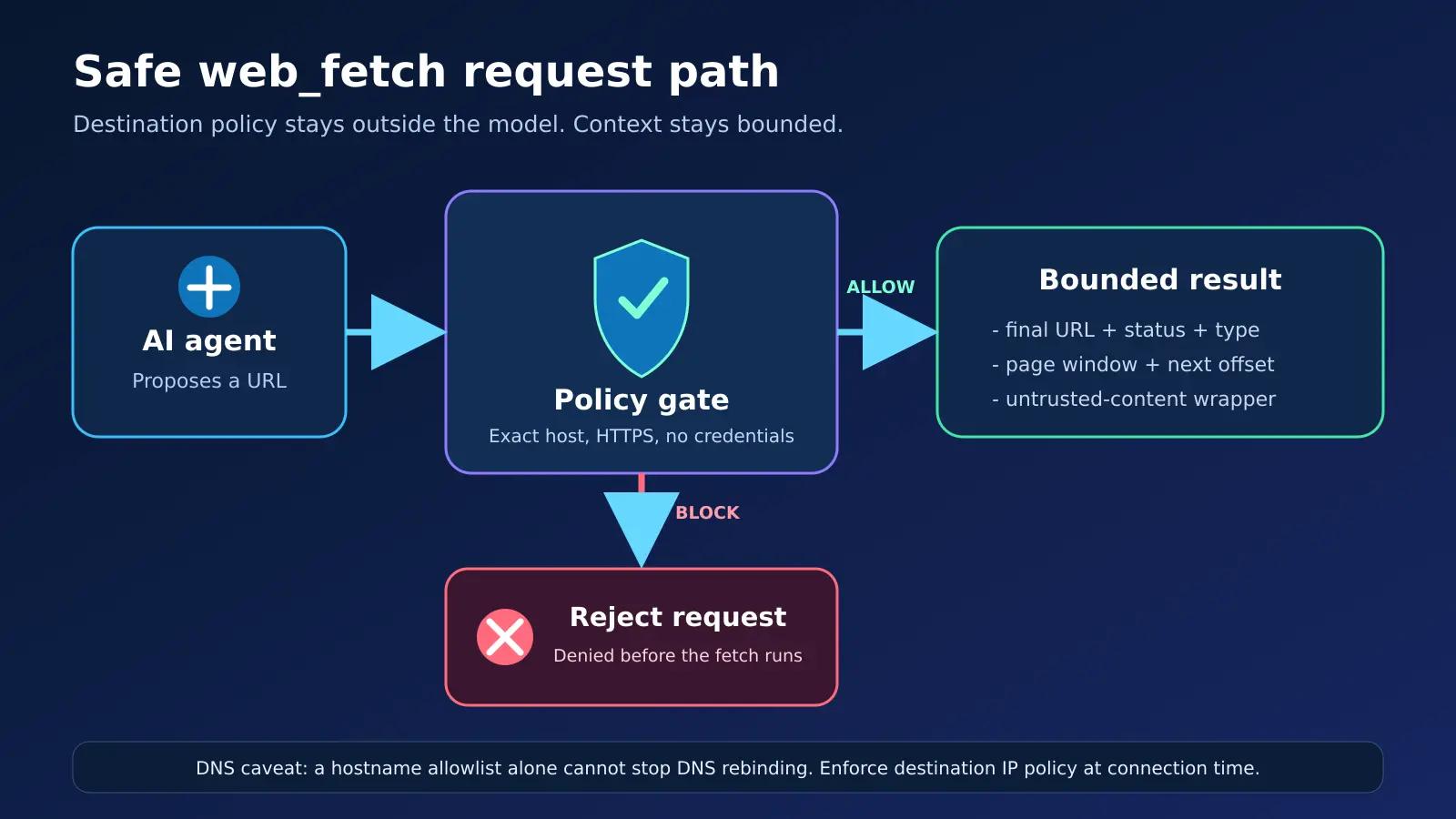
That separation matters. A system prompt such as “only visit our documentation” is a behavioral instruction. An allowedHosts policy is an enforcement point.
A bounded configuration to start with
Cloudflare's documentation shows these controls. This example intentionally narrows them for a documentation-only agent:
import { webFetchTool } from "agents/webfetch/pi";

const readDocs = webFetchTool({
  binding: env.AI,
  allowedHosts: ["developers.cloudflare.com"],
  pageChars: 10_000,
  maxBytes: 1_000_000,
  timeoutMs: 15_000,
  maxRedirects: 3,
});
Register readDocs in the harness instead of a broadly configured fetch tool. Cloudflare documents the defaults as 20,000 characters per result, 5,000,000 response bytes, a 30-second deadline and five redirects. Those defaults are reasonable general limits, not a security policy tailored to your application.
If your workflow only needs three documentation domains, list those three. Do not use *.example.com unless every present and future subdomain belongs inside the same trust boundary. Cloudflare notes that *.example.com matches subdomains but not the apex example.com.
Add a small pre-gate for user-supplied URLs
The SDK already normalizes and validates requests. A small application-level gate can still make your business rule explicit and testable before the tool runs:
const allowedHosts = new Set(["developers.cloudflare.com"]);

export function approveWebFetchUrl(rawUrl) {
  const url = new URL(rawUrl);
  const host = url.hostname.toLowerCase().replace(/\.$/, "");

  if (url.protocol !== "https:") throw new Error("HTTPS required");
  if (url.username || url.password) throw new Error("URL credentials forbidden");
  if (!allowedHosts.has(host)) throw new Error("Host not approved");

  return url.toString();
}

export function approveRedirect(location, currentUrl) {
  return approveWebFetchUrl(new URL(location, currentUrl).toString());
}
Reproducible local check: the Hostlelo version of this helper was run with Node's built-in test runner. Five deterministic tests passed: the approved host, a suffix-trap host, plain HTTP, embedded credentials and a redirect to 169.254.169.254.
node --test web-fetch-policy.test.mjs
# tests 5, pass 5, fail 0
This test verifies the helper's policy logic only. It does not prove the safety, uptime or performance of a deployed Cloudflare agent.
What the built-in policy blocks
According to Cloudflare's Web Fetch documentation, the built-in source:
- accepts HTTP requests but rejects non-HTTP schemes and credentials in URLs;
- blocks private IP literals and local hostnames by default;
- checks each redirect target;
- rejects HTTPS-to-HTTP redirects;
- rejects URLs longer than 2,000 characters;
- lets the application set allowed and blocked hosts, byte limits, timeouts and redirect limits.
allowPrivateHosts defaults to false. Keep it that way in production unless the entire design explicitly requires internal access and has a separate network policy.
The DNS caveat developers should not miss
Cloudflare also states that the built-in source does not resolve DNS to inspect the addresses behind a public hostname. That creates an important boundary: hostname filtering is useful, but it is not a complete defense against DNS rebinding.
OWASP's SSRF Prevention Cheat Sheet recommends validating all resolved IPv4 and IPv6 destinations and ensuring the HTTP client actually connects to a validated address. A separate unchecked DNS lookup between validation and connection can defeat a pre-check.
Practical choices:
- Prefer an exact allowlist of domains you control or strongly trust.
- Put outbound traffic behind a network or service boundary that denies private, link-local, loopback and metadata-service destinations.
- If you provide a custom
WebFetchSource, remember that Cloudflare says the custom source owns URL validation, host restrictions, byte limits and redirect handling. - Apply the same destination policy on every redirect, retry and fallback connection.
- Do not present a DNS lookup made before
fetch()as a complete rebinding defense unless the connection is pinned to the validated address while preserving TLS verification.
This is a Hostlelo deployment recommendation based on Cloudflare's documented boundary and OWASP guidance; it is not a claim that the SDK has a disclosed vulnerability.
Prompt injection is a separate problem
The tool wraps fetched material in an untrusted_web_content tag. Cloudflare explicitly says this marks external content as data, not instructions, but does not guarantee protection from prompt injection.
For a production research agent:
- keep secrets and write-capable tools out of the same step when possible;
- require confirmation for mutations, purchases, publishing or account changes;
- allow the model to quote or summarize fetched text, not change policy because a page tells it to;
- log the requested URL, final URL, status, content type and decision;
- cap how many fetches a single task may perform;
- attach source URLs to the final answer so a person can verify them.
For a broader access model, see Hostlelo's guide on giving AI agents website credentials safely.
Re-fetching, caching and changing pages
The built-in tool fetches the URL again for each continuation window. Cloudflare warns that reading five windows makes five requests and the content can change between calls.
If consistency matters, call fetchWeb() once, retain the returned WebFetchPage, and generate additional windows from that saved object with windowWebFetchPage(). Also record a retrieval timestamp and the final URL. For long-running agents, design retries and resumability separately; Hostlelo's Workers runtime grace-period guide explains why a longer drain window still does not replace reconnect and recovery logic.
When to use a browser instead
Choose web_fetch for public, read-only material that can be obtained with a normal GET request. Choose a browser when the task needs:
- JavaScript-rendered content;
- a login session or cookies;
- screenshots or visual verification;
- form interaction;
- a page blocked by a bot challenge.
Cloudflare says web_fetch sends GET requests without browser cookies, credentials or custom request headers. Raw mode can return textual bodies, but not PDF or other binary documents. Images, audio and video are unsupported.
Cost and deployment considerations
Established facts from the current documentation:
- Web Fetch is labeled beta, so its API may change.
- HTML and document conversion uses a Workers AI binding; local development conversions run remotely against the Cloudflare account.
- Markdown, JSON and plain text bypass Workers AI conversion.
- Cloudflare's Markdown Conversion page says most format conversions are free, while some image-related conversions may use models and incur cost after free allocations.
Your total deployment cost can still include Worker requests, CPU, model inference, storage, logging and repeated fetches. Cloudflare does not publish one universal “cost per web_fetch call” on the Web Fetch page, so estimate from your actual mix of content types and account plan. Set budgets and monitor real usage rather than copying a hypothetical price.
A 10-minute pre-launch review
Before enabling the tool for users:
- [ ] Pin or require Agents SDK 0.28.0 or later and review beta changes before upgrades.
- [ ] Use exact
allowedHostsvalues wherever possible. - [ ] Keep
allowPrivateHosts: falsein production. - [ ] Lower
maxBytes,pageChars,timeoutMsandmaxRedirectsto the smallest useful values. - [ ] Revalidate every redirect and retry path.
- [ ] Decide whether pages may change between continuation windows.
- [ ] Treat fetched content as untrusted and separate it from write-capable tools.
- [ ] Record the original URL, final URL, status, content type and retrieval time.
- [ ] Add network-layer protection if DNS rebinding is in scope.
- [ ] Test timeout, oversized response, unsupported format, bot challenge and cancellation paths.
What is fact, recommendation and open work?
- Verified release fact: Agents SDK 0.28.0 includes
agents/webfetch. - Cloudflare-documented behavior: the tool converts supported documents, windows long pages and returns response metadata.
- Cloudflare-documented limitation: the untrusted-content wrapper is not a prompt-injection guarantee.
- Hostlelo recommendation: use exact hostnames and smaller limits for a documentation agent.
- OWASP-aligned recommendation: add connection-time destination IP enforcement for DNS-rebinding resistance.
- Open deployment work: measure the limits and cost that fit your own workload.
The practical innovation is not that an agent can call fetch(); developers could already write that. It is that document conversion, pagination, response metadata and request controls now arrive as one supported SDK tool. The responsible way to adopt it is to keep that convenience inside a narrow, observable network policy.
Reader questions
Was Cloudflare web_fetch released on October 12, 2026?
Cloudflare's GitHub page shows Agents SDK 0.28.0 released on October 9. The public changelog and Web Fetch documentation were published or updated on October 12. This article separates those dates.
What can the Cloudflare Agents SDK web_fetch tool read?
Cloudflare documents webpages, PDF and supported Office files, JSON, Markdown and text. Images, audio and video are unsupported. JavaScript-rendered pages, login sessions and interactions need a browser tool.
Does web_fetch prevent SSRF?
It blocks non-HTTP schemes, URL credentials, private IP literals, local hostnames and unsafe redirects by default, and supports host and size limits. Cloudflare says it does not resolve public hostnames to inspect their destination IPs, so DNS rebinding needs additional connection-time or network-layer controls.
Does the untrusted_web_content wrapper stop prompt injection?
No. Cloudflare says the wrapper marks fetched content as data rather than instructions, but it is not a guarantee. Keep permissions narrow and separate fetched content from write-capable actions.
When should an agent use a browser instead of web_fetch?
Use a browser for JavaScript-rendered pages, authentication, cookies, screenshots or interaction. Use web_fetch for bounded, read-only GET access to public material.
How much does one web_fetch call cost?
Cloudflare does not list one universal per-call price on the Web Fetch page. Most Markdown conversions are described as free, while some image-related conversions may use models. Worker requests, model inference, storage, logging and repeated fetches can add cost, so measure the actual workload and plan.
Sources & further reading
What changed
Reviewed on 13 October 2026 against Cloudflare's 0.28.0 release, 12 October changelog, current beta documentation, Markdown Conversion pricing notes and OWASP SSRF guidance. Includes an original cover, a precise flow diagram and a locally executed five-test URL-policy demo.
Originally published . About our editorial updates.