Cloudflare WAF Adds an Atlassian CVE-2026-21589 Rule—Patch Anyway
Cloudflare added a blocking WAF rule for Atlassian CVE-2026-21589 on 12 October. Verify the rule, patch affected Data Center products and review logs.

On this page
- What changed on 12 October?
- Who is affected?
- Fixed versions to use for your inventory
- First verify that the Cloudflare rule can run
- Patch in a controlled order
- Check for requests before and after the WAF change
- Test without turning production into an exploit lab
- What the new WAF rule does not prove
- The practical decision
- Reader questions
- Sources & further reading
The short answer
Cloudflare's 12 October 2026 WAF release adds a blocking rule for Atlassian CVE-2026-21589. It can reduce exposure at the edge, but it does not patch a self-managed Atlassian Data Center installation. Verify the Managed Ruleset and exceptions, upgrade to a fixed release, then review both Cloudflare Security Events and origin access logs.
Before you start
For administrators of self-managed Atlassian Data Center products or the Cloudflare zone in front of them. You need authorized access to the Atlassian version inventory, backup and maintenance procedures, Cloudflare WAF configuration, Security Events and origin access logs. Do not run exploit payloads against production.
Cloudflare published a new managed WAF detection on 12 October 2026 for CVE-2026-21589. Atlassian disclosed the underlying vulnerability on 5 October 2026. The fresh event is the Cloudflare rule—not a new Atlassian disclosure and not proof that every Cloudflare-proxied instance is automatically safe.
What changed on 12 October?
Cloudflare added a blocking rule for CVE-2026-21589 to the Cloudflare Managed Ruleset. Cloudflare describes the issue as arbitrary file access affecting Atlassian products. The rule's default action is Block, according to the 12 October WAF changelog.
That is useful at the edge: a matching request can be stopped before it reaches an origin. But the rule is a compensating control. It does not change an Atlassian binary, prove that the Managed Ruleset is deployed for your zone, remove an exception, or investigate requests that reached the application before the rule was available.
Cloudflare also added a separate TanStack XSS detection in the same release. This guide intentionally focuses on the Atlassian issue because Atlassian's primary advisory provides a complete affected-product list, fixed versions, temporary mitigations and log-review guidance.
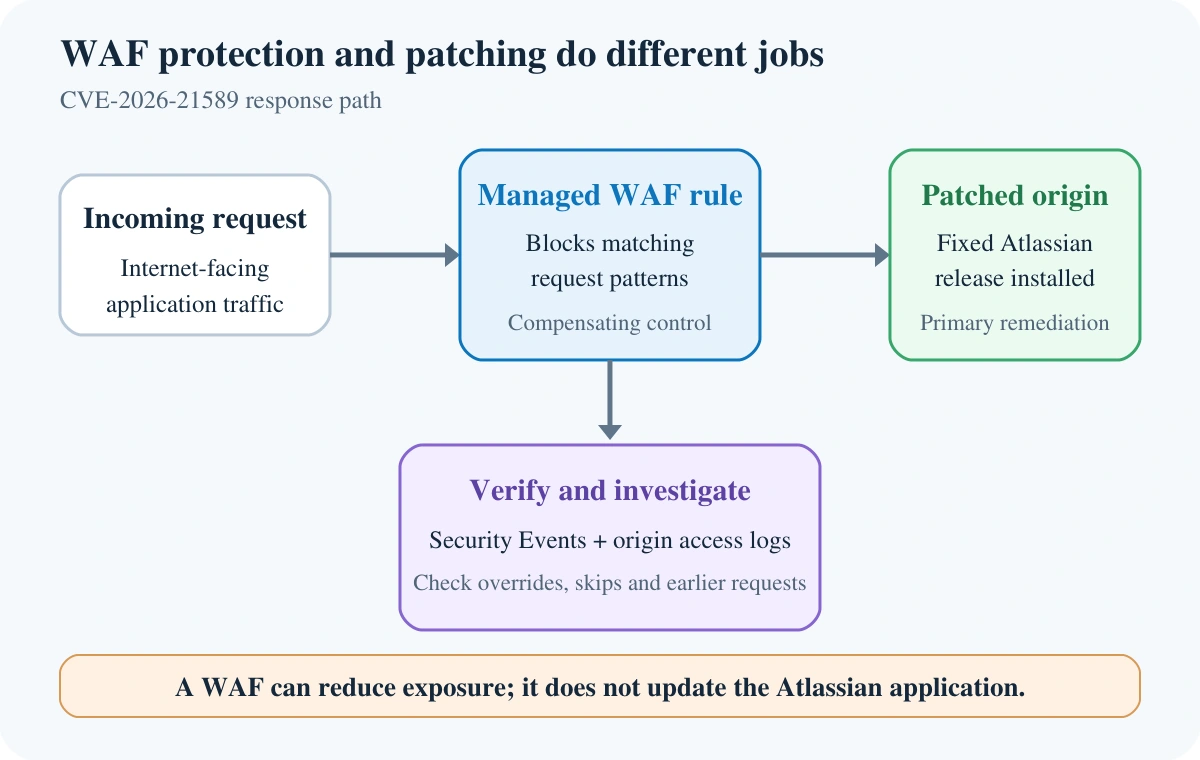
A WAF can reduce exposure; the fixed Atlassian release remains the primary remediation.
Who is affected?
Atlassian's advisory covers these self-managed products:
- Bitbucket Data Center
- Confluence Data Center
- Jira Service Management Data Center
- Jira Software Data Center
- Bamboo Data Center
- Crowd Data Center
- Crucible
- Fisheye
An unauthenticated attacker can request a specific file within the web application's root directory. Atlassian says exploitation requires knowing the exact file name and path; the flaw does not provide directory listing.
For Atlassian Cloud, the vendor says affected cloud products were patched, its investigation found no evidence of exploitation, and customers do not need to act. Do not extend that statement to self-managed Data Center installations. Atlassian says it cannot confirm whether individual self-managed instances were affected and tells customers to investigate.
Fixed versions to use for your inventory
Treat every earlier release of the listed product as affected until you map it to an appropriate fixed branch. Atlassian recommends a fixed LTS release or later.
- Bitbucket Data Center: 9.4.26, 10.2.8 or 10.5.1
- Confluence Data Center: 9.2.26 or 10.2.19
- Jira Service Management Data Center: 5.12.40, 10.3.26 or 11.3.12
- Jira Software Data Center: 9.12.40, 10.3.26 or 11.3.12
- Bamboo Data Center: 10.2.24 or 12.1.12
- Crowd Data Center: 6.3.7, 7.0.3, 7.1.7 or 7.2.4
- Crucible: 4.9.15
- Fisheye: 4.9.15
These are the fixed versions listed in Atlassian's advisory as reviewed on 13 October 2026. Select a vendor-supported branch appropriate to your installation; do not assume that the numerically shortest upgrade path is compatible with your apps, database or Java runtime.
For a cluster, inventory every node, mirror and externally reachable route. A load balancer can keep traffic flowing to an unpatched node even after another node has been upgraded.
First verify that the Cloudflare rule can run
Do not infer protection merely because the hostname resolves through Cloudflare.
- In the zone, confirm the traffic is actually proxied through Cloudflare and reaches the intended origin.
- Open Security Settings and confirm the Cloudflare Managed Ruleset is deployed and enabled. Cloudflare's dashboard deployment guide documents the current workflow.
- Browse the managed rules and search for CVE-2026-21589 or the Atlassian arbitrary-file-access description.
- Check the rule action. The 12 October changelog says the new detection ships with Block.
- Review the deployment scope, overrides and skip rules. An exception can take priority over an override, so a broad skip may prevent the detection from evaluating the request.
- Confirm that the public Atlassian hostnames and paths are inside the ruleset's execution scope.
Cloudflare notes that available managed rulesets and configuration options vary by plan. Use the dashboard state for your actual zone rather than assuming a feature is enabled from a documentation screenshot.
Patch in a controlled order
A reasonable emergency sequence is:
- Restrict exposure if possible. Atlassian recommends removing an affected instance from the public internet until it is patched or mitigated. Limit access to a VPN or trusted network where operationally possible.
- Back up configuration and application data. Confirm that the backup is usable and record the exact versions of the application, apps, database driver and Java runtime.
- Confirm the edge control. Verify the Cloudflare Managed Ruleset, this specific rule, its scope and exceptions.
- Patch a non-production or isolated node first. Follow the product upgrade documentation and preserve a rollback path.
- Test essential workflows. Include login, search, attachments, project or space access, integrations, webhooks and SSO.
- Roll through the remaining nodes. Keep an accurate node-by-node version record and do not return an old node to the pool.
- Review logs and WAF events. Patching closes the known flaw; it does not erase evidence of earlier requests.
The same principle applies to WordPress plugin incidents: an edge control buys time, but the vulnerable component still needs a verified update. See Hostlelo's patch-first and compromise-check workflow for Bricksforge for a parallel example.
Check for requests before and after the WAF change
Cloudflare's Security Events documentation explains how to review requests that a security product acted on or flagged. Filter for Managed Rules, the affected hostname, the CVE rule description and the relevant time window. Free-plan views use sampled logs, so absence from the dashboard is not proof that no request occurred.
Review the origin or reverse-proxy access logs separately. Atlassian advises URL-decoding each request line up to two passes, then searching for parent-directory traversal sequences adjacent to path separators. The advisory also provides a regex for raw log lines. Use the vendor's current expression instead of copying an old pattern from a repost.
Record at least:
- event time in UTC and the origin server's local timezone
- hostname, request path and HTTP method
- source IP or trusted proxy chain, with your normal privacy controls
- Cloudflare action, service and rule description
- origin status and response size
- the specific node that handled the request
A blocked event proves that Cloudflare applied a rule to that request. It does not prove the origin was vulnerable or compromised. Conversely, a lack of events may reflect sampling, retention, a ruleset scope problem, an exception or traffic that bypassed Cloudflare.
If only some users report a failure after enabling or updating WAF controls, compare Security Events with origin logs before declaring a regional outage. Hostlelo's partial-outage checklist using Cloudflare Radar can help separate connectivity signals from an application or rule decision.
Test without turning production into an exploit lab
Do not send exploit payloads to a production Atlassian instance. Use the rule browser to confirm the detection exists, validate the execution scope, and inspect real security events. If your security team needs active validation, use an authorized staging environment with synthetic data and a written test plan.
After patching, confirm the running version from the product's own administration or system-information view on every node. Then repeat normal application smoke tests. A successful homepage response is not enough: file handling, SSO, search and integrations may exercise different paths.
What the new WAF rule does not prove
The 12 October release is not evidence of a global attack campaign, a Cloudflare outage or exploitation of your instance. Cloudflare's changelog announces a new detection. Atlassian's 5 October advisory says its Cloud products were patched and reports no evidence of exploitation there, while advising self-managed customers to investigate their own environments.
It also does not guarantee that every malicious variation will be blocked. Defence in depth here means a patched application, restricted origin access, verified edge controls, retained logs, tested backups and an incident process—not a single checkbox.
The practical decision
If you run an affected Atlassian Data Center product, patch to an appropriate fixed release now. Keep the Cloudflare rule enabled where it applies, but verify its deployment rather than assuming it. Search both edge and origin logs across a window that begins before 12 October.
If you use Atlassian Cloud only, the vendor says no customer action is required for this CVE. Preserve that distinction when communicating internally so teams do not waste time looking for a self-managed patch that does not apply to them.
Reader questions
Does Cloudflare automatically protect every Atlassian site from CVE-2026-21589?
No. Protection depends on traffic passing through Cloudflare, the Cloudflare Managed Ruleset being deployed and enabled for the relevant scope, and no exception skipping the rule. Verify the actual zone configuration.
Can I delay the Atlassian patch if the WAF rule is blocking?
No. Treat the WAF rule as a compensating control. Atlassian recommends patching affected self-managed products to a fixed version or later; a WAF rule does not update the origin application.
Are Atlassian Cloud customers affected?
Atlassian says affected Cloud products were patched, its investigation found no evidence of exploitation, and Cloud customers do not need to act. That statement does not cover self-managed Data Center installations.
What should I check in Cloudflare after the rule release?
Confirm the Cloudflare Managed Ruleset is deployed and enabled, search for the CVE rule, verify its Block action and scope, and review overrides, skip rules and Security Events for the affected hostname.
Does a blocked WAF event mean the Atlassian server was compromised?
No. It shows that a request matched a rule and was actioned at the edge. Correlate it with origin logs, application telemetry and your incident-response process before drawing a conclusion.
Has Hostlelo tested an exploit against this vulnerability?
No. This article is based on Cloudflare's 12 October changelog and Atlassian's 5 October advisory. It does not claim exploit testing, a benchmark, global rollout measurement or evidence of compromise.
Sources & further reading
What changed
New guide reviewed 13 October 2026. Distinguishes Cloudflare's 12 October WAF rule from Atlassian's 5 October advisory and adds a verification, patching and log-review workflow.
Originally published . About our editorial updates.