Cloudflare browserTool:Persistent Is Not Permanent
Cloudflare's browserTool keeps tabs between turns, not forever. Plan for lost logins, shared cookies and interrupted actions before business use.
On this page
- What is new, and when did it happen?
- The mechanism: durable agent, temporary browser
- A separate tab is not a separate customer
- An interrupted click is an unknown outcome
- Proposed workflow: bind approval to the current context
- A reproducible local policy fixture
- A small staging pilot before business use
- Guardrails and human handoff need their own checks
- What will persistence cost?
- What is established, proposed and still untested?
- Reader questions
- Sources & further reading
The short answer
Cloudflare browserTool can retain a live browser across agent turns. Treat restarts, identity changes and interrupted writes as recovery events; persistence is not permanent storage or transactional safety.
Before you start
A staging target with synthetic data and a read-only identity for the proposed pilot. SDK 0.28.0 or newer and the official guide's bindings for a Cloudflare deployment. Python 3.8+ is sufficient for the local fixture, with no credentials required.
An AI assistant that returns to the same browser can avoid reopening a dashboard on every turn. But “the conversation remembers” and “the browser is still logged in” are different statements.
Cloudflare's recent browserTool announcement makes this distinction worth reviewing before connecting an agent to a business website. The useful design question is not just how to preserve a tab. It is what the application must do when that tab, login or action outcome can no longer be trusted.
What is new, and when did it happen?
The Agents SDK 0.28.0 release is dated 9 October 2026. It introduced the persistent browser tool and adapters for Pi, the AI SDK and TanStack AI.
Cloudflare's public browserTool announcement is dated 13 October 2026. This article was researched on 14 October. We are covering that recent announcement and its operational implications, not claiming that the package first shipped today.
The tool lets a model drive a Browser Run browser through the Chrome DevTools Protocol (CDP). A live session can retain tabs, cookies and login state across turns. Cloudflare names SDK 0.28.0 or newer as the prerequisite.
This is a developer capability, not evidence that an autonomous agent can safely administer your hosting account.
The mechanism: durable agent, temporary browser
The Durable Object stores a browser session ID and reconnects to the external browser after hibernation if that session survives.
The SDK defaults to a 10-minute idle window. Expiry or a crash replaces the browser; a returning scope receives restarted: true, with old state gone. See the browser tool guide.
That means your durable job record should contain business progress, not an assumption that a browser can resume forever. A completed draft's identifier, for example, is a more useful checkpoint than “the editor tab was open.”
Do not confuse defaults: the underlying Browser Run limits document a 60-second inactivity default, extendable to 10 minutes. The SDK announcement describes its own 10-minute setting. Neither is a permanent-session promise, and provider releases can close sessions.
A separate tab is not a separate customer
The announcement says Pi conversations get separate active tabs by default, but cookies and logins are shared inside a Browser.
Our recommendation for a multi-customer hosting assistant is to allocate a separate Browser for each authorization boundary. Resolve that boundary from authenticated server-side identity, not a model-supplied customer name. A “tenant-a” string in a prompt is not an access check.
Hypothetical example: one employee inspects a staging storefront while another reviews a different customer's admin page. Putting those conversations in separate tabs of the same logged-in browser does not establish isolation. The convenience of a shared session can become the wrong architecture for that workload.
Use the general AI-agent website-access checklist for permission planning. This article's narrower concern is browser continuity, identity and recovery after interruption.
An interrupted click is an unknown outcome
The browser guide says Pi does not automatically replay calls interrupted by eviction. Stopping a conversation also does not cancel a browser call already running.
Our interpretation is deliberately conservative: a timeout or interruption does not prove that the target website did nothing. A form submission might have reached the server before the agent lost its result.
Before retrying a write:
- Check the intended record through an authorized read path.
- If the result is already present, record completion and do not submit again.
- If it is absent and the check is definitive, re-observe current identity and state before seeking approval.
- If the evidence is ambiguous, retain an unknown outcome and ask for review instead of guessing.
Prefer a target application's idempotent API when one exists. A browser click plus a local “done” flag is not an exactly-once transaction across two systems.
Also, restarted: true is not an approval barrier: the tool runs against the replacement browser. Our recommendation is to enforce write permission before dispatch, not after a general browser call finishes.
Proposed workflow: bind approval to the current context
The following is an author-proposed application design, not authorization that Cloudflare installs automatically.
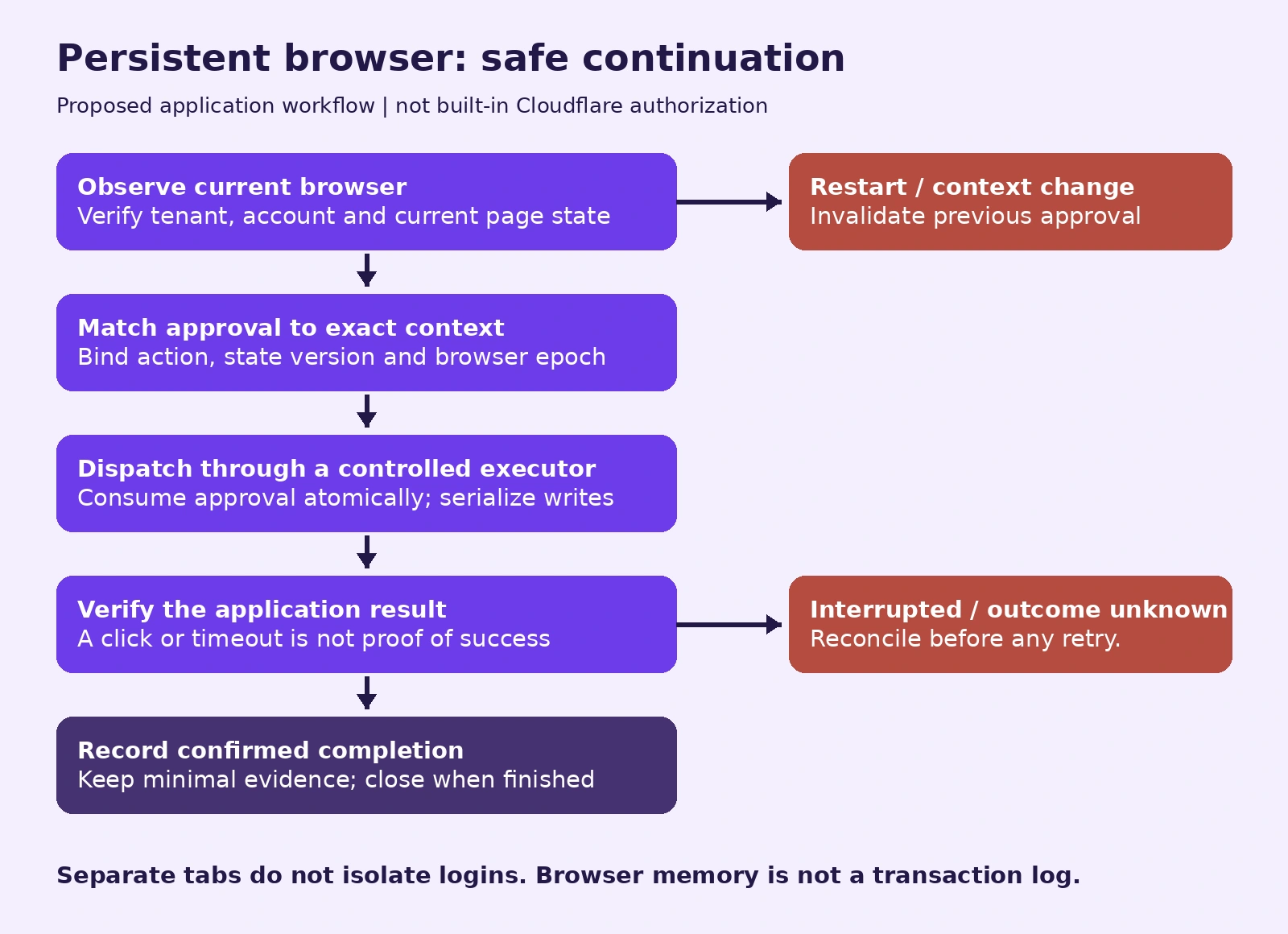
- Observe. Read the current account, tenant, target record and browser lifecycle identity through trusted application code.
- Bind. Tie approval to the exact intended action, current state version and a browser epoch. An epoch is our application's identifier for one browser lifetime, not a new Cloudflare API field.
- Dispatch. Consume approval atomically through a restricted executor, with serialized writes and a bounded approval lifetime.
- Verify. Read the application's authoritative result, not merely the button-click response.
- Record or reconcile. Record confirmed completion; keep ambiguous outcomes pending. After context changes, invalidate approval and start observation again.
These checks must run where the action is enforced. A model instruction saying “always ask first” is not that enforcement layer.
OWASP's excessive-agency guidance supports restricting tool functionality and permissions rather than relying on model behaviour alone. In our proposed architecture, if the model still has arbitrary CDP control over a privileged logged-in account, a separate approval function can be bypassed. Start with a genuinely read-only target account. For writes, provide narrowly scoped application tools or APIs and avoid leaving a general privileged browser tool available beside them.
A reproducible local policy fixture
This original Python example demonstrates context matching and unknown-outcome handling. It uses synthetic records, does not connect to Cloudflare and does not implement login verification, token expiry, atomic approval consumption or a browser executor.
Run it with Python 3.8 or newer; no third-party packages or credentials are required:
from dataclasses import dataclass, replace

@dataclass(frozen=True)
class Observation:
    tenant: str
    browser_epoch: str
    account: str
    state_version: str
    identity_verified: bool
    outcome: str

@dataclass(frozen=True)
class Approval:
    tenant: str
    browser_epoch: str
    account: str
    state_version: str
    action_digest: str

def decide_write(observed, approved, requested_digest):
    if observed.outcome == "completed":
        return "NOOP"
    if observed.outcome != "not_started":
        return "RECONCILE"
    if observed.identity_verified is not True or approved is None:
        return "DENY"
    same_context = (
        observed.tenant, observed.browser_epoch,
        observed.account, observed.state_version
    ) == (
        approved.tenant, approved.browser_epoch,
        approved.account, approved.state_version
    )
    if not same_context or requested_digest != approved.action_digest:
        return "DENY"
    return "ALLOW_ONCE"

obs = Observation("tenant-a", "epoch-1", "staging-editor",
                  "revision-7", True, "not_started")
approval = Approval("tenant-a", "epoch-1", "staging-editor",
                    "revision-7", "synthetic-action-1")

assert decide_write(obs, approval, "synthetic-action-1") == "ALLOW_ONCE"
assert decide_write(replace(obs, browser_epoch="epoch-2"),
                    approval, "synthetic-action-1") == "DENY"
assert decide_write(replace(obs, outcome="unknown"),
                    approval, "synthetic-action-1") == "RECONCILE"
We executed a companion unittest fixture on 14 October: 10 tests passed. Cases covered matching context, changed epoch, other tenant, other account, changed state, unknown outcome, completed outcome, missing approval, unverified identity and changed action. That result checks the fixture's branches, not Cloudflare behaviour or production security.
The “ALLOW_ONCE” label expresses intended policy only. Calling this pure function twice returns the same answer; it does not consume approval. Real integration needs atomic state updates, trusted observations, a freshness policy, concurrency handling and destination-side duplicate protection. A successful local test is not a reason to enable unattended production writes.
A small staging pilot before business use
Here is a proposed pilot, not a deployment we ran:
- Pick an isolated staging dashboard with synthetic data and a read-only test identity.
- Follow the complete official guide's browser, model, Worker Loader and Durable Object bindings and lifecycle registration.
- Ask for one page inspection, then a second inspection in the same session without navigating again. Keep evidence of which session and page were actually used.
- Test a deliberate session close/restart. Confirm the application invalidates old approval and requires fresh identity observation.
- Test an interrupted staging action separately using a harmless test record. Compare the target's actual result with the application's recorded outcome.
- Finish the job and close its browser; document who owns cleanup and recovery.
For static documents that do not need UI interaction, web_fetch may be the smaller tool. A persistent browser adds value when rendered UI and between-turn continuity are genuinely needed.
Guardrails and human handoff need their own checks
Browser Run's hostname guardrails are fixed for a session. Omitting both allowlist properties leaves HTTP/HTTPS requests unrestricted; an exact hostname does not automatically allow its subdomains. Inventory required redirects and asset hosts before choosing a list.
Our recommendation is to allow only the dependencies the pilot actually needs, and test an intentionally excluded host. A destination allowlist is not an action allowlist: an allowed admin hostname can still expose destructive controls.
For human handoff, Live View provides links containing signed credentials. Protect them like access to the logged-in session, including read-only links that reveal visible data. A viewer's read-only restriction does not make other automation connections read-only.
The SDK guide says browserTool does not pause for takeover. Hand off between turns. Our recommendation: verify the person is finished before resuming, and keep takeover URLs out of logs and public tickets.
What will persistence cost?
As checked on 14 October 2026, the Browser Run pricing page lists 10 browser minutes per day on Workers Free. Workers Paid includes 10 browser hours per month, followed by $0.09 per additional hour. Browser Sessions also have concurrency billing: 10 included browsers using the monthly average of daily peaks, then $2 per additional browser.
Do not confuse included concurrency with the account's operational concurrency limit. Budget Workers/Durable Object use, model calls and any generated-code runtime charges separately; this is not an all-in agent price.
Idle sessions continue consuming browser time until closed or timed out. Our suggested budget review records active work, idle gaps, concurrency, model/tool calls and failed jobs. Extending every idle session or sending keepalive traffic purely to retain a login can increase costs without making the workflow recoverable.
What is established, proposed and still untested?
Documented capability: recent SDK support for a persistent remote browser, bounded lifetime, shared cookies within a Browser and interruption behaviour.
Our proposed design: separate authorization boundaries, context-bound approval, controlled execution and explicit reconciliation.
Executed here: a small local policy fixture with synthetic inputs.
Not executed here: a deployed Cloudflare agent, browser persistence across a real hibernation, login/MFA flows, vendor guardrails, cost or latency benchmarks, and a production write/recovery trial.
The practical takeaway is simple: persist the browser when it helps, but make the business workflow able to explain what happened when the browser disappears.
Reader questions
Is browserTool a new release from 14 October 2026?
No. The SDK 0.28.0 release is dated 9 October, and Cloudflare's public browserTool announcement is dated 13 October. This article was researched on 14 October.
Is keeping the conversation enough to recover a browser job?
No. Keep business progress and confirmed results separately. A remembered instruction does not establish the current browser account, page or action outcome.
Does the Python example prevent duplicate submissions?
No. It illustrates decision branches only. It does not consume approval or implement a browser executor, concurrency control or destination-side idempotency.
Should a timed-out browser action be retried immediately?
Not if its outcome is unknown. Inspect the intended application's result through an authorized read path first, then decide whether a retry is justified.
Are website hostname allowlists sufficient for safe writes?
No. They restrict destinations, not which actions an allowed page exposes. Use restricted target accounts and enforce write permissions in the actual executor or receiving API.
Sources & further reading
- Cloudflare browserTool announcement, 13 October 2026
- Cloudflare Agents SDK 0.28.0 release, 9 October 2026
- Cloudflare browser tool guide, updated 13 October 2026
- Cloudflare Browser Run limits
- Cloudflare Browser Run pricing, checked 14 October 2026
- Cloudflare Browser Run hostname guardrails
- Cloudflare Browser Run Live View
- OWASP LLM06:2025, Excessive Agency
Originally published . About our editorial updates.