How to Migrate a Website: Test, Sync and Switch Hosts Safely
Move a website to a new host with an inventory, private tests, final data sync, careful DNS changes and a rollback plan that accounts for new transactions.
The short answer
To migrate a website to a new host, copy its application and data, test the destination before switching traffic, control changes during the final sync, and verify the live service before retiring the source. Moving hosting does not necessarily require transferring the domain registration. Email and other services need their own migration plan.

Reading options
On this page
- Make an inventory before choosing a migration tool
- Set a recovery point and a decision owner
- Use a staged cutover plan
- Test the destination without sending customers there
- Control writes during the final copy
- Change DNS carefully
- Watch outcomes before cancelling anything
- Reader questions
- Sources & further reading
Before you start
Access to both hosts and authoritative DNS, an independent backup, a destination test method and an agreed owner for the final cutover.
The difficult part of a move is often the last hour. A copy made yesterday can be technically perfect and still be missing today's orders. This guide focuses on that handover rather than repeating individual backup-plugin instructions.
Make an inventory before choosing a migration tool
List the website files, database, uploads, email, scheduled tasks, DNS records, certificates, external callbacks and paid integrations. Record who controls the hosting, domain registrar, authoritative DNS and email provider. They may be four different organizations.
For WordPress, check the destination against the official requirements and your application dependencies. Do not combine a hosting move, a domain rename, a theme replacement and a major runtime upgrade unless you have a reason and a separately tested plan.
If you need copying instructions, our WordPress migration methods cover the implementation choices. This article supplies the operational sequence around that copy.
Set a recovery point and a decision owner
Create a backup you can restore independently of the old provider. Check its contents and a representative recovery before beginning the final move. Agree who can say "proceed" or "stop", and which failures make the destination unacceptable.
For a shop, that might include an incomplete order history or a failed payment callback. For a lead-generation site, it could be a form that reports success while messages never arrive.
Do not promise zero downtime from a generic checklist. The achievable cutover depends on the application, data synchronization and traffic-routing controls.
Use a staged cutover plan
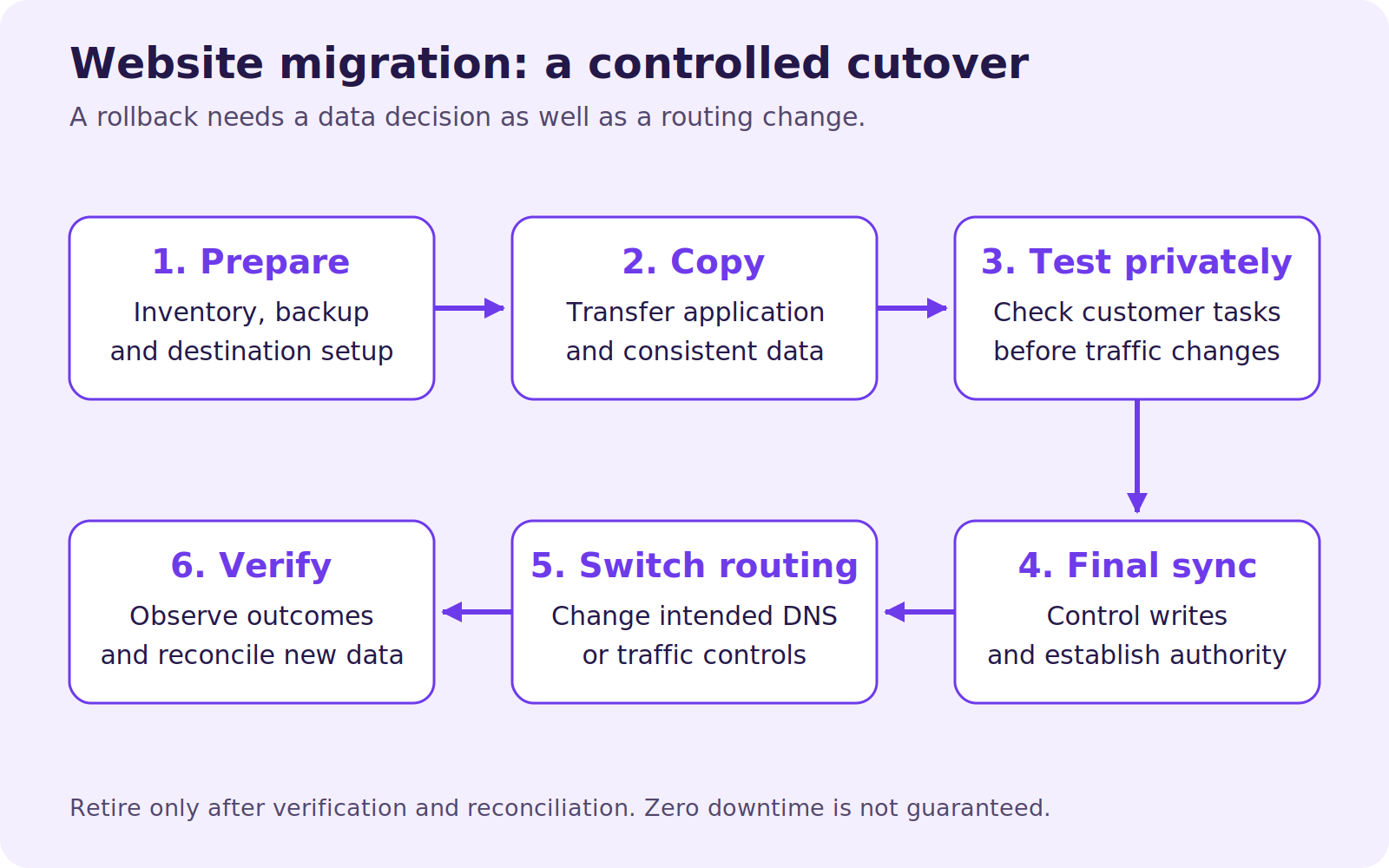
Stage | Action | Evidence needed before proceeding |
|---|---|---|
Prepare | Inventory, independent backup, destination configuration | Access works and recovery path is documented |
Initial copy | Transfer files and database | Destination serves the expected application |
Private test | Exercise important URLs and customer tasks | Correct content, TLS, redirects, forms and integrations |
Final sync | Pause or reconcile writes, copy remaining changes | A documented authoritative dataset |
Switch | Change the intended DNS or routing records | Both old and new paths remain understood |
Observe | Watch errors, transactions, email and logs | Live business tasks succeed |
Retire | Remove source only after reconciliation and recovery checks | No remaining service or data depends on it |
These are exit conditions, not a universal timetable. A quiet static site and an active shop need different final-sync procedures.
Test the destination without sending customers there
Use the new provider's supported preview method or a local hostname override. Check that the hostname, certificate and application URL remain correct; a temporary URL can change cookie, callback or redirect behavior.
An illustrative command for testing a new IPv4 origin is:
curl --resolve example.com:443:192.0.2.10 \
  --head https://example.com/
The IP is documentation-only. Replace it and the hostname with your real destination. The example is unexecuted. It requires the destination to serve valid TLS for that hostname and does not bypass a CDN unless you deliberately select the origin. A successful header request is only one check; test actual user journeys too.
Verify login, search, forms, downloads, scheduled jobs, email delivery and payment sandbox callbacks where applicable. Keep staging access protected and prevent test copies from sending real customer notifications.
Control writes during the final copy
Decide where new orders, comments, bookings and uploads are allowed. For a simple migration, a planned maintenance window can stop writes while you take a final consistent copy. More demanding applications may require replication or an application-specific synchronization process.
Do not let two independent databases accept orders and assume that switching DNS merges them. If writes occurred at both locations, reconcile them deliberately. A DNS rollback without reconciling new destination transactions can lose business records.
Record the last authoritative transaction or timestamp and the final sync's completion. This gives you evidence if a customer later reports a missing order.
Change DNS carefully
Lower relevant TTLs sufficiently in advance if your DNS service permits it, then wait for the previously published TTL to age out. Lowering a TTL just before the move does not shorten old cached records retroactively.
Prefer changing only the records needed for the move. A nameserver change can affect the whole zone, including MX, TXT and verification records. Check IPv4 and IPv6 separately. Our DNS checks explain why different visitors can reach different servers during a transition.
Google's hosting-change guidance covers preparation, traffic switching and monitoring when URLs stay the same. Keep intended canonical URLs, redirects and crawl access intact. Do not use a domain-change process for an unchanged domain.
Watch outcomes before cancelling anything
Check production from an independent network and follow the actual customer paths. Verify that forms reach the right inbox, jobs run at the intended time and external services call the new destination.
Keep the source available for a planned observation and reconciliation period appropriate to the site's activity and DNS behavior. A fixed number of hours is not proof that every dependency has moved. Then take a final retained backup and cancel only the service you have replaced.
Reader questions
Do I have to transfer my domain to change hosting?
No. You can often keep the registrar and change the relevant DNS records. A registrar transfer and a website migration are separate operations.
Does moving WordPress also move my email?
Not necessarily. Mailboxes, messages and mail routing require an explicit scope and verification plan, even when they currently share the hosting account.
Can I switch DNS back if something fails?
Routing can often be changed back, but new writes at the destination must be reconciled. A rollback plan needs data handling as well as DNS instructions.
Was this guide helpful?
Help us make the next update better.
Sources & further reading
Originally published . About our editorial updates.