Forgekit Review: Practical Memory and Guardrails for AI Coding Agents
Explore Forgekit's Git-backed memory, impact checks, and verification for AI coding agents, with code-backed examples, a demo, and honest limits.
The short answer
Forgekit is worth a focused pilot when repeated project explanations, hidden change dependencies, or unclear test evidence slow down AI-assisted coding. Its Git-backed memory, impact checks, and explicit verification states are implemented, while integration depth, heuristic accuracy, and optional provider behavior need careful boundaries.
Reading options
On this page
- What Forgekit is, in plain English
- Pain point 1: explaining the same project decisions again
- Pain point 2: a small edit with hidden consequences
- Pain point 3: “done” without a useful test record
- Pain point 4: rules drifting between coding tools
- A real project demo: making spend uncertainty visible
- How to try Forgekit without overcommitting
- Privacy, limitations, and what the evidence supports
- What stands out about Juber's engineering
- Visual credits
- Reader questions
- Sources & further reading
Before you start
Node.js 20 or later; Git and Bash for relevant integrations; a small repository with tests you understand. Review generated project configuration. Use --no-settings to skip the global Claude settings merge. Optional providers may involve network access and usage charges.
Disclosure: This creator-led spotlight features Juber Shaikh's own open-source project. It combines public-source review with the bounded checks described below, rather than an independent customer endorsement.
An AI coding session can feel productive right up to the handoff. The agent fixes a function but misses its callers. The next session repeats a decision the team already rejected. A confident “done” arrives before anyone can see which tests actually ran.
Those are the everyday problems Forgekit tackles. Created by Juber Shaikh, who builds publicly as CodeWithJuber, it adds persistent project knowledge, change-impact inspection, and verification around coding assistants. Its appeal is concrete: give the agent useful evidence before an edit, then leave a checkable record afterward.
This review covers version 1.11.0 at commit d4b1c548. We checked implementation and test code against the documentation. A bounded execution check of that revision completed with 1,893 passing tests, three skips, and successful type checking and Biome checks. No live provider-backed LLM calls were made. These checks do not establish that every editor or hosted-provider integration works end to end. The animation below is a clearly labeled, existing project asset.
What Forgekit is, in plain English
Forgekit is an MIT-licensed Node.js command-line toolkit and MCP server. MCP gives compatible assistants a standard way to call its tools. The package requires Node 20 or later and declares no runtime npm dependencies, although development checks and optional features have their own requirements. Git and, for some integrations, Bash still matter. Package manifest and MIT license
Its core workflow connects three jobs:
- Remember relevant facts, decisions, and lessons in repository files
- Inspect what a proposed change may affect
- Run the project's verification and report what was actually checked
Forgekit also compiles shared rules into different coding tools' configuration formats. That makes it useful when a developer switches assistants or teammates use different editors. The repository remains the common place for knowledge and policy.
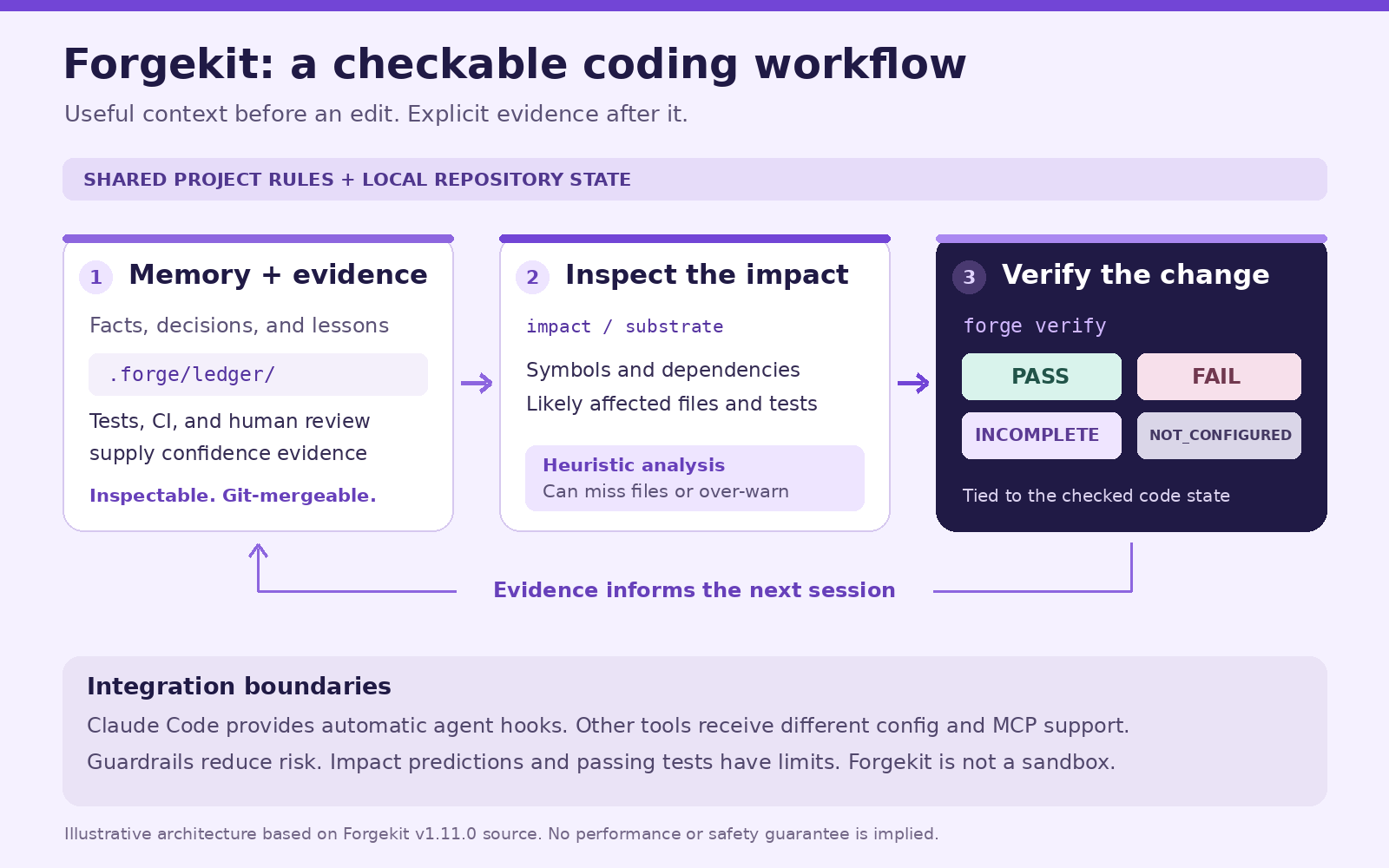
Illustration: a simplified view of the implemented workflow. Automatic lifecycle hooks are specific to Claude Code; other integrations have different capabilities.
Pain point 1: explaining the same project decisions again
The usual workaround for session amnesia is another prompt, another handoff note, or another growing instruction file. That takes time, and a stale instruction can keep influencing later work after the code has changed.
Forgekit stores structured claims under .forge/ledger/. A claim can represent a fact, lesson, decision, or reusable artifact. Its identity comes from its content. Evidence and provenance are recorded separately, so the same claim can gather observations without changing its identity.
The important engineering choice is how confidence changes. Reading or repeating a claim does not make it more trustworthy. The implementation distinguishes evidence such as test results, CI results, structural checks, and human acceptance or reversal. It also accounts for age. The pure merge implementation and its tests cover the properties needed for replicas to converge regardless of merge order. Ledger implementation and merge tests
Imagine a repository where maintainers repeatedly explain that token validation belongs in one shared helper. A project fact can record that decision:
forge remember "token-validation" \
  "Keep token validation in src/auth.js and cover boundary lengths in tests."
forge ledger query "token validation"
forge ledger verify
These are example commands for a repository with that structure, not a transcript of a new run. ledger verify checks ledger integrity; it does not prove that the prose is correct. Human review and relevant tests still supply that evidence.
The advantage is continuity that developers can inspect, version, and discuss through Git. Teams should decide which knowledge belongs in shared history before committing the ledger. Confidential information does not become safe to publish because it is stored as a claim.
Pain point 2: a small edit with hidden consequences
Changing a shared helper can affect a caller, a test, and a document outside the files named in the prompt. Manually chasing those connections adds review work, especially in an unfamiliar repository.
Forgekit builds an Atlas code index in .forge/atlas.json. It extracts symbols and relationships, then uses that graph to estimate affected files. The default impact command follows reverse dependencies. Broader relationship analysis can also include files sharing dependencies and files the target depends on. The output exposes those distinctions rather than presenting every candidate as the same kind of dependency. Atlas implementation and CLI behavior
forge atlas build
forge impact verifyToken
forge substrate "Change verifyToken in src/auth.js to require length > 20; update tests"
The last command brings several checks together: specification gaps, suggested model effort, likely impact, relevant memory, context coverage, and a verification checklist. That gives a reviewer a useful starting point before accepting a broad edit.
The boundary matters. Atlas uses approximate, regex-derived analysis. It can miss real relationships and report irrelevant ones. An empty impact list is not a safety clearance. “Context complete” means the computed material was delivered within the tool's estimated budget, not that every fact needed for correct reasoning is present. Pre-action pipeline and context assembly
Use it when planning a refactor, reviewing a generated patch, or learning a repository's likely connections. Follow the suggestions with code reading and tests.
Pain point 3: “done” without a useful test record
A green-looking summary can hide several different situations: tests passed, no runner was configured, part of a monorepo was skipped, or the code changed while a suite was still running. Reviewers lose time reconstructing what the agent actually verified.
Forgekit's verification code explicitly models four outcomes: PASS, FAIL, INCOMPLETE, and NOT_CONFIGURED. It records suite details, coverage information, and the code state associated with the result. A detected runner that cannot execute does not become a pass. If the code changes during verification, the result becomes incomplete. Verification implementation
forge verify
forge verify --json
Run the first command for a readable report, or the second when you need structured output. Each invocation runs verification, so choose one when repeating an expensive suite would be wasteful.
This is especially relevant to multi-package projects. Forgekit distinguishes measured package coverage from coverage inferred through a recognized root command or declared in configuration. That nuance helps reviewers judge what the verdict actually supports.
It still depends on the quality and scope of the project's tests. Passing a weak suite cannot establish correctness outside what it exercises. forge verify also runs repository-defined commands, so evaluate unfamiliar repositories in an appropriately isolated environment.
The code's machine-local evidence signature makes casual record fabrication harder, but the source explicitly says it is not a security boundary against an agent with shell access. That is a useful example of a feature documented at its real strength. Evidence-signing boundary
Pain point 4: rules drifting between coding tools
Maintaining one set of instructions for Claude Code, another for Cursor, and another for Codex creates repetition. A rule fixed in one place can remain wrong somewhere else.
Forgekit's emitters turn shared configuration into host-specific files. In the reviewed version, the documented targets include Claude Code, Codex, Cursor, Gemini CLI, Aider, GitHub Copilot, Windsurf/Devin, Zed, Continue, OpenClaw, and Kimi Code. Roo Code and VS Code receive MCP configuration. Tests inspect emitted files and preservation of user-owned content. Sync tests
Integration depth varies:
- Claude Code has the deepest integration, including lifecycle hooks and selected blocking guards
- Several other tools receive both native instructions and MCP registration
- Aider, Windsurf/Devin, and Kimi Code do not receive the same project-local MCP registration
- OpenClaw's configuration-only route requires a separate registration command
- Outside Claude Code, the documented enforcement route is an installed Git pre-commit gate
The project distinguishes configuration tests from actual execution inside a host. Its CI does not launch all the supported editors to prove that each loads every emitted file. Read the integration matrix before expecting identical behavior everywhere.
The practical benefit is less duplicated configuration and a shared vocabulary for checks, while preserving the developer's existing assistant.
A real project demo: making spend uncertainty visible
Runaway sessions create a separate problem: developers may notice cost only after a long task. Forgekit includes budget configuration, a spend meter, and an optional hard breaker for the Claude Code cost guard.
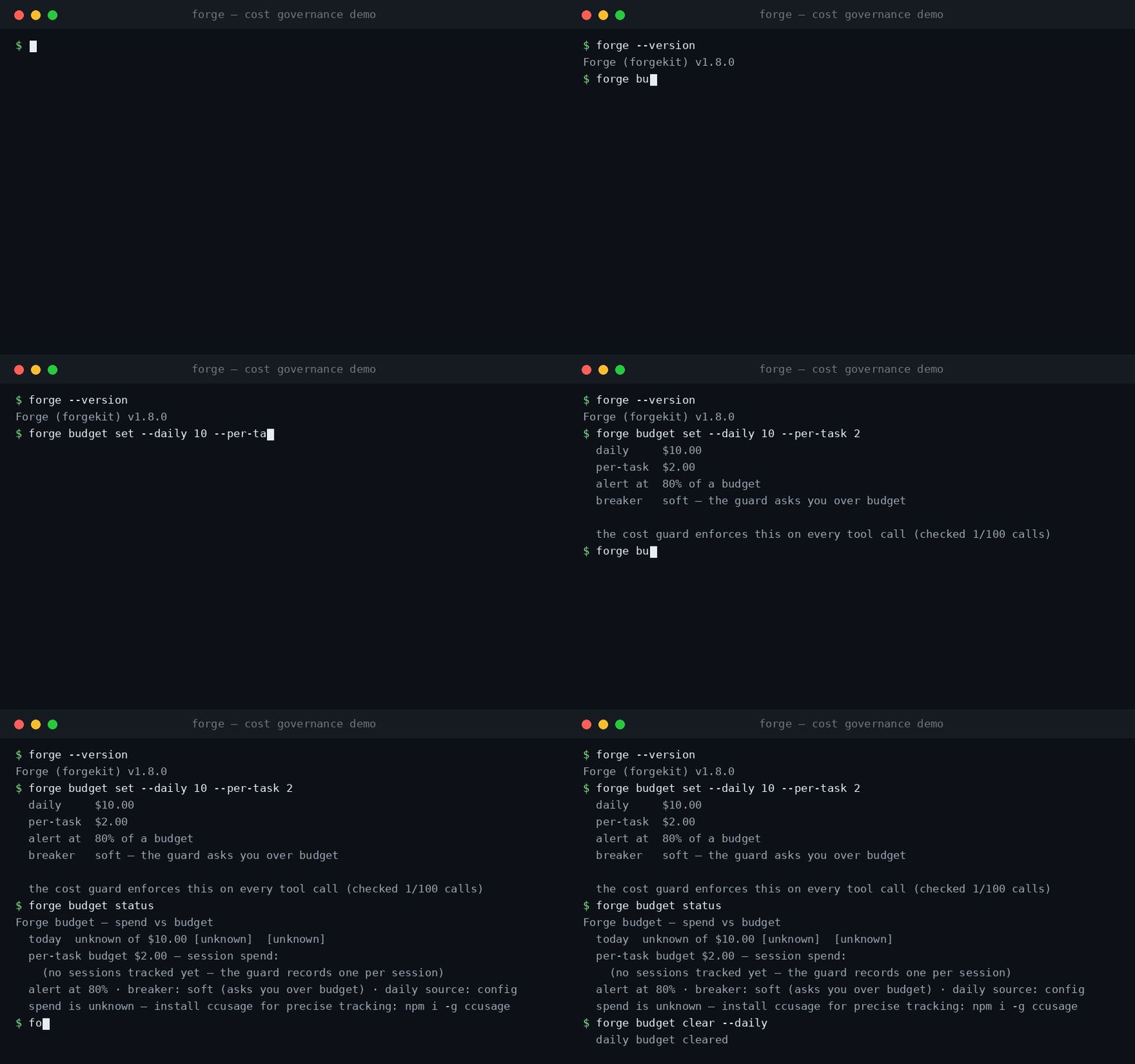
Demo provenance: this is the repository's existing v1.8.0 terminal animation, rendered from maintainer-captured CLI output. It is not a fresh v1.11.0 screen recording or a savings benchmark. The generation script records that provenance.
forge budget set --daily 10 --per-task 2 --alert-at 0.8
forge budget status
forge budget clear --daily
These examples set USD budgets. Soft mode asks when the measured limit is exceeded; --hard opts into blocking. The guard checks every hundredth tool call, so this is not a precise provider-side spending cap. Missing spend data is reported as unknown and does not trigger a block. Per-task accounting is session-based and can be distorted by concurrent sessions. Budget implementation
That honest “unknown” is worth noticing. A dashboard should tell you when it lacks evidence rather than quietly displaying zero.
How to try Forgekit without overcommitting
Start in a small repository with tests you understand. The documented npm installation is:
npm install -g @codewithjuber/forgekitFor an initial configuration trial, choose your target explicitly. For example:
forge init --no-settings --tools codex
forge doctor
Replace codex with the supported tool you actually use. This still creates project configuration, so review the diff. --no-settings skips the global Claude settings merge. Without it, forge init can modify ~/.claude/settings.json, affecting other repositories too. The implementation backs up and preserves unrelated settings, but the scope deserves attention. Initialization code
Next, inspect one known helper with forge impact, query one project fact, and run forge verify. Compare the results with what you already know. Only then consider automatic hooks, stricter enforcement, optional embeddings, or shared ledger synchronization.
Privacy, limitations, and what the evidence supports
Repository-local files make the core state inspectable. They do not guarantee that every feature is offline. Optional LLM and embedding paths can send selected text to configured providers, and catalog lookups may make network requests. The embedding adapter supports an HTTP endpoint or a user-specified command, with a fallback to lexical matching. Review the destination and data before enabling it. LLM adapter and embedding adapter
One integration caveat was confirmed using a mocked network: provider configuration recognizes OpenRouter, but the reviewed direct HTTP resolver does not read OPENROUTER_API_KEY. In an OpenRouter-only environment, that optional path fails despite provider detection. The finding concerns this pinned revision; it should be rechecked after an upstream fix.
Security guards are defense in depth. Secret detection can miss unfamiliar formats, regex command checks are bypassable, and shared ledger records need access discipline. The project's own security policy says Forgekit is not a sandbox.
Performance claims also need boundaries. The current README openly reports that an older, tuned routing demonstration's savings did not generalize: a held-out evaluation spent 20.2% more than its always-premium comparison. That evaluation belongs to the Python research prototype, not the shipped Node runtime. This review makes no general cost-reduction or accuracy promise. Evaluation boundaries
What stands out about Juber's engineering
The distinctive work is in connecting ordinary development evidence to agent behavior: content-addressed memory, explicit confidence sources, configuration emitters, code-state-bound test records, and understandable failure states.
The repository also shows attention to less glamorous details: preserving hand-written configuration, keeping merge behavior testable, reporting incomplete verification, documenting provider boundaries, and correcting overstrong benchmark claims. Those are concrete reasons to explore Juber's work without needing customer counts or sweeping intelligence claims.
Forgekit is a promising beta for developers who want more continuity and accountability around AI-assisted coding. It is best evaluated on one real pain point in one repository. If you keep re-explaining decisions, start with memory. If changes spread unexpectedly, start with impact inspection. If reviews stall at “what actually passed?”, start with verification.
Explore the Forgekit repository, read the command guide, and share a reproducible example of what helped or what was missed. If the project earns a place in your workflow, a thoughtful issue, contribution, or GitHub star is a useful way to support it.
Visual credits
The cover is an AI-generated editorial illustration, not application UI. The workflow diagram is an original explanation based on the reviewed source. The GIF is the repository's historical v1.8.0 animation, rendered from maintainer-captured output. Demo source; copyright 2026 CodeWithJuber, MIT license.
Reader questions
What does Forgekit do for AI coding agents?
Forgekit combines repository-backed memory, heuristic change-impact inspection, test verification, and shared configuration for supported coding tools. It helps developers carry project knowledge between sessions and inspect the evidence behind completed work.
Does Forgekit work with Codex and Cursor?
Forgekit emits native project instructions and MCP configuration for Codex and Cursor. Automatic lifecycle hooks and agent-level blocking have deeper support in Claude Code, so the integration experience is not identical.
Does Forgekit guarantee an agent will produce correct code?
No. Impact analysis is approximate, tests only cover what they exercise, and the project is beta. The verification command distinguishes PASS, FAIL, INCOMPLETE, and NOT_CONFIGURED instead of treating missing evidence as success.
Is Forgekit entirely offline?
Core state is stored in local files, but optional LLM and embedding features can transmit selected text to providers, and model-catalog lookups can make network requests. Check settings and destinations before enabling those paths.
Does forge init change global settings?
It can merge Forgekit entries into the global Claude settings file. Use forge init --no-settings to skip that merge, select your intended tool with --tools, and review the project configuration diff.
Has this review tested live LLM providers?
No live provider-backed LLM calls were made. The pinned revision completed a bounded check with 1,893 passing tests, three skips, and successful type checking and Biome checks. A provider-selection issue was reproduced with a mocked network and is being tracked separately.
Was this guide helpful?
Help us make the next update better.
Sources & further reading
- Reviewed package manifest
- MIT license
- Architecture and maturity boundaries
- Per-tool integration matrix
- Evidence-weighted memory implementation
- Impact graph implementation
- Verification implementation
- Budget implementation
- Provider configuration
- Direct HTTP implementation
- Optional embedding adapter
- Security policy
- Benchmark boundaries
- Existing demo provenance
What changed
Reviewed Forgekit v1.11.0 at d4b1c548de203aaf923b8e45de08869d04047162. Original source: 1,893 tests passed, 3 skipped; type checking and Biome passed. Optional OpenRouter direct-HTTP issue reproduced with mocked network; no merged fix is claimed. No live LLM-provider or every-host validation.
Originally published . About our editorial updates.